Kafka中的消息序列化和反序列化

Kafka生产者中的配置项key.serializervalue.serializer指示如何将用户通过其ProducerRecord提供的键和值对象转换为字节。对于简单的字符串或字节类型,可以使用包含的ByteArraySerializerStringSerializer进行序列化操作。

kafka在发送或者接收消息的时候实际是使用byte[]字节型数组进行传输的。但是我们平常使用的时候,不但可以使用byte[],还可以使用int、short、long、float、double、String等数据类型,这是因为在我们使用这些数据类型的时候,kafka根据我们指定的序列化和反序列化方式转成byte[]类型之后再进行传输来提高传输效率。

通常我们在使用kakfa发送或者接受消息的时候都需要指定消息的key和value序列化方式,如生产者我们可以设置value.serializerorg.apache.kafka.common.serialization.StringSerializer来设置value的序列化方式为字符串,即我们可以发送string类型的消息。目前kafka原生支持的序列化和反序列化方式如下两表所示,这些原生的序列化和反序列化的类都是在org.apache.kafka.common.serialization包之下:

kafka序列化方式表

序列化方式 对应java数据类型 说明
ByteArraySerializer byte[] 原生类型
ByteBufferSerializer ByteBuffer 关于ByteBuffer
IntegerSerializer Interger
ShortSerializer Short
LongSerializer Long
DoubleSerializer Double
StringSerializer String

kafka反序列化方式表

序列化方式 对应java数据类型 说明
ByteArrayDeserializer byte[] 原生类型
ByteBufferDeserializer ByteBuffer 关于ByteBuffer
IntegerDeserializer Interger
ShortDeserializer Short
LongDeserializer Long
DoubleDeserializer Double
StringDeserializer String

Java原生类型的序列化和反序列化

上面我们了解一些关于kafka原生的一些序列化和反序列化方式。它们究竟是如实现的呢?以string类型为例子,我们看一下,kafka如何实现序列化/反序列化的。

kafka序列化/反序列化方式的实现代码在org.apache.kafka.common.serialization包下。

String 类型的序列化类

我们查看org.apache.kafka.common.serialization.StringSerializer这个类。

package org.apache.kafka.common.serialization;

import org.apache.kafka.common.errors.SerializationException;

import java.io.UnsupportedEncodingException;
import java.util.Map;

/**
 *  String encoding defaults to UTF8 and can be customized by setting the property key.serializer.encoding,
 *  value.serializer.encoding or serializer.encoding. The first two take precedence over the last.
 */
public class StringSerializer implements Serializer<String> {
    private String encoding = "UTF8";

    @Override
    public void configure(Map<String, ?> configs, boolean isKey) {
        String propertyName = isKey ? "key.serializer.encoding" : "value.serializer.encoding";
        Object encodingValue = configs.get(propertyName);
        if (encodingValue == null)
            encodingValue = configs.get("serializer.encoding");
        if (encodingValue instanceof String)
            encoding = (String) encodingValue;
    }

    @Override
    public byte[] serialize(String topic, String data) {
        try {
            if (data == null)
                return null;
            else
                return data.getBytes(encoding);
        } catch (UnsupportedEncodingException e) {
            throw new SerializationException("Error when serializing string to byte[] due to unsupported encoding " + encoding);
        }
    }

    @Override
    public void close() {
        // nothing to do
    }
}

由上面的代码我们可以看出:

  • String的序列化类是继承了Serializer接口,指定<String>泛型,然后实现的Serializer接口的configure()serialize()close()方法。代码重点的实现是在serialize(),可以看出这个方法将我们传入的String类型的数据,简单的通过data.getBytes(encoding)方法进行了序列化。

String 类新的反序列化类

我们查看org.apache.kafka.common.serialization.StringDeserializer这个类。

package org.apache.kafka.common.serialization;

import org.apache.kafka.common.errors.SerializationException;

import java.io.UnsupportedEncodingException;
import java.util.Map;

/**
 *  String encoding defaults to UTF8 and can be customized by setting the property key.deserializer.encoding,
 *  value.deserializer.encoding or deserializer.encoding. The first two take precedence over the last.
 */
public class StringDeserializer implements Deserializer<String> {
    private String encoding = "UTF8";

    @Override
    public void configure(Map<String, ?> configs, boolean isKey) {
        String propertyName = isKey ? "key.deserializer.encoding" : "value.deserializer.encoding";
        Object encodingValue = configs.get(propertyName);
        if (encodingValue == null)
            encodingValue = configs.get("deserializer.encoding");
        if (encodingValue instanceof String)
            encoding = (String) encodingValue;
    }

    @Override
    public String deserialize(String topic, byte[] data) {
        try {
            if (data == null)
                return null;
            else
                return new String(data, encoding);
        } catch (UnsupportedEncodingException e) {
            throw new SerializationException("Error when deserializing byte[] to string due to unsupported encoding " + encoding);
        }
    }

    @Override
    public void close() {
        // nothing to do
    }
}

同样,由上面的代码我们可以看出:

  • String类型的反序列化类是继承了Deserializer接口,指定<String>泛型,然后实现的Deserializer接口的configure()deserialize()close()方法。代码重点的实现是在deserialize(),可以看出这个方法将我们传入的byte[]类型的数据,简单的通过return new String(data, encoding)方法进行了反序列化得到了String类型的数据。

复杂Java对象的序列化及反序列化

通过上面,我们对kafka原生序列化/反序列化方式的了解,我们可以看出,kafka实现序列化/反序列化可以简单的总结为两步,第一步实现序列化Serializer或者反序列化Deserializer接口。第二步实现接口方法,将指定类型序列化成byte[]或者将byte[]反序列化成指定数据类型(String)。

graph LR
    生产者(String)--序列化-->传输和持久("Byte[]")--反序列化-->消费者(String)

由于原生类型不支持复杂对象类型,所以接下来,我们来实现对复杂对象类型的自定义序列化/反序列化方式。

这里我们介绍两种方式:

利用Buffer缓冲区

问题陈述:

Chapter 4 Activity 4.2

Kafka 消息也可以传递复杂对象类型。通常,这些对象将有多个字段。例如供应商对象。

实体类 Supplier

@Data
public class Supplier {
    private final int supplierId;
    private final String supplierName;
}

如果希望发送此类自定义对象或类型结构,则需要实现自定义序列化器和反序列化器。实现需要自定义序列化器和反序列化器。

解决方案 为了实现上述要求,利用缓冲区(Buffer,内存中预留指定大小的存储空间)用来对输入/输出(I/O)的数据作临时存储,这里由于需要保存字节数据所以我们使用ByteBuffer

自定义序列化类 SupplierSerializer

public class SupplierSerializer implements Serializer<Supplier> {
    private final String encoding = "UTF8";

    @Override
    public void configure(Map<String, ?> configs, boolean isKey) {

    }
    @Override
    public byte[] serialize(String topic, Supplier data) {

        int sizeOfName;
        byte[] serializedName;

        try {
            if (data == null) {
                return null;
            }
           // 根据 字符编码 转换成字节数组
            serializedName = data.getName().getBytes(encoding);
            // 通过sizeOfName可以帮助在反序列化的时候
            // 可以知道要取多少个字符来根据指定编码格式转换成回字符串
            sizeOfName = serializedName.length;
            ByteBuffer buf = ByteBuffer.allocate(4 + 4 + sizeOfName);

            buf.putInt(data.getID()); // supplierId 是int类型占4 bytes
            buf.putInt(sizeOfName);   // supplierName 长度
            buf.put(serializedName);  // supplierName 内容

            return buf.array();

        } catch (Exception e) {
            throw new SerializationException("Error when serializing Supplier to byte[]");
        }
    }

    @Override
    public void close() {
        // nothing to do
    }
}

自定义反序列化类 SupplierDeserializer

public class SupplierDeserializer implements Deserializer<Supplier> {
    private final String encoding = "UTF8";

    @Override
    public void configure(Map<String, ?> configs, boolean isKey) {
        //Nothing to configure
    }

    @Override
    public Supplier deserialize(String topic, byte[] data) {

        try {
            if (data == null) {
                System.out.println("Null recieved at deserialize");
                return null;
            }

            ByteBuffer buf = ByteBuffer.wrap(data);
            int id = buf.getInt(); // 获取 supplierId的 int类型的值

            // 获取 supplierName长度
            int sizeOfName = buf.getInt();
            // 创建相同长度的字节数组
            byte[] nameBytes = new byte[sizeOfName]; 

            // get(nameBytes) :
            //  从当前位置开始相对读,读nameBytes.length个byte,
            //  并写入dst下标从offset到offset+length的区域
            buf.get(nameBytes); // 根据获取 supplierName
            String deserializedName = new String(nameBytes, encoding);

            return new Supplier(id, deserializedName);

        } catch (Exception e) {
            throw new SerializationException("Error when deserializing byte[] to Supplier");
        }
    }

    @Override
    public void close() {
        // nothing to do
    }
}

JSON格式的序列化及反序列化

实体类 JsonData

import java.util.Date;
import java.util.Map;

// lombok
@Data
@AllArgsConstructor
@NoArgsConstructor
public class JsonData {
    @JsonProperty("lng")
    private double longitude;
    @JsonProperty("lat")
    private double latitude;
    private double weight;
    private Date timestamp;
}

什么是 JSON ?

  • JSON 指的是 JavaScript 对象表示法(JavaScript Object Notation)
  • JSON 是轻量级的文本数据交换格式,类似 XML
  • JSON 比 XML 更小、更快,更易解析。
  • JSON 独立于语言:JSON 使用 Javascript语法来描述数据对象,但是 JSON 仍然独立于语言和平台。JSON 解析器和 JSON 库支持许多不同的编程语言。 目前非常多的动态(PHP,JSP,.NET)编程语言都支持JSON。
  • JSON 具有自我描述性,更易理解

JSON 实例

{
    "sites": [    
        { "name":"NIIT" , "url":"www.niit.com.cn" },     
        { "name":"Google" , "url":"www.google.com" },     
        { "name":"WeiBo" , "url":"www.weibo.com" }    
    ]
}

这个 sites 对象是包含 3 个站点记录(对象)的数组。

语法:

JSON 键必须是字符串,字符串必须使用双引号包裹。

JSON 值可以是:

  • 数字(整数或浮点数)
  • 字符串(在双引号中)
  • 逻辑值(true 或 false)
  • 数组(在中括号中)
  • 对象(在大括号中)
  • null

JSON的Java解析库 - Jackson

市面有很多用于解析JSON的用Java编写的第三方库,比如Jackson(fasterxml,可靠、灵活、可定制,使用广泛),Gson(Google, 轻量、简洁),国内比较著名的有FastJson(Alibaba个人开源,特点是快,虽然很有多历史漏洞,但是作为国人还是要支持一下,可以越来越好),这些库的用法比较类似,这里的案例使用的是Jackson

Jackson的maven依赖

<dependency>
    <groupId>com.fasterxml.jackson.core</groupId>
    <artifactId>jackson-core</artifactId>
    <version>2.11.0</version>
</dependency>
<dependency>
    <groupId>com.fasterxml.jackson.core</groupId>
    <artifactId>jackson-databind</artifactId>
    <version>2.11.0</version>
</dependency>
<dependency>
    <groupId>com.fasterxml.jackson.core</groupId>
    <artifactId>jackson-annotations</artifactId>
    <version>2.11.0</version>
</dependency>

基于Jackson的一个用于解析Json的工具类 JsonSerializerUtil

public class JsonSerializerUtil {

    /**
     * JSON序列化
     *
     * @param object 对象
     * @return JSON字符串
     */
    public static String serialize(Object object) {
        ObjectMapper mapper = new ObjectMapper();
        try {
            return mapper.writeValueAsString(object);
        } catch (JsonProcessingException e) {
            e.printStackTrace();
            return "";
        }
    }

    /**
     * JSON字符串反序列化
     *
     * @param jsonStr JSON字符串
     * @return a Map
     */
    public static Map deserialize(String jsonStr) {
        try {
            return deserialize(jsonStr, Map.class);
        } catch (Exception e) {
            e.printStackTrace();
            return new HashMap();
        }
    }

    public static <T> T deserialize(String jsonStr, Class<T> classType) throws Exception {
        return new ObjectMapper().readValue(jsonStr, classType);
    }
}

自定义序列化类 JsonDataSerializer

public class JsonDataSerializer implements Serializer<JsonData> {

    @Override
    public void configure(Map<String, ?> configs, boolean isKey) {

    }

    @Override
    public byte[] serialize(String topic, JsonData data) {
        return JsonSerializerUtil.serialize(data).getBytes();
    }

    @Override
    public void close() {
        // nothing to do
    }
}

自定义反序列化类 JsonDataDeserializer

public class JsonDataDeserializer implements Deserializer<JsonData> {
    private final String encoding = "UTF8";

    @Override
    public void configure(Map<String, ?> configs, boolean isKey) {
        //Nothing to configure
    }

    @Override
    public JsonData deserialize(String topic, byte[] data) {

        if (data == null) {
            return null;
        }

        JsonData jsonData = null;

        try {
            String jsonString = new String(data, encoding);
            jsonData =  JsonSerializerUtil.deserialize(jsonString, JsonData.class);
        } catch (Exception e) {
            e.printStackTrace();
        }

        return jsonData;
    }

    @Override
    public void close() {
        // nothing to do
    }
}

作业

LG Activity Exer 1

需要将书籍(Book) 的信息通过Kafka传输, 书籍的相关字段有 书名 (name), 订购数量(quantityOrdered),单价(unitPrice),请编写一个生产者发送书籍消息, 在编写一个消费者消费书籍消息。

可以自行选择序列化的方式。

总结

实现序列化还有很多比较成熟的第三方序列化库可以使用(如avro,protoBuff等),关于采用什么样的方式去序列化数据还需要根据业务场景自己去定义。

Views: 569

Kafka Consumer API

高级API

在控制台创建发送者

$ bin/kafka-console-producer.sh \
--broker-list hadoop000:9092 --topic first

>hello world

创建消费者(过时API)

import java.util.HashMap;
import java.util.List;
import java.util.Map;
import java.util.Properties;
import kafka.consumer.Consumer;
import kafka.consumer.ConsumerConfig;
import kafka.consumer.ConsumerIterator;
import kafka.consumer.KafkaStream;
import kafka.javaapi.consumer.ConsumerConnector;

public class CustomConsumer {

  @SuppressWarnings("deprecation")
  public static void main(String[] args) {
     Properties properties = new Properties();
     properties.put("zookeeper.connect", "hadoop000:2181");
     properties.put("group.id", "g1");
     properties.put("zookeeper.session.timeout.ms", "500");
     properties.put("zookeeper.sync.time.ms", "250");
     properties.put("auto.commit.interval.ms", "1000");

     // 创建消费者连接器
     ConsumerConnector consumer = Consumer.createJavaConsumerConnector(new ConsumerConfig(properties));

     HashMap<String, Integer> topicCount = new HashMap<>();
     topicCount.put("first", 1);

     Map<String, List<KafkaStream<byte[], byte[]>>> consumerMap = consumer.createMessageStreams(topicCount);

     KafkaStream<byte[], byte[]> stream = consumerMap.get("first").get(0);

     ConsumerIterator<byte[], byte[]> it = stream.iterator();

     while (it.hasNext()) {
       System.out.println(new String(it.next().message()));
     }
  }
}

官方提供案例(自动维护消费情况, 新API)

高级消费者和简单的消费者有以下的区别。

1.自动/隐藏偏移管理(Offset Management )

2.自动(简单)分区分配

3.Broker 故障转移 => 自动重新平衡

4.Consumer 故障转移 => 自动重新平衡

import java.util.Arrays;
import java.util.Properties;
import org.apache.kafka.clients.consumer.ConsumerRecord;
import org.apache.kafka.clients.consumer.ConsumerRecords;
import org.apache.kafka.clients.consumer.KafkaConsumer;

public class CustomNewConsumer {

  public static void main(String[] args) {

     Properties props = new Properties();
     // 定义kakfa 服务的地址,不需要将所有broker指定上 
     props.put("bootstrap.servers", "hadoop000:9092");
     // 制定consumer group 
     props.put("group.id", "test");
     // 是否自动确认offset 
     props.put("enable.auto.commit", "true");
     // 自动确认offset的时间间隔 
     props.put("auto.commit.interval.ms", "1000");
     // key的序列化类
     props.put("key.deserializer", "org.apache.kafka.common.serialization.StringDeserializer");
     // value的序列化类 
     props.put("value.deserializer", "org.apache.kafka.common.serialization.StringDeserializer");
     // 定义consumer 
     KafkaConsumer<String, String> consumer = new KafkaConsumer<>(props);
     // 消费者订阅的topic, 可同时订阅多个 
     consumer.subscribe(Arrays.asList("first", "second","third"));

     while (true) {
       // 读取数据,读取超时时间为100ms 
       ConsumerRecords<String, String> records = consumer.poll(100);

       for (ConsumerRecord<String, String> record : records)
         System.out.printf("offset = %d, key = %s, value = %s%n", record.offset(), record.key(), record.value());
     }
  }
}

低级API

也叫Simple Consumer, 实际使用起来并不简单.

实现使用低级API读取指定topic,指定partition,指定offset的数据。

1)消费者使用低级API 的主要步骤:

步骤 主要工作
1 根据指定的分区从主题元数据中找到主副本
2 获取分区最新的消费进度
3 从主副本拉取分区的消息
4 识别主副本的变化,重试

2)方法描述:

findLeader() 客户端向种子节点发送主题元数据,将副本集加入备用节点
getLastOffset() 消费者客户端发送偏移量请求,获取分区最近的偏移量
run() 消费者低级AP I拉取消息的主要方法
findNewLeader() 当分区的主副本节点发生故障,客户将要找出新的主副本

3)代码:

import java.nio.ByteBuffer;
import java.util.ArrayList;
import java.util.Collections;
import java.util.HashMap;
import java.util.List;
import java.util.Map;

import kafka.api.FetchRequest;
import kafka.api.FetchRequestBuilder;
import kafka.api.PartitionOffsetRequestInfo;
import kafka.cluster.BrokerEndPoint;
import kafka.common.ErrorMapping;
import kafka.common.TopicAndPartition;
import kafka.javaapi.FetchResponse;
import kafka.javaapi.OffsetResponse;
import kafka.javaapi.PartitionMetadata;
import kafka.javaapi.TopicMetadata;
import kafka.javaapi.TopicMetadataRequest;
import kafka.javaapi.consumer.SimpleConsumer;
import kafka.message.MessageAndOffset;

public class SimpleExample {
  private List<String> m_replicaBrokers = new ArrayList<>();

  public SimpleExample() {
    m_replicaBrokers = new ArrayList<>();
  }

  public static void main(String args[]) {
    SimpleExample example = new SimpleExample();
    // 最大读取消息数量
    long maxReads = Long.parseLong("3");
    // 要订阅的topic
    String topic = "test1";
    // 要查找的分区
    int partition = Integer.parseInt("0");
    // broker节点的ip
    List<String> seeds = new ArrayList<>();
    seeds.add("192.168.9.102");
    seeds.add("192.168.9.103");
    seeds.add("192.168.9.104");
    // 端口
    int port = Integer.parseInt("9092");
    try {
      example.run(maxReads, topic, partition, seeds, port);
    } catch (Exception e) {
      System.out.println("Oops:" + e);
      e.printStackTrace();
    }
  }

  public void run(long a_maxReads, String a_topic, int a_partition, List<String> a_seedBrokers, int a_port) throws Exception {

    // 获取指定Topic partition的元数据
    PartitionMetadata metadata = findLeader(a_seedBrokers, a_port, a_topic, a_partition);

    if (metadata == null) {
      System.out.println("Can't find metadata for Topic and Partition. Exiting");
      return;
    }

    if (metadata.leader() == null) {
      System.out.println("Can't find Leader for Topic and Partition. Exiting");
      return;
    }

    String leadBroker = metadata.leader().host();
    String clientName = "Client" + a_topic + "" + a_partition;

    SimpleConsumer consumer = new SimpleConsumer(leadBroker, a_port, 100000, 64 * 1024, clientName);
    long readOffset = getLastOffset(consumer, a_topic, a_partition, kafka.api.OffsetRequest.EarliestTime(), clientName);
    int numErrors = 0;

    while (a_maxReads > 0) {
      if (consumer == null) {
        consumer = new SimpleConsumer(leadBroker, a_port, 100000, 64 * 1024, clientName);

      }

      FetchRequest req = new FetchRequestBuilder().clientId(clientName).addFetch(a_topic, a_partition, readOffset, 100000).build();

      FetchResponse fetchResponse = consumer.fetch(req);

      if (fetchResponse.hasError()) {
        numErrors++;
        // Something went wrong!
        short code = fetchResponse.errorCode(a_topic, a_partition);
        System.out.println("Error fetching data from the Broker:" + leadBroker + " Reason: " + code);

        if (numErrors > 5)
          break;
        if (code == ErrorMapping.OffsetOutOfRangeCode()) {
          // We asked for an invalid offset. For simple case ask for
          // the last element to reset
          readOffset = getLastOffset(consumer, a_topic, a_partition, kafka.api.OffsetRequest.LatestTime(), clientName);
          continue;
        }

        consumer.close();
        consumer = null;
        leadBroker = findNewLeader(leadBroker, a_topic, a_partition, a_port);
        continue;
      }

      numErrors = 0;

      long numRead = 0;
      for (MessageAndOffset messageAndOffset : fetchResponse.messageSet(a_topic, a_partition)) {
        long currentOffset = messageAndOffset.offset();
        if (currentOffset < readOffset) {
          System.out.println("Found an old offset: " + currentOffset + " Expecting: " + readOffset);
          continue;
        }

        readOffset = messageAndOffset.nextOffset();
        ByteBuffer payload = messageAndOffset.message().payload();

        byte[] bytes = new byte[payload.limit()];
        payload.get(bytes);
        System.out.println(String.valueOf(messageAndOffset.offset()) + ": " + new String(bytes, "UTF-8"));
        numRead++;
        a_maxReads--;
      }

      if (numRead == 0) {
        try {
          Thread.sleep(1000);
        } catch (InterruptedException ie) {
        }
      }
    }

    if (consumer != null)
      consumer.close();
  }

  public static long getLastOffset(SimpleConsumer consumer, String topic, int partition, long whichTime, String clientName) {

    TopicAndPartition topicAndPartition = new TopicAndPartition(topic, partition);

    Map<TopicAndPartition, PartitionOffsetRequestInfo> requestInfo = new HashMap<TopicAndPartition, PartitionOffsetRequestInfo>();

    requestInfo.put(topicAndPartition, new PartitionOffsetRequestInfo(whichTime, 1));

    kafka.javaapi.OffsetRequest request = new kafka.javaapi.OffsetRequest(requestInfo, kafka.api.OffsetRequest.CurrentVersion(), clientName);

    OffsetResponse response = consumer.getOffsetsBefore(request);

    if (response.hasError()) {
      System.out.println("Error fetching data Offset Data the Broker. Reason: " + response.errorCode(topic, partition));
      return 0;
    }
    long[] offsets = response.offsets(topic, partition);
    return offsets[0];
  }

  private String findNewLeader(String a_oldLeader, String a_topic, int a_partition, int a_port) throws Exception {

    for (int i = 0; i < 3; i++) {
      boolean goToSleep = false;
      PartitionMetadata metadata = findLeader(m_replicaBrokers, a_port, a_topic, a_partition);
      if (metadata == null) {
        goToSleep = true;
      } else if (metadata.leader() == null) {
        goToSleep = true;
      } else if (a_oldLeader.equalsIgnoreCase(metadata.leader().host()) && i == 0) {
        // first time through if the leader hasn't changed give
        // ZooKeeper a second to recover
        // second time, assume the broker did recover before failover,
        // or it was a non-Broker issue

        goToSleep = true;
      } else {
        return metadata.leader().host();
      }

      if (goToSleep) {
           Thread.sleep(1000);
      }
    }
    System.out.println("Unable to find new leader after Broker failure. Exiting");
    throw new Exception("Unable to find new leader after Broker failure. Exiting");
  }

  private PartitionMetadata findLeader(List<String> a_seedBrokers, int a_port, String a_topic, int a_partition) {
    PartitionMetadata returnMetaData = null;

    loop:
    for (String seed : a_seedBrokers) {
      SimpleConsumer consumer = null;

      try {
        consumer = new SimpleConsumer(seed, a_port, 100000, 64 * 1024, "leaderLookup");
        List<String> topics = Collections.singletonList(a_topic);
        TopicMetadataRequest req = new TopicMetadataRequest(topics);
        kafka.javaapi.TopicMetadataResponse resp = consumer.send(req);
        List<TopicMetadata> metaData = resp.topicsMetadata();

        for (TopicMetadata item : metaData) {
          for (PartitionMetadata part : item.partitionsMetadata()) {
            if (part.partitionId() == a_partition) {
              returnMetaData = part;
               break loop;
            }
          }
        }
      } catch (Exception e) {
        System.out.println("Error communicating with Broker [" + seed + "] to find Leader for [" + a_topic + ", " + a_partition + "] Reason: " + e);
      } finally {
        if (consumer != null)
          consumer.close();
      }
    }

    if (returnMetaData != null) {
      m_replicaBrokers.clear();
      for (BrokerEndPoint replica : returnMetaData.replicas()) {
        m_replicaBrokers.add(replica.host());
      }
    }
    return returnMetaData;
  }
}

Views: 569

玩转 Java 8 Stream API

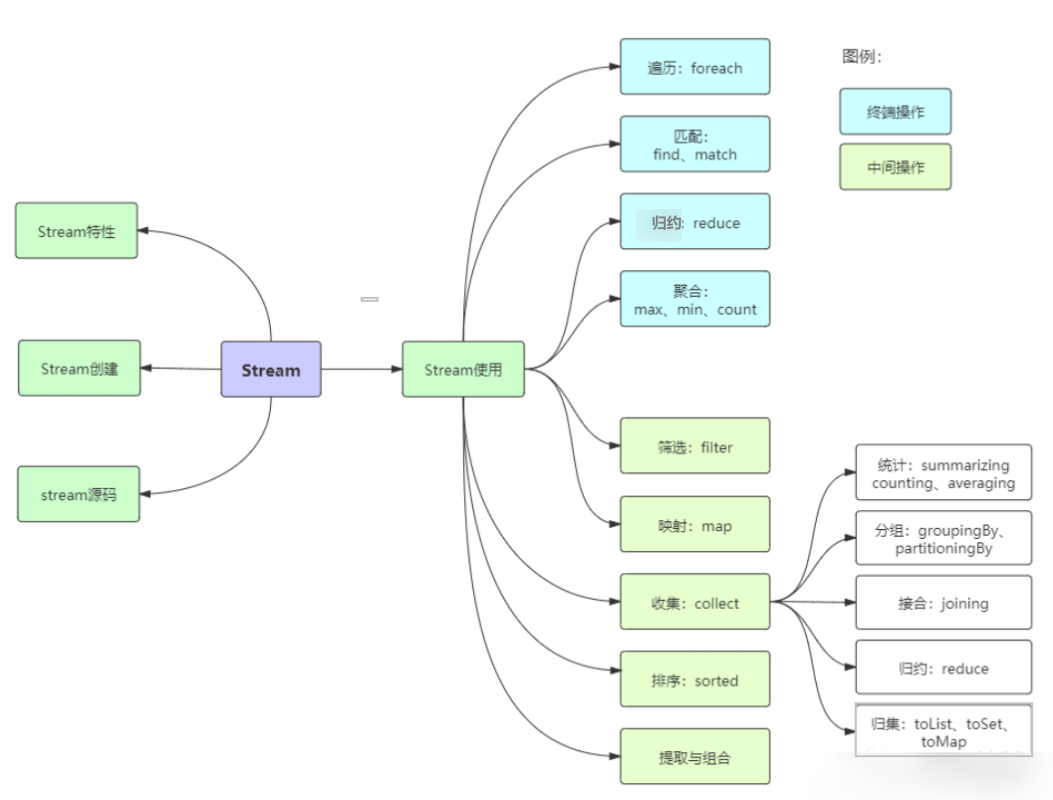
image-20211031204304133

先贴上几个案例,水平高超的同学可以挑战一下:

  1. 从员工集合中筛选出salary大于8000的员工,并放置到新的集合里。
  2. 统计员工的最高薪资、平均薪资、薪资之和。
  3. 将员工按薪资从高到低排序,同样薪资者年龄小者在前。
  4. 将员工按性别分类,将员工按性别和地区分类,将员工按薪资是否高于8000分为两部分。

用传统的迭代处理也不是很难,但代码就显得冗余了,跟Stream相比高下立判。

1 Stream概述

Java 8 是一个非常成功的版本,这个版本新增的Stream,配合同版本出现的 Lambda ,给我们操作集合(Collection)提供了极大的便利。

那么什么是Stream

Stream将要处理的元素集合看作一种流,在流的过程中,借助Stream API对流中的元素进行操作,比如:筛选、排序、聚合等。

Stream可以由数组或集合创建,对流的操作分为两种:

  1. 中间操作,每次返回一个新的流,可以有多个。
  2. 终端操作,每个流只能进行一次终端操作,终端操作结束后流无法再次使用。终端操作会产生一个新的集合或值。

另外,Stream有几个特性:

  1. stream不存储数据,而是按照特定的规则对数据进行计算,一般会输出结果。
  2. stream不会改变数据源,通常情况下会产生一个新的集合或一个值。
  3. stream具有延迟执行特性,只有调用终端操作时,中间操作才会执行。

2 Stream的创建

Stream可以通过集合数组创建。

1、通过 java.util.Collection.stream() 方法用集合创建流

List<String> list = Arrays.asList("a", "b", "c");
// 创建一个顺序流
Stream<String> stream = list.stream();
// 创建一个并行流
Stream<String> parallelStream = list.parallelStream();

2、使用java.util.Arrays.stream(T[] array)方法用数组创建流

int[] array={1,3,5,6,8};
IntStream stream = Arrays.stream(array);

3、使用Stream的静态方法:of()、iterate()、generate()

Stream<Integer> stream = Stream.of(1, 2, 3, 4, 5, 6);

Stream<Integer> stream2 = Stream.iterate(0, (x) -> x + 3).limit(4);
stream2.forEach(System.out::println); // 0 2 4 6 8 10

Stream<Double> stream3 = Stream.generate(Math::random).limit(3);
stream3.forEach(System.out::println);

输出结果:

0 3 6 9

0.6796156909271994 0.1914314208854283 0.8116932592396652

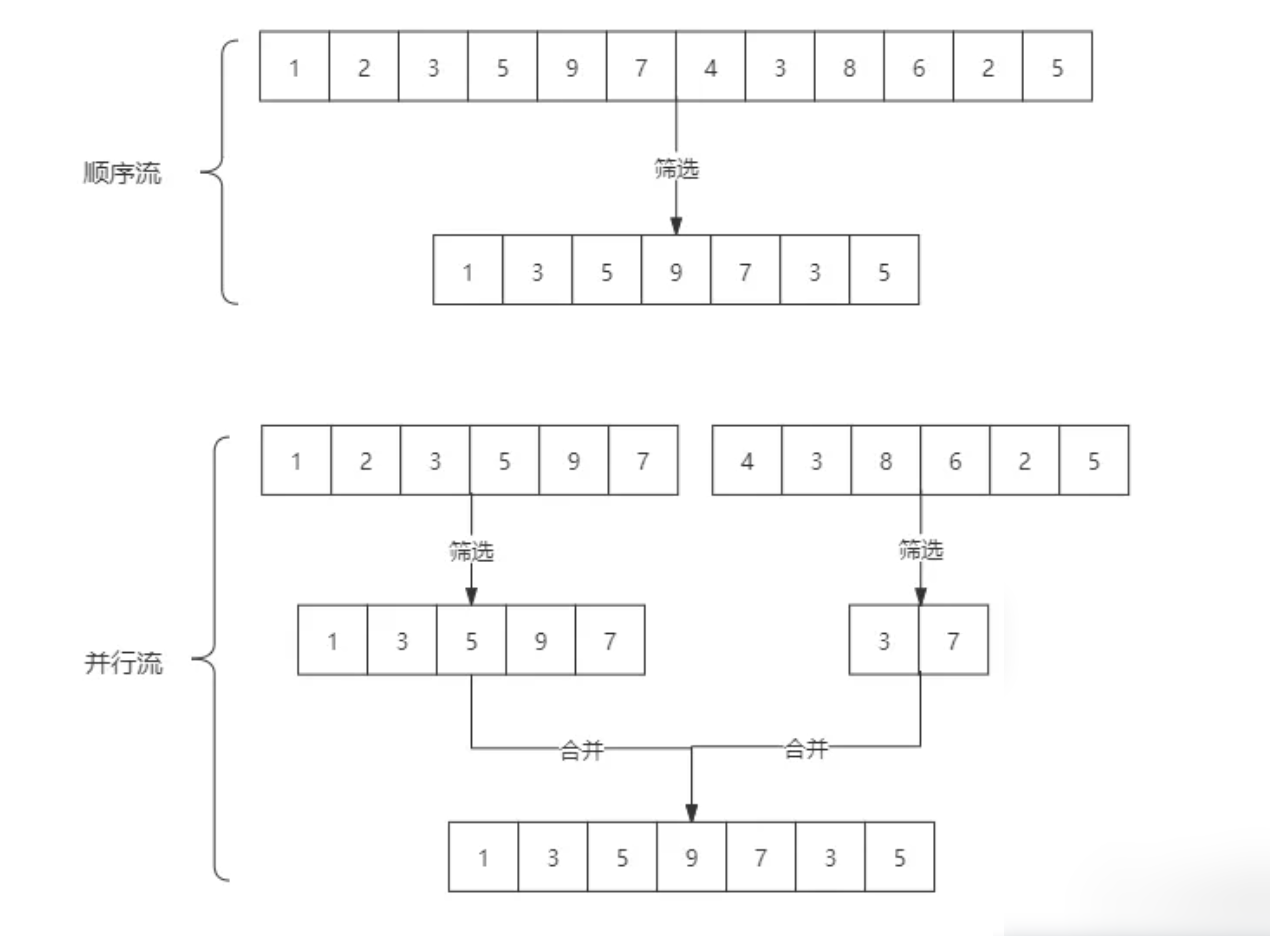
streamparallelStream的简单区分: stream是顺序流,由主线程按顺序对流执行操作,而parallelStream是并行流,内部以多线程并行执行的方式对流进行操作,但前提是流中的数据处理没有顺序要求。例如筛选集合中的奇数,两者的处理不同之处:

image-20211031203335805

如果流中的数据量足够大,并行流可以加快处速度。

除了直接创建并行流,还可以通过parallel()把顺序流转换成并行流:

Optional<Integer> findFirst = list.stream().parallel().filter(x->x>6).findFirst();

3 Stream的使用

在使用stream之前,先理解一个概念:Optional

Optional类是一个可以为null的容器对象。如果值存在则isPresent()方法会返回true,调用get()方法会返回该对象, 否则会抛出异常。Optional类还可以用更优雅的方式进行判空处理, 更详细说明请见:https://docs.oracle.com/javase/8/docs/api/java/util/Optional.html

接下来,大批代码向你袭来!我将用20个案例将Stream的使用整得明明白白,只要跟着敲一遍代码,就能很好地掌握。

案例使用的员工类

这是案例中使用的员工类:

public class Person {
    private String name;  // 姓名
    private int salary; // 薪资
    private int age; // 年龄
    private String sex; //性别
    private String area;  // 地区

    // 构造方法
    public Person(String name, int salary, String sex, String area) {
        this.name = name;
        this.salary = salary;
        this.age = age;
        this.sex = sex;
        this.area = area;
    }

    public Person(String name, int salary, int age, String sex, String area) {
        this.name = name;
        this.salary = salary;
        this.age = age;
        this.sex = sex;
        this.area = area;
    }

    // 省略了get和set,请自行添加
    public String getName() {
        return name;
    }

    public void setName(String name) {
        this.name = name;
    }

    public int getSalary() {
        return salary;
    }

    public void setSalary(int salary) {
        this.salary = salary;
    }

    public int getAge() {
        return age;
    }

    public void setAge(int age) {
        this.age = age;
    }

    public String getSex() {
        return sex;
    }

    public void setSex(String sex) {
        this.sex = sex;
    }

    public String getArea() {
        return area;
    }

    public void setArea(String area) {
        this.area = area;
    }
}

3.1 遍历/匹配(foreach/find/match)

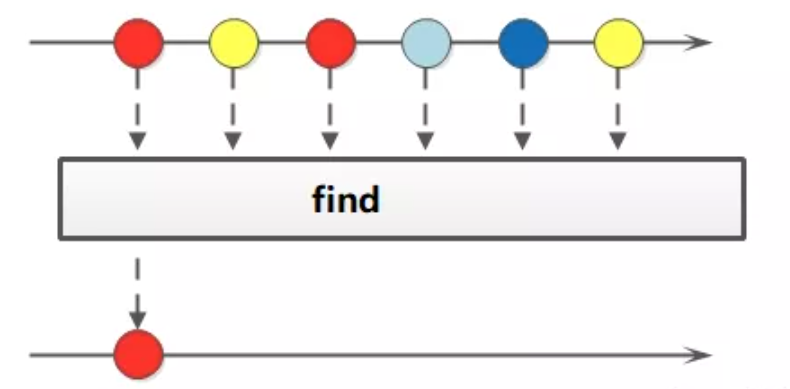
Stream也是支持类似集合的遍历和匹配元素的,只是Stream中的元素是以Optional类型存在的。Stream的遍历、匹配非常简单。

image-20211031203355248

// 遍历输出符合条件的元素
list.stream().filter(x -> x > 6).forEach(System.out::println);
// 匹配第一个
Optional<Integer> findFirst = list.stream().filter(x -> x > 6).findFirst();
// 匹配任意(适用于并行流)
Optional<Integer> findAny = list.parallelStream().filter(x -> x > 6).findAny();
// 是否包含符合特定条件的元素
System.out.println("匹配第一个值:" + findFirst.get());
System.out.println("匹配任意一个值:" + findAny.get());
boolean anyMatch = list.stream().anyMatch(x -> x > 6);
System.out.println("是否存在大于6的值:" + anyMatch);

3.2 筛选(filter)

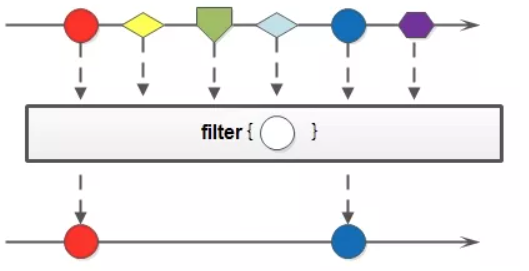
筛选,是按照一定的规则校验流中的元素,将符合条件的元素提取到新的流中的操作。

image-20211031210320051

案例一:筛选出Integer集合中大于7的元素,并打印出来

List<Integer> list2 = Arrays.asList(6, 7, 3, 8, 1, 2, 9);
Stream<Integer> stream = list2.stream();
stream.filter(x -> x > 7).forEach(System.out::println);

预期结果:

8 9

案例二:筛选员工中工资高于8000的人,并形成新的集合。 形成新集合依赖collect(收集),后文有详细介绍。

List<Person> personList = new ArrayList<Person>();
personList.add(new Person("Tom", 8900, "male", "New York"));
personList.add(new Person("Jack", 7000, "male", "Washington"));
personList.add(new Person("Lily", 7800, "female", "Washington"));
personList.add(new Person("Anni", 8200, "female", "New York"));
personList.add(new Person("Owen", 9500, "male", "New York"));
personList.add(new Person("Alisa", 7900, "female", "New York"));

// 筛选员工中工资高于8000的人,并形成新的集合
List<String> fiterList = personList.stream().filter(x -> x.getSalary() > 8000).map(Person::getName).collect(Collectors.toList());
System.out.print("高于8000的员工姓名:" + fiterList);

运行结果:

高于8000的员工姓名:[Tom, Anni, Owen]

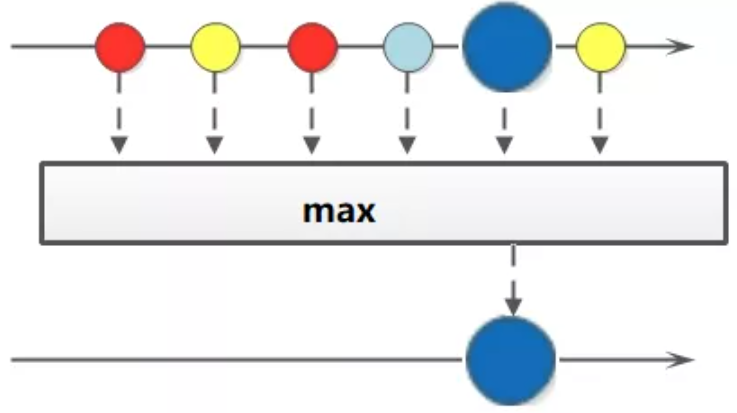
3.3 聚合(max/min/count)

maxmincount这些字眼你一定不陌生,没错,在mysql中我们常用它们进行数据统计。Java stream 中也引入了这些概念和用法,极大地方便了我们对集合、数组的数据统计工作。

image-20211031203425525

案例一:获取String集合中最长的元素。

// 获取String集合中最长的元素
List<String> list = Arrays.asList("adnm", "admmt", "pot", "xbangd", "weoujgsd");
Optional<String> max = list.stream().max(Comparator.comparing(String::length));
System.out.println("最长的字符串:" + max.get());

输出结果:

最长的字符串:weoujgsd

案例二:获取Integer集合中的最大值。

List<Integer> list = Arrays.asList(7, 6, 9, 4, 11, 6);

// 自然排序
Optional<Integer> max = list.stream().max(Integer::compareTo);
Optional<Integer> max1 = list.stream().max(Comparator.naturalOrder());
System.out.println("自然排序的最大值:" + max.get());
System.out.println("自然排序的最大值:" + max1.get());

// 自定义排序
Optional<Integer> max2 = list.stream().max((o1, o2) -> o1.compareTo(o2));
System.out.println("自定义排序的最大值:" + max2.get());

输出结果:

自然排序的最大值:11

自定义排序的最大值:11

案例三:获取员工工资最高的人。

List<Person> personList = new ArrayList<>();
personList.add(new Person("Tom", 8900, "male", "New York"));
personList.add(new Person("Jack", 7000, "male", "Washington"));
personList.add(new Person("Lily", 7800, "female", "Washington"));
personList.add(new Person("Anni", 8200, "female", "New York"));
personList.add(new Person("Owen", 9500, "male", "New York"));
personList.add(new Person("Alisa", 7900, "female", "New York"));

Optional<Person> max = personList.stream().max(Comparator.comparingInt(Person::getSalary));
System.out.println("员工工资最大值:" + max.get().getSalary());

输出结果:

员工工资最大值:9500

案例四:计算Integer集合中大于6的元素的个数。

List<Integer> list = Arrays.asList(7, 6, 4, 8, 2, 11, 9);
long count = list.stream().filter(x -> x > 6).count();
System.out.println("list中大于6的元素个数:" + count);

输出结果:

list中大于6的元素个数:4

3.4 映射(map/flatMap)

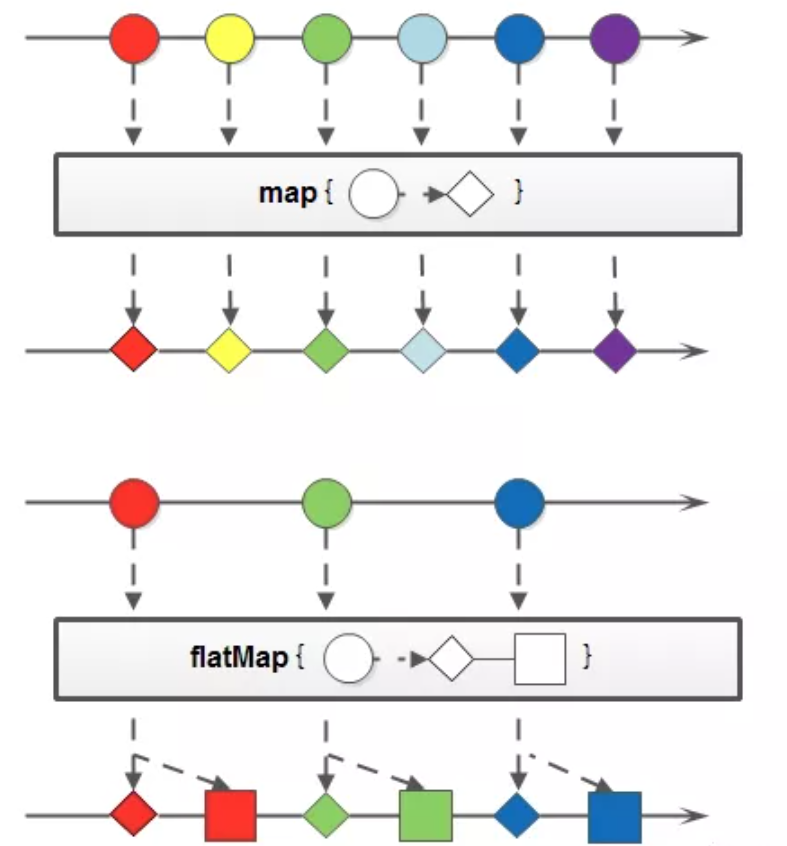
映射,可以将一个流的元素按照一定的映射规则映射到另一个流中。分为mapflatMap

  • map:接收一个函数作为参数,该函数会被应用到每个元素上,并将其映射成一个新的元素。
  • flatMap:接收一个函数作为参数,将流中的每个值都换成另一个流,然后把所有流连接成一个流。

image-20211031203517018

案例一:英文字符串数组的元素全部改为大写。整数数组每个元素+3。

String[] strArr = { "abcd", "bcdd", "defde", "fTr" };
List<String> strList = Arrays.stream(strArr).map(String::toUpperCase).collect(Collectors.toList());
System.out.println("每个元素大写:" + strList);

List<Integer> intList = Arrays.asList(1, 3, 5, 7, 9, 11);
List<Integer> intListNew = intList.stream().map(x -> x + 3).collect(Collectors.toList());
System.out.println("每个元素+3:" + intListNew);

输出结果:

每个元素大写:[ABCD, BCDD, DEFDE, FTR]

每个元素+3:[4, 6, 8, 10, 12, 14]

案例二:将员工的薪资全部增加1000。

List<Person> personList = new ArrayList<Person>();
personList.add(new Person("Tom", 8900, "male", "New York"));
personList.add(new Person("Jack", 7000, "male", "Washington"));
personList.add(new Person("Lily", 7800, "female", "Washington"));
personList.add(new Person("Anni", 8200, "female", "New York"));
personList.add(new Person("Owen", 9500, "male", "New York"));
personList.add(new Person("Alisa", 7900, "female", "New York"));

// 不改变原来员工集合的方式
List<Person> personListNew = personList.stream().map(person -> {
    Person personNew = new Person(person.getName(), 0, null, null);
    personNew.setSalary(person.getSalary() + 10000);
    return personNew;
}).collect(Collectors.toList());
System.out.println("一次改动前:" + personList.get(0).getName() + "-->" + personList.get(0).getSalary());
System.out.println("一次改动后:" + personListNew.get(0).getName() + "-->" + personListNew.get(0).getSalary());

// 改变原来员工集合的方式
List<Person> personListNew2 = personList.stream().map(person -> {
    person.setSalary(person.getSalary() + 10000);
    return person;
}).collect(Collectors.toList());
System.out.println("二次改动前:" + personList.get(0).getName() + "-->" + personListNew.get(0).getSalary());
System.out.println("二次改动后:" + personListNew2.get(0).getName() + "-->" + personListNew.get(0).getSalary());

输出结果:

一次改动前:Tom–>8900

一次改动后:Tom–>18900

二次改动前:Tom–>18900

二次改动后:Tom–>18900

案例三:将两个字符数组合并成一个新的字符数组。

List<String> list = Arrays.asList("m,k,l,a", "1,3,5,7");
List<String> listNew = list.stream().flatMap(s -> {
    // 将每个元素转换成一个stream
    String[] split = s.split(",");
    Stream<String> s2 = Arrays.stream(split);
    return s2;
}).collect(Collectors.toList());

System.out.println("处理前的集合:" + list);
System.out.println("处理后的集合:" + listNew);

输出结果:

处理前的集合:[m-k-l-a, 1-3-5]

处理后的集合:[m, k, l, a, 1, 3, 5, 7]

3.5 归约(reduce)

归约,也称缩减, 其实就是从前往后两两归并, 最后得到一个总的归并的结果,从结果来看是把一个流缩减成一个值,能实现对集合求和、求乘积和求最值操作。

image-20211031203558850

案例一:求Integer集合的元素之和、乘积和最大值。

List<Integer> list = Arrays.asList(1, 3, 2, 8, 11, 4);
// 求和方式1
Optional<Integer> sum = list.stream().reduce((x, y) -> x + y);
// 求和方式2
Optional<Integer> sum2 = list.stream().reduce(Integer::sum);
// 求和方式3 - 第一个参数是第一次用于累加的数
Integer sum3 = list.stream().reduce(0, Integer::sum);
System.out.println("list求和:" + sum.get() + "," + sum2.get() + "," + sum3);

// 求乘积
Optional<Integer> product = list.stream().reduce((x, y) -> x * y);
System.out.println("list求积:" + product.get());

// 求最大值方式1
Optional<Integer> max = list.stream().reduce((x, y) -> x > y ? x : y);
// 求最大值写法2 - 第一个参数是第一次用于比较的数
Integer max2 = list.stream().reduce(Integer.MIN_VALUE, Integer::max);
System.out.println("list求最大值:" + max.get() + "," + max2);

输出结果:

list求和:29,29,29

list求积:2112 list

list求最大值:11,11

案例二:求所有员工的工资之和和最高工资。

List<Person> personList = new ArrayList<Person>();
personList.add(new Person("Tom", 8900, "male", "New York"));
personList.add(new Person("Jack", 7000, "male", "Washington"));
personList.add(new Person("Lily", 7800, "female", "Washington"));
personList.add(new Person("Anni", 8200, "female", "New York"));
personList.add(new Person("Owen", 9500, "male", "New York"));
personList.add(new Person("Alisa", 7900, "female", "New York"));

// 求工资之和方式1:
Optional<Integer> sumSalary = personList.stream().map(Person::getSalary).reduce(Integer::sum);
// 求工资之和方式2:
Integer sumSalary2 = personList.stream().reduce(0, (first, second) -> first += second.getSalary(),
        (sum1, sum2) -> sum1 + sum2);
// 求工资之和方式3:
Integer sumSalary3 = personList.stream().reduce(0, (first, second) -> first += second.getSalary(), Integer::sum);
System.out.println("工资之和:" + sumSalary.get() + "," + sumSalary2 + "," + sumSalary3);

// 求最高工资方式1:
Integer maxSalary = personList.stream().reduce(0, (max, p) -> max > p.getSalary() ? max : p.getSalary(),
        Integer::max);
// 求最高工资方式2:
Integer maxSalary2 = personList.stream().reduce(0, (max, p) -> max > p.getSalary() ? max : p.getSalary(),
        (max1, max2) -> max1 > max2 ? max1 : max2);
System.out.println("最高工资:" + maxSalary + "," + maxSalary2);

输出结果:

工资之和:49300,49300,49300

最高工资:9500,9500

3.6 收集(collect)

collect,收集,可以说是内容最繁多、功能最丰富的部分了。从字面上去理解,就是把一个流收集起来,最终可以是收集成一个值也可以收集成一个新的集合。

collect主要依赖java.util.stream.Collectors类内置的静态方法。

3.6.1 归集(toList/toSet/toMap)

因为流不存储数据,那么在流中的数据完成处理后,需要将流中的数据重新归集到新的集合里。toListtoSettoMap比较常用,另外还有toCollectiontoConcurrentMap等复杂一些的用法。

下面用一个案例演示toListtoSettoMap

List<Integer> list = Arrays.asList(1, 6, 3, 4, 6, 7, 9, 6, 20);
List<Integer> listNew = list.stream().filter(x -> x % 2 == 0).collect(Collectors.toList());
System.out.println("toList:" + listNew);

Set<Integer> set = list.stream().filter(x -> x % 2 == 0).collect(Collectors.toSet());
System.out.println("toSet:" + set);

List<Person> personList = new ArrayList<Person>();
personList.add(new Person("Tom", 8900, "male", "New York"));
personList.add(new Person("Jack", 7000, "male", "Washington"));
personList.add(new Person("Lily", 7800, "female", "Washington"));
personList.add(new Person("Anni", 8200, "female", "New York"));
Map<?, Person> map = personList.stream().filter(p -> p.getSalary() > 8000)
        .collect(Collectors.toMap(Person::getName, p -> p));
System.out.println("toMap:" + map);

运行结果:

toList:[6, 4, 6, 6, 20]

toSet:[4, 20, 6]

toMap:{Tom=mutest.Person@5fd0d5ae, Anni=mutest.Person@2d98a335}

3.6.2 统计(count/averaging)

Collectors提供了一系列用于数据统计的静态方法:

  • 计数:count
  • 平均值:averagingIntaveragingLongaveragingDouble
  • 最值:maxByminBy
  • 求和:summingIntsummingLongsummingDouble
  • 统计以上所有:summarizingIntsummarizingLongsummarizingDouble

案例:统计员工人数、平均工资、工资总额、最高工资。

List<Person> personList = new ArrayList<Person>();
personList.add(new Person("Tom", 8900, "male", "New York"));
personList.add(new Person("Jack", 7000, "male", "Washington"));
personList.add(new Person("Lily", 7800, "female", "Washington"));

// 求总数
// Long count = (long) personList.size();
// Long count = personList.stream().count();
Long count = personList.stream().collect(Collectors.counting());
System.out.println("员工总数:" + count);

// 求平均工资
Double average = personList.stream().collect(Collectors.averagingDouble(Person::getSalary));
System.out.println("员工平均工资:" + average);

// 求最高工资
Optional<Integer> max = personList.stream().map(Person::getSalary).collect(Collectors.maxBy(Integer::compare));
System.out.println("员工最高工资:" + max);

// 求工资之和
Integer sum = personList.stream().collect(Collectors.summingInt(Person::getSalary));
System.out.println("员工工资总和:" + sum);

// 一次性统计所有信息
DoubleSummaryStatistics collect = personList.stream().collect(Collectors.summarizingDouble(Person::getSalary));
System.out.println("员工工资所有统计:" + collect);

运行结果:

员工总数:3 员工平均工资:7900.0 员工工资总和:23700 员工工资所有统计:DoubleSummaryStatistics{count=3, sum=23700.000000,min=7000.000000, average=7900.000000, max=8900.000000}

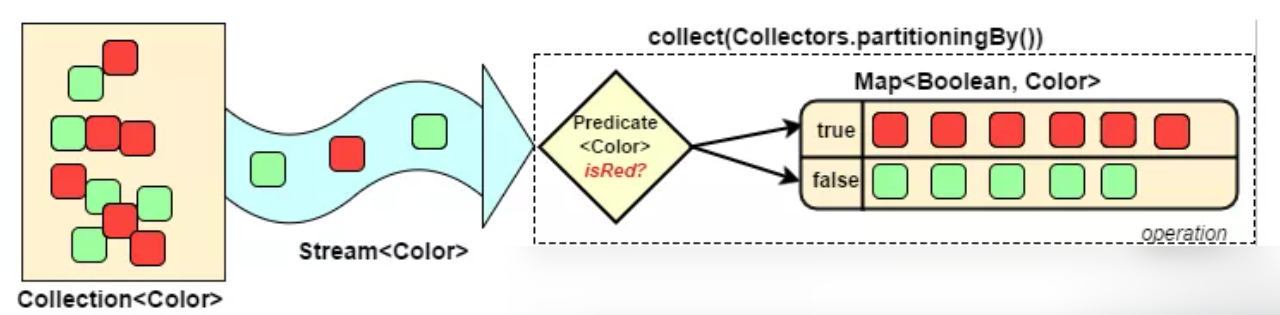
3.6.3 分组(partitioningBy/groupingBy)

  • 分区:将stream按条件分为两个Map,比如员工按薪资是否高于8000分为两部分。
  • 分组:将集合分为多个Map,比如员工按性别分组。有单级分组和多级分组。

image-20211031203705460

案例:将员工按薪资是否高于8000分为两部分;将员工按性别和地区分组

List<Person> personList = new ArrayList<Person>();
personList.add(new Person("Tom", 8900, "male", "New York"));
personList.add(new Person("Jack", 7000, "male", "Washington"));
personList.add(new Person("Lily", 7800, "female", "Washington"));
personList.add(new Person("Anni", 8200, "female", "New York"));
personList.add(new Person("Owen", 9500, "male", "New York"));
personList.add(new Person("Alisa", 7900, "female", "New York"));

// 将员工按薪资是否高于8000分组
Map<Boolean, List<Person>> part = personList.stream().collect(Collectors.partitioningBy(x -> x.getSalary() > 8000));
// 将员工按性别分组
Map<String, List<Person>> group = personList.stream().collect(Collectors.groupingBy(Person::getSex));
// 将员工先按性别分组,再按地区分组
Map<String, Map<String, List<Person>>> group2 = personList.stream().collect(Collectors.groupingBy(Person::getSex, Collectors.groupingBy(Person::getArea)));
System.out.println("员工按薪资是否大于8000分组情况:" + part);
System.out.println("员工按性别分组情况:" + group);
System.out.println("员工按性别、地区:" + group2);

输出结果:

员工按薪资是否大于8000分组情况:{false=[mutest.Person@2d98a335, mutest.Person@16b98e56, mutest.Person@7ef20235], true=[mutest.Person@27d6c5e0, mutest.Person@4f3f5b24, mutest.Person@15aeb7ab]}  

员工按性别分组情况:{female=[mutest.Person@16b98e56, mutest.Person@4f3f5b24, mutest.Person@7ef20235], male=[mutest.Person@27d6c5e0, mutest.Person@2d98a335, mutest.Person@15aeb7ab]}  

员工按性别、地区:{female={New York=[mutest.Person@4f3f5b24, mutest.Person@7ef20235], Washington=[mutest.Person@16b98e56]}, male={New York=[mutest.Person@27d6c5e0, mutest.Person@15aeb7ab], Washington=[mutest.Person@2d98a335]}}  

3.6.4 接合(joining)

joining可以将stream中的元素用特定的连接符(没有的话,则直接连接)连接成一个字符串。

List<Person> personList = new ArrayList<Person>();
personList.add(new Person("Tom", 8900, 23, "male", "New York"));
personList.add(new Person("Jack", 7000, 25, "male", "Washington"));
personList.add(new Person("Lily", 7800, 21, "female", "Washington"));

String names = personList.stream().map(p -> p.getName()).collect(Collectors.joining(","));
System.out.println("所有员工的姓名:" + names);
List<String> list = Arrays.asList("A", "B", "C");
String string = list.stream().collect(Collectors.joining("-"));
System.out.println("拼接后的字符串:" + string);

运行结果:

所有员工的姓名:Tom,Jack,Lily 拼接后的字符串:A-B-C

3.6.5 集合工具类的归约方法(reducing)

stream本身的reduce方法也可以替换成Collectors类提供的reducing`方法。

List<Person> personList = new ArrayList<>();
personList.add(new Person("Tom", 8900, 23, "male", "New York"));
personList.add(new Person("Jack", 7000, 25, "male", "Washington"));
personList.add(new Person("Lily", 7800, 21, "female", "Washington"));

// 每个员工减去起征点后的薪资之和(这个例子并不严谨,但一时没想到好的例子)
Integer sum1 = personList.stream().collect(Collectors.reducing(0, Person::getSalary, (i, j) -> (i + j - 5000)));
Integer sum2 = personList.stream().collect(Collectors.reducing(0, Person::getSalary, (i, j) -> (i + j - 5000)));
System.out.println("员工扣税薪资总和:" + sum1);
System.out.println("员工扣税薪资总和:" + sum2);

// stream的reduce(建议)
Optional<Integer> sum3 = personList.stream().map(Person::getSalary).reduce(Integer::sum);
System.out.println("员工薪资总和:" + sum3.get());

运行结果:

员工扣税薪资总和:8700 员工薪资总和:23700

3.7 排序(sorted)

sorted,中间操作。有两种排序:

  • sorted():自然排序,流中元素需实现Comparable接口
  • sorted(Comparator com):Comparator排序器自定义排序

案例:将员工按工资由高到低(工资一样则按年龄由大到小)排序

List<Person> personList = new ArrayList<Person>();

personList.add(new Person("Sherry", 9000, 24, "female", "New York"));
personList.add(new Person("Tom", 8900, 22, "male", "Washington"));
personList.add(new Person("Jack", 9000, 25, "male", "Washington"));
personList.add(new Person("Lily", 8800, 26, "male", "New York"));
personList.add(new Person("Alisa", 9000, 26, "female", "New York"));

// 按工资升序排序(自然排序)
List<String> newList = personList.stream().sorted(Comparator.comparing(Person::getSalary)).map(Person::getName)
        .collect(Collectors.toList());
// 按工资倒序排序
List<String> newList2 = personList.stream().sorted(Comparator.comparing(Person::getSalary).reversed())
        .map(Person::getName).collect(Collectors.toList());
// 先按工资再按年龄升序排序
List<String> newList3 = personList.stream()
        .sorted(Comparator.comparing(Person::getSalary).thenComparing(Person::getAge)).map(Person::getName)
        .collect(Collectors.toList());
// 先按工资再按年龄自定义排序(降序)
List<String> newList4 = personList.stream().sorted((p1, p2) -> {
    if (p1.getSalary() == p2.getSalary()) {
        return p2.getAge() - p1.getAge(); // 降序
    } else {
        return p2.getSalary() - p1.getSalary(); // 降序
    }
}).map(Person::getName).collect(Collectors.toList());

System.out.println("按工资升序排序:" + newList);
System.out.println("按工资降序排序:" + newList2);
System.out.println("先按工资再按年龄升序排序:" + newList3);
System.out.println("先按工资再按年龄自定义降序排序:" + newList4);

运行结果:

按工资自然排序:[Lily, Tom, Sherry, Jack, Alisa] 按工资降序排序:[Sherry, Jack, Alisa,Tom, Lily] 先按工资再按年龄自然排序:[Sherry, Jack, Alisa, Tom, Lily] 先按工资再按年龄自定义降序排序:[Alisa, Jack, Sherry, Tom, Lily]

3.8 提取/组合

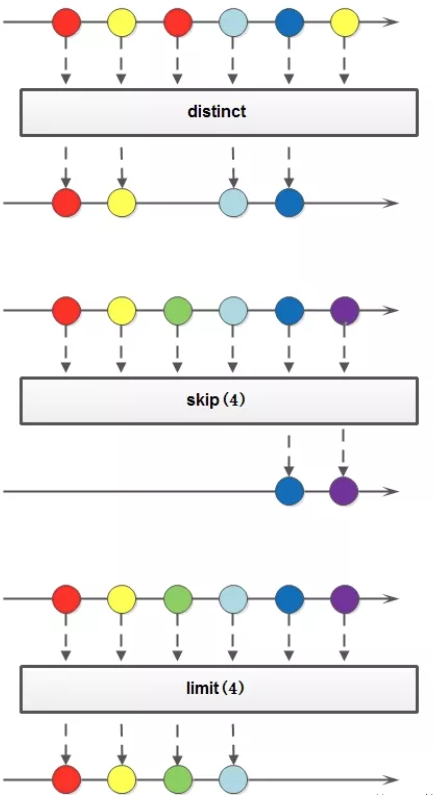
流也可以进行合并、去重、限制、跳过等操作。

image-20211031204447910

String[] arr1 = { "a", "b", "c", "d" };
String[] arr2 = { "d", "e", "f", "g" };

Stream<String> stream1 = Stream.of(arr1);
Stream<String> stream2 = Stream.of(arr2);

// concat:合并两个流 distinct:去重
List<String> newList = Stream.concat(stream1, stream2).distinct().collect(Collectors.toList());
System.out.println("concat and distinct:" + newList);

// limit:限制从流中获得前n个数据
// iterate: Returns an stream by a function to an initial element(seed)
List<Integer> collect = Stream.iterate(1, x -> x + 2).limit(10).collect(Collectors.toList());
System.out.println("limit:" + collect);

// skip:跳过前n个数据
List<Integer> collect2 = Stream.iterate(1, x -> x + 2).skip(1).limit(5).collect(Collectors.toList());
System.out.println("skip:" + collect2);

运行结果:

流合并:[a, b, c, d, e, f, g] limit:[1, 3, 5, 7, 9, 11, 13, 15, 17, 19] skip:[3, 5, 7, 9, 11]

原文链接及版权说明:

原文链接:https://blog.csdn.net/mu_wind/article/details/109516995

版权声明:本文为CSDN博主「云深i不知处」的原创文章,遵循CC 4.0 BY-SA版权协议,转载请附上原文出处链接及本声明。

并行流

对于CPU密集型任务使用并行流可以利用多线程提高执行效率.这里使用线程的sleep方法来模拟耗时的CPU密集型任务(经实验只有出现阻塞线程的操作才会使用多线程, 否则只会在主线程中进行计算), 这样实际计算就会启动ForkJoinPool中的worker线程来并发执行提高计算效率.

默认worker数量是CPU核数-1, 但是可以使用虚拟机选项-Djava.util.concurrent.ForkJoinPool.common.parallelism=N设置worker的数量为N(最大值为32767)。

    @Test
    public void loopingTest(){
        // 顺序流
        AtomicInteger result = new AtomicInteger();
        long start = System.nanoTime();
        for (int x = 1; x < 1000; x++) {
            Utils.sleep(10);
            result.addAndGet(x);
        }
        long end = System.nanoTime();
        System.out.printf("time spent for normal  looping: %.3f sec.%n",(end-start)*1E-9);
    }

    @Test
    public void sequenceStreamTest(){
        // 顺序流
        AtomicInteger result = new AtomicInteger();
        long start = System.nanoTime();
        IntStream.range(1, 1000).forEach(x->{
            Utils.sleep(10);
            result.addAndGet(x);
        });
        long end = System.nanoTime();
        System.out.printf("time spent for sequence stream: %.3f sec.%n",(end-start)*1E-9);
    }

    @Test
    public void parallelStreamTest(){
        // 并行流
        // 对于CPU密集型任务使用并行流可以提高执行效率
        // 此系统属性用来指定并行流计算所使用的 ForkJoinPool.commonPool-worker 的线程数量(并行度)
        System.setProperty("java.util.concurrent.ForkJoinPool.common.parallelism", "50");
        AtomicInteger result = new AtomicInteger();
        long start = System.nanoTime();
        IntStream.range(1, 1000).parallel().forEach(x->{
            Utils.sleep(10);
            result.addAndGet(x);
        });
        long end = System.nanoTime();
        System.out.printf("time spent for parallel stream: %.3f sec.%n",(end-start)*1E-9);
    }

输出结果:

time spent for parallel stream:  0.376 sec.
time spent for sequence stream: 15.917 sec.
time spent for normal  looping: 17.574 sec.

可以看到,当ForkJoinPool.commonPool-worker数量为50时, 原来顺使用序流需要运行17秒, 而并行流只需要1秒不到.

使用并行流实现WordCount

再看另一个例子, 分别使用顺序流和并行流(并行度设置为100)计算词频统计.

    @Test
    public void wordCountBySequenceStream() {

        List<String> lines;
        lines = Arrays.asList(
                "the cow jumped over the moon",
                "an apple a day keep the doctor away",
                "snow white and the seven dwarfs",
                "i am at two with nature",
                "the cow jumped over the moon",
                "an apple a day keep the doctor away",
                "snow white and the seven dwarfs",
                "i am at two with nature"
        );

        HashMap<String, Long> resultMap = new HashMap<>();

        long start = System.nanoTime();
        lines.stream().flatMap(line -> {
                    Utils.sleep(50);
                    return Arrays.stream(line.toLowerCase().split(" "));
                }
        ).forEach(word -> {
            Utils.sleep(50);
            if (resultMap.containsKey(word)) {
                resultMap.put(word, resultMap.get(word) + 1L);
            } else {
                resultMap.put(word, 1L);
            }
        });
        long end = System.nanoTime();
        System.out.printf("time spent for wordcount by sequence stream: %.3f sec.%n", (end - start) * 1E-9);

        resultMap.forEach(MxWordCountByParalleStreamTest::accept);
    }

    @Test
    public void wordCountByParallelStream() {
        System.setProperty("java.util.concurrent.ForkJoinPool.common.parallelism", "100");

        List<String> lines;
        lines = Arrays.asList(
                "the cow jumped over the moon",
                "an apple a day keep the doctor away",
                "snow white and the seven dwarfs",
                "i am at two with nature",
                "the cow jumped over the moon",
                "an apple a day keep the doctor away",
                "snow white and the seven dwarfs",
                "i am at two with nature"
        );

        HashMap<String, Long> resultMap = new HashMap<>();

        long start = System.nanoTime();
        lines.parallelStream().flatMap(line -> {
            Utils.sleep(50);
            return Arrays.stream(line.toLowerCase().split(" "));
        }).forEach(word -> {
            Utils.sleep(50);
            if (resultMap.containsKey(word)) {
                resultMap.put(word, resultMap.get(word) + 1L);
            } else {
                resultMap.put(word, 1L);
            }
        });
        long end = System.nanoTime();
        System.out.printf("time spent for wordcount by parallel stream: %.3f sec.%n", (end - start) * 1E-9);
        resultMap.forEach(MxWordCountByParalleStreamTest::accept);
    }

    private static void accept(String word, Long count) {
        System.out.println(word + ": " + count);
    }

执行结果:

time spent for wordcount by parallel stream: 1.999 sec.
over: 2
a: 2
away: 2
nature: 2
jumped: 2
i: 2
seven: 2
cow: 2
am: 2
an: 2
two: 2
dwarfs: 2
the: 8
doctor: 2
apple: 2
with: 2
moon: 2
at: 2
white: 2
snow: 2
and: 2
keep: 2
day: 2
time spent for wordcount by sequence stream: 3.850 sec.
over: 2
a: 2
away: 2
nature: 2
jumped: 2
seven: 2
i: 2
cow: 2
am: 2
an: 2
two: 2
dwarfs: 2
the: 8
doctor: 2
apple: 2
with: 2
moon: 2
at: 2
white: 2
snow: 2
and: 2
keep: 2
day: 2

Process finished with exit code 0

可见使用并行流可以节省一半的时间.

需要特别注意的是, 不是任何情况下使用并行流都可以节省时间, 并且使用时还要特别当心是否有线程安全问题.

Views: 560