集合框架是 Java 中最重要的内容之一。无论是最基本的 Java SE 应用程序开发,还是企业级的 Java EE 程序开发,集合都是开发过程中常用的部分。
1 集合的基本概念
首先,什么是集合呢?
集合是一种对象,只不过这种对象的功能,是储存和管理多个对象。例如,我们生活中的“抽屉”对象,抽屉就是用来放东西的,也就是说,“抽屉”这个对象的功能,就是用来储存和管理多个对象的。
那是不是除了集合之外,就没有别的管理多个对象的方式了呢?不是。我们之前学到的
数组,就能够完成储存和管理多个对象的功能。
那使用数组管理和储存多个对象,有什么问题呢? 看下面这个需求:
-
创建一个长度为 3 的字符串数组,在数组中放入“zhang3”,“li4”,“wang5”这三个字符串。
-
在下标为 1 的位置插入“zhao6”字符串(这意味着需要进行数组扩容)
-
删除“li4”这个字符串。
上面这段需求,用数组怎么实现呢?
参考实现代码如下:
public class TestArray {
    public static void main(String args[]){
        String[] names = new String[3]; names[0] = "zhang3";
        names[1] = "li4"; names[2] = "wang5";

        //插入 zhao6 之前需要扩容
        String[] newNames = new String[names.length * 2]; for(int i = 0; i<names.length; i++){
        newNames[i] = names[i];
        }
        names = newNames;

        //插入(不使用 for 循环,而直接赋值)
        names[3] = names[2]; names[2] = names[1]; names[1] = "zhao6";

        //删除(不使用 for 循环)
        names[2] = names[3];
    }
}
可以看出,用数组也可以实现相应的扩容、插入、删除等操作。但是,是用数组进行这些相关操作,却非常的不方便,需要撰写大量的基础代码。这些代码繁琐、重复,而且容易出错(很有可能产生数组下标越界异常等),有没有办法把程序员从这种繁重的劳动中解放出来呢?
我们可以把数组、以及对数组相关的操作封装在一个类中。例如,我们封装一个 MyList类:
public class MyList {
    //data 用来保存数组数据
    private Object[] data;
    //index 保存有效元素的个数
    private int index;
    //初始数组长度是 5,有效元素个数为 0
    public MyList(){
        data = new Object[5]; index = 0;
    }
    //把 value 元素放到末尾 如果 data 数组已满则自动扩充
    public void add(Object value){
    …
    }
    //把 value 元素插入在 pos 位置 如果 data 数组已满则自动扩充
    public void add(int pos, Object value){
    …
    }
    //删除 pos 位置的元素
    public void delete(int pos){
    …
    }

    //获得下标为 pos 的元素
    public Object get(int pos){
    …

    }
    //获得有效元素的个数public int size(){
    …
    }
    //判断数组中是否包含 obj 对象
    //如果存在则返回 true
    //否则返回 false
    public boolean contains(Object obj){
    …
    }
}
注意几个要点。
- 为了能够让 MyList 类更通用,能够保存 Java 中任何一种对象,我们把数据类型设为 Object 类型。由于 Object 类型是Java 中所有类型的父类,因此可以把任何对象都赋值给 Object 类型的引用,也就是说,能够把任何一种对象都放入 Object 数组。如果遇到基本类型的数据,也能将数据转换为包装类对象,同样可以放入 Object 数组。
- MyList 类有一个属性 index,这个属性用来保存有效元素的个数。例如,刚开始的时候,创建了一个长度为 5 的 Object 类型数组,但是这相当于有 5 个元素的空间。但是刚创建的时候,数组中并没有存入有价值的数据,因此有效元素的个数为 0 个,index 值也为0。再举一个例子,假设在一个长度为 10 的数组中,存入了 10 个元素。之后,调用了一次delete 方法,此时,由于删掉了一个元素,因此有效元素的个数变为 9 个。虽然有效元素的个数变少了,但是数组的长度并没有减小,数组的长度依然是 10。利用 index 属性,就可以判断数组是不是已经满了(如果 index 等于 data.length,则意味着数组满了)。在执行插入操作时,如果发现数组已满,则自动完成数组长度的扩充。
- MyList 中,封装了数据 data,并且封装了跟数据相关的操作,例如对数组进行增加、删除和插入等操作。这样,我们就把数组这种数据,和对数组的基本操作封装在了一起,从而再遇到数组的一些插入和删除操作时,可以不用重新实现复杂的数组插入和删除操作,而直接利用 MyList 类中封装的函数。这样,通过封装 MyList 类,减少了程序员的工作量,也提高了代码的重用性。
例如,利用 MyList 改写之前那个数组的练习,代码下可以修改如下:
public class TestMyList {
    public static void main(String args[]){ MyList list = new MyList();
        //初始化
        list.add("zhang3");
        list.add("li4");
        list.add("wang5");

        // 插 入 zhao6 list.add(1, "zhao6");

        //删除 li4

        list.delete(2);

    }
}
可以看到,利用了 list 的 add 和 delete 方法,可以让程序员省略自己实现数组插入删除的麻烦。也就是说,MyList 封装了数组的插入和删除操作,让程序员可以直接调用而不用自己重新实现。
完整的 MyList 代码如下:
public class MyList {
    //data 用来保存数组数据
    private Object[] data;
    //index 保存有效元素的个数
    private int index;

    //初始数组长度是 5,有效元素个数为 0 public MyList(){
    data = new Object[5]; index = 0;
    }

    //把 value 元素放到末尾
    public void add(Object value){
        if(index == data.length) this.expand(); data[index] = value;
        index++;
    }

    //把 value 元素插入在 index 位置
    public void add(int pos, Object value){ if(index == data.length) this.expand(); for(int i = index; i>pos; i--){
        data[i] = data[i-1];
        }
        data[pos] = value; index++;
        }

        //删除 index 位置的元素
        public void delete(int pos){ for(int i=pos;i<index-1;i++){
        data[i] = data[i+1];
        }
        index--;
        }

        //获得有效元素的个数public int size(){
        return index;
    }

    //判断数组中是否包含 obj 对象
    //如果存在则返回 true
    //否则返回 false
    public boolean contains(Object obj){ for(int i = 0; i<index; i++){
        if (data[i].equals(obj)) return true;
        }
        return false;
        }
        //获得下标为 pos 的元素
        public Object get(int pos){ return data[pos];
    }

    private void expand(){
        Object[] newArray = new Object[data.length * 2]; for(int i = 0; i<data.length; i++){
        newArray[i] = data[i];
        }
        data = newArray;
    }
}
2 集合框架概览
类似于 MyList 这样的类,其实,Sun 公司已经为我们写好了,完全不需要我们自己实现。这就是 Sun 公司提供的集合框架。对于我们来说,重要的不是如何实现这些类,而是如何使用 Sun 公司提供给我们的集合类。
集合就是 Sun 公司为程序员写的很多类。这些类用来储存和管理多个对象。当然,对于管理多个对象来说,管理的方式和特点多种多样。对不同的管理方式会有不同的类来实现。将这些集合类提炼出共性,就能够提炼出很多不同的接口。这些包含着共性的接口,就是我们学习集合重点要掌握的内容。
下面就是 Java 集合框架中,几个主要的接口:
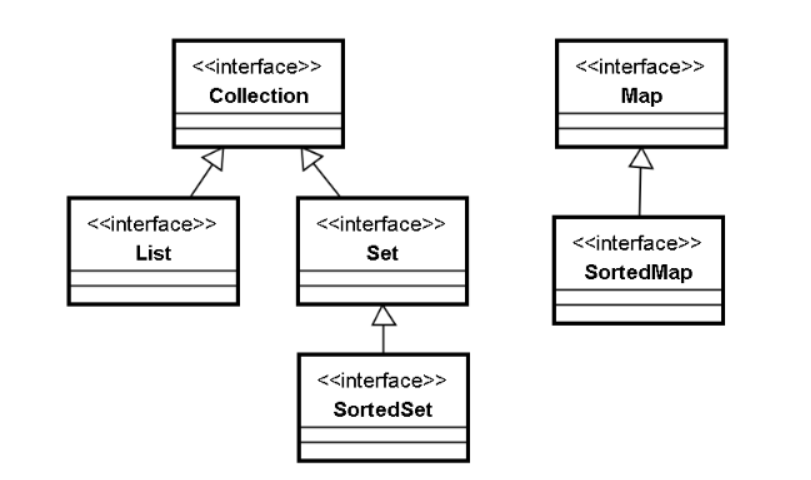
上图是 Java 集合框架中主要的接口。我们分别对每个接口进行描述。
- Collection 接口。这个接口的特点是:元素是 Object。换而言之,Collection 接口所有的子接口,以及其实现类,所管理的元素单位都是对象。
- Map 接口。与 Collection 接口对应,Map 接口所管理的元素不是对象,而是“键值对”。什么是键值对呢?“键”和“值”各是一个对象,这两个对象之间,存在着对应的关系,我们可以通过键对象,来找到对应的值对象。在 Map 中,键对象是唯一的,不可重复的,而键对象所对应的值对象是可以重复的。
例如,每隔四年,都会举办一次世界杯,经过艰苦的捉对厮杀,最终会有一个世界杯冠军产生。这样,举办世界杯的年份,和世界杯冠军,组成了一个对应的关系。上面所说的对应的关系,就是“键值对”的关系。值可以重复,但是键却是唯一的。例如,世界杯举办年份和世界杯冠军的对应关系中,键是世界杯举办的年份,而值是世界杯冠军的获得者。世界杯举办年份这个键不可能重复。例如,2002 年世界杯冠军为巴西队,则“2002—巴西”形成一个键值对的关系。2002 这个键不能够重复, 因为 2002 年只有一个世界杯冠军。而巴西队在 1994 年也获得过世界杯冠军,因此
“1994—巴西”也形成一个键值对。由此可见,值对象可以重复。
- Collection 有两个子接口,其中一个子接口为 List 接口。List 接口的特点,是 List 中元素有顺序,可以重复。所谓元素有顺序,指的是说,几个元素放入 List 的先后顺序,就是这几个元素在 List 中的排列顺序。通过集合中元素的顺序,我们可以区分出集合中第 1 个元素,第 2 个元素……
- Collection 还有一个子接口 Set 接口。Set 接口的特点是元素不可以重复,无顺序。例如,在一家饭店中,有“蒸羊羔”、“蒸熊掌”、“蒸鹿尾”三道菜。对于厨师来说, 他会做这三道菜,可以认为他会做的菜放在一个 Set 集合中,顾客可以从这个集合中挑选若干道菜。在这个集合中,没有元素重复(不会有个厨师跟顾客说,我会做蒸羊羔,还有蒸熊掌,还有蒸羊羔、还有蒸熊掌„„),并且元素的顺序也不重要,没有第 1 个第 2 个之分。
- Set 接口有个子接口 SortedSet。这个接口具有 Set 的特点,其中的元素不能够重复。
但是这个接口与 SortedSet 不同的地方在于,这个接口中的元素会按照一定的排序规则,自动对集合中的元素排序。
- Map 有个子接口 SortedMap。这个接口与 Map 一样,管理的元素是键值对,键不能重复,值可以重复。所不同的是,在这个接口中,键对象会按照一定的排序规则, 自动排序。
下面我们就针对这几种接口,分别进行学习和讨论。
要掌握每种集合接口,就要重点掌握集合接口的这几个方面:
1、 接口的特点
2、 接口中定义的基本操作
3、 该集合如何遍历
4、 接口的不同实现类,以及实现类之间的区别
3 Collection
1、 接口特点
Collection 接口的特点是元素是 Object。遇到基本类型数据,需要转换为包装类对象。
2 、基本操作
Collection 接口中常用的基本操作罗列如下:
- boolean add(Object o)
这个操作表示把元素加入到集合中。add 方法的返回值为 boolean 类型。如果元素加入集合成功,则返回 true,否则返回 false。
- boolean contains(Object o)
这个方法判断集合中是否包含了 o 元素。
- boolean isEmpty()
这个方法判断集合是否为空。
- Iterator iterator()
这个方法很重要,可以用来完成集合的迭代遍历操作。
- boolean remove(Object o)
remove 方法表示从集合中删除 o 元素。返回值表示删除是否成功。
- void clear()
clear 方法清空集合。
- int size()
获得集合中元素的个数。
3、 Collection 如何遍历Collection 的实现类
Collection 没有直接的实现类。也就是说,某些实现类实现了 Collection 接口的子接口, 例如 List、Set,这样能够间接的实现 Collection 接口。但是没有一个实现类直接实现了Collection 接口却没有实现其子接口。
正因为如此,Collection 如何遍历,我们会在讲解其子接口时详细阐述。
4 List
4.1 List 特点和基本操作
List 接口的特点:元素是对象,并且元素有顺序,可以重复。
可以把 List 当做是一个列表。例如,如果让我们列出历任美国总统,我们必然会按照顺序说出每一任的人名,对于连任的总统,在这个列表中就会出现多次。这样的结构就是一个典型的 List:元素有顺序,并且可以重复出现。
对于 List 而言,元素的所谓“顺序”,指的是每个元素都有下标。因此,List 的基本操作,除了从 Collection 接口中继承来的之外,还有很多跟下标相关的操作。基本操作罗列如下:
- boolean add(Object o) / void add(int index, Object element)
在 List 接口中有两个重载的 add 方法。第一个 add 方法是从 Collection 接口中继承而来的,表示的是把 o 元素加入到 List 的末尾;第二个 add 方法是 List 接口特有的方法,表示的是把元素 element 插入到集合中 index 下标处。
- Object get(int index) / Object set(int index, Object element)
get 方法获得 List 中下标为 index 的元素,set 方法把 List 中下标为 index 的元素设置为 element。
利用这两个方法,可以对 List 根据相应下标进行读写。
- int indexOf(Object o)
这个方法表示在 List 中进行查找。如果 List 中存在 o 元素,则返回相应的下标。如果 List 中不存在 o 元素,则返回-1。
这个方法可以用来查找某些元素的下标。
除此之外,List 接口中还有一些诸如 size、clear、isEmpty 等方法,这些方法与介绍 Collection 接口中的相应方法含义相同,在此不再赘述。
4.2 遍历
首先,为了能使用 List 接口,必须先简单介绍一个 List 接口的实现类:ArrayList。这个类使用数组作为底层数据结构,实现了 List 接口,我们使用这个类来演示应该如何对 List 进行遍历。
由于 List 接口具有下标,因此我们用类似对数组遍历的方式,采用 for 循环对 List 进行遍历。示例代码如下:
public class TestArrayList {
public static void main(String args[]){
        List list = new ArrayList(); list.add("hello");
        list.add("world");
        list.add("java");
        list.add("study");

        for(int i = 0; i<list.size(); i++){ System.out.println(list.get(i));
        }

    }
}
可以看出,利用 List 接口中的 size 方法,我们可以得出集合中元素的个数,那么集合中元素的下标范围就是 0 ~ size-1 。继而我们可以通过 get 方法,根据下标获得相应的元素。利用这种方法,我们就可以遍历一个 List。
除此之外,List 接口还有另外一种遍历方式:迭代遍历。
4.2.1 迭代遍历
迭代遍历是 Java 集合中的一个比较有特色的遍历方式。这种方法被用来遍历 Collection 接口,也就是说,既可以用来遍历 List,也可以用来遍历 Set。
使用迭代遍历时,需要调用集合的 iterator 方法。这个方法在 Collection 接口中定义, 也就是说,List 接口也具有 iterator 方法。
这个方法的返回值类型是一个 Iterator 类型的对象。Iterator 是一个接口类型,接口类型没有对象,由此可知,调用 iterator 方法,返回的一定是 Iterator 接口的某个实现类的对象。这是非常典型的把多态、接口用在方法的返回值上面。
Iterator 接口表示的是“迭代器”类型。利用迭代器,我们可以对集合进行遍历,这种遍历方式即称之为迭代遍历。
例如,有如下代码:
public class TestArrayList {
    public static void main(String args[]){
        List list = new ArrayList(); list.add("hello");
        list.add("world");
        list.add("java");
        list.add("study");

        Iterator iter = list.iterator();
    }
}
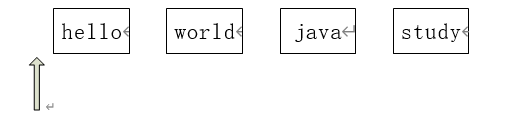
此时,在集合中有四个元素:hello、world、java、study。
在调用 list 的 iterator 方法之后,返回一个 Iterator 类型的对象。这个对象就好像一个指针,指向第一个元素之前。如下图:
在迭代器中定义了两个方法:
- boolean hasNext()
这个方法返回一个 boolean 类型,表示判断迭代器右方还有没有元素。对于上面这种情况,对迭代器调用 hasNext()方法,返回值为 true。
- Object next()
这个方法,会把迭代器向右移动一格。同时,这个方法返回一个对象,这个对象就是迭代器向右移动时,跳过的那个对象。如下图:
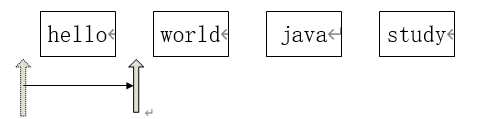
调用一次 next 方法之后,迭代器向右移动一位。在向右移动的同时,跳过了“hello” 这个元素,于是这个元素就作为返回值返回。
我们可以再持续的调用 next()方法,依次返回“world”,“java”,“study”对象,直至 hasNext()方法返回 false,意味着迭代器已经指向了集合的末尾,遍历过程即结束。
利用 Iterator 接口以及 List 中的 iterator 方法,可以对整个 List 进行遍历。代码如下:
public class TestArrayList {
    public static void main(String args[]){
        List list = new ArrayList(); list.add("hello");
        list.add("world");
        list.add("java");
        list.add("study");
        Iterator iter = list.iterator(); while(iter.hasNext()){
        Object value = iter.next(); System.out.println(value);
    }

    }
}
迭代遍历往往是用 while 循环来实现的。利用 hasNext 方法返回值作为循环条件,判断List 后面是否还有其他元素。在循环体中,调用 next 方法,一方面把迭代器向后移动,另外一方面一一返回 List 中元素的值。
4.3 实现类
List 接口有以下几个实现类。要注意的是,这几个类都实现了 List 接口,也就是说,如果我们针对 List 接口编程的话,使用不同的实现类,编程的方式是一样的。例如,ArrayList 和 LinkedList 都实现了 List 接口,如果我们要把上一小节的程序里的实现由 ArrayList 替换成 LinkedList,只需要把这一句代码
List list = new ArrayList();
改为
List list = new LinkedList();
其余代码由于都是针对 List 接口的,因此完全不需要修改。也就是说,不管实现类是什么样子,对 List 接口的操作是一样的。这也从一个侧面反映了接口的作用:解耦合。
下面针对不同的实现类,分别进行一下介绍。
4.3.1 ArrayList 和 LinkedList
ArrayList 的特点是采用数组实现。很类似于之前我们写的 MyList 类,当然,实际的 ArrayList 类和我们写的 MyList 相比,还是复杂了很多。
用数组这样一种结构来实现 List 接口,具有以下特点:
用数组实现 List 接口,如果要查询 List 中给定下标的元素,只需要使用数组下标就可以直接查到,实现起来非常方便,而且由于数组中,元素的存储空间是连续的,因此通过下标很容易快速对元素进行定位,因此查询效率也很高。
但是,如果使用数组实现 List 接口,则必须要面对一个问题:数组的插入和删除的效率较低。例如,如果要进行数组的插入,有可能要大量移动数组的元素,有可能要进行数组的扩容从而进行大量的内存拷贝的工作。而数组的删除,同样可能意味着要移动大量的数组元素。因此,从这方面来说,数组的插入和删除操作效率比较低。
而 LinkedList 实现 List 接口时,采用的是链表的实现方式。
下面简单介绍一下链表这种数据结构。
最基本的链表结构是这样的:链表由多个节点组成。每个节点分为两个部分:第一个部分用来储存链表的数据,另一个部分用来储存下一个节点的地址。如何来理解这个问题呢?有些寻宝和侦探小说里,常常有这样的情节:要打开一个宝藏,需要分散在不同地方的 n 把钥匙。我们伟大的主人公刚出场的时候,往往手上握有一条线索。通过这条线索,能够找到一个装有钥匙的盒子,并且发现,在装着钥匙的装帧精美的盒子中,会发现寻找下一把 钥匙需要的线索。就这样历经千辛万苦,最后终于获得宝藏。
在这种情形中,如果我们把钥匙当做数据,那么每个盒子就可以当做一个节点:在节点中,一部分放着数据,另一部分指向下一个节点。也就好像是,盒子中装着钥匙,并且装着发现下一个盒子的线索。我们可以用图来表示这种情况。例如,假设有如下代码:
List list = new LinkedList(); list.add("hello");
list.add("world");
list.add("java");
list.add("study");
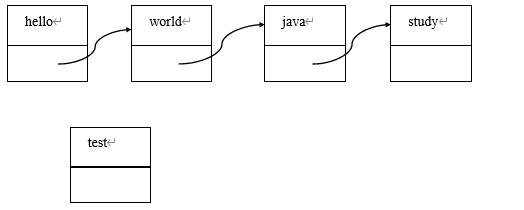
上面的代码创建了一个 LinkedList,在内存中的图像如下:

此时,如果调用 get(3)方法,则会由 hello 节点开始,先从 hello 节点找到 world 节点, 再从 world 节点找到 java 节点,再从 java 节点找到 study 节点。因此在查询方面,相对于数组直接使用下标,链表实现的 LinkedList,在查询方面效率较低。
而如果要进行插入操作,LinkedList 就会有比较明显的优势:因为 LinkedList 不需要进行数据内容的复制。例如,假设运行了如下代码:
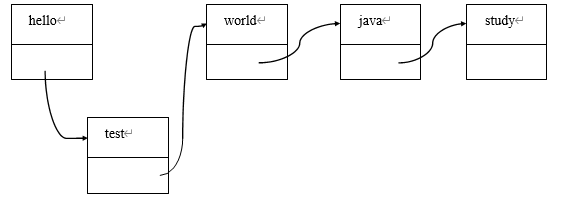
list.add(1, “test”);
则内存中会进行下面的操作:
- 创建一个新节点。
- 修改 hello 和 test 的指针指向即可。
与之类似的,使用链表进行删除也只需要改动某个指针的指向即可。例如,假设运行了如下代码:
list.delete(2);
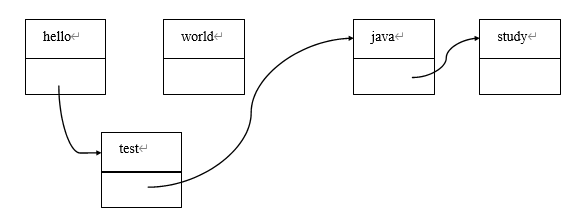
由上面的例子可知,相对使用数组实现 List,使用链表实现 List 中的插入和删除功能, 由于没有数组扩容以及移动数据等问题,因此效率要远远高于使用数组实现。
ArrayList 和 LinkedList 之间的区别如下表:
实现方式 特点
ArrayList 数组实现 增删慢,查询快
LinkedList 链表实现 增删快,查询慢
4.3.2 Vector
Vector 是JDK1.0 遗留下的产物。Vector 同样实现了 List 接口,而且也是使用数组实现。
Vector 和 ArrayList 之间的比较如下:
| 实现方式 |
特点 |
| ArrayList |
数组实现-轻量级,速度快,线程不安全 |
| Vector |
数组实现-重量级,速度慢,线程安全 |
这两个类实现的方式都采用数组实现,所不同的是,Vector 为了保证线程安全,采用了重量级的实现方式。在 Vector 中,所有的方法都被设计为了同步方法。这样,当多线程共同访问同一个 Vector 对象时,不会产生同步问题,但却牺牲了访问的效率。
而 ArrayList 中所有方法并没有被作成同步方法,因此访问效率较快。当然,当多线程同时访问同一个 ArrayList 对象时,可能会造成线程的同步问题。
关于线程的同步,在本书线程的章节中有更加详细的描述,请读者参考。
5 Set
5.1 Set 特点和基本操作
就像之前提到的一样,Set 接口的特点是元素不可以重复,无顺序。具体例子不再赘述。那 Set 接口有哪些基本操作呢?Set 接口中所有的操作都继承自 Collection 接口,也就是说,Set 接口没有自己特有的操作,其所有操作都来源于父接口 Collection。因此,它具有 Collection 接口中定义的那些诸如 add、remove 等方法。
特别要注意的是,由于 Set 集合中的元素没有顺序,因此 Set 集合中的元素没有下标的概念。因此,和 List 接口不同,Set 接口中没有定义与下标相关的操作。
Set 接口相关的内容请参考对 Collection 接口的描述。
5.2 遍历
与 List 接口一样,我们先介绍一个 Set 接口的实现类,HashSet。我们利用这个类来测试 Set 接口的遍历。
Set 接口中没有跟下标相关的方法,也就是说,Set 接口中没有类似 List 接口中的 get方法,因此,无法使用跟下标紧密联系的 for 循环遍历。
但是,Set 接口可以使用迭代遍历。Collection 接口中定义了 iterator 方法,因此 Set 接口中也包含了这个方法。对于 Set 集合来说(尤其是 JDK1.5 以前的版本),只能采用迭代器的方式来遍历。
示例代码如下:
public class TestSet {
public static void main(String[] args) { Set set = new HashSet(); set.add("hello");
set.add("world");
set.add("java");
//加入重复元素是,add 方法会返回 false

set.add("hello");
//迭代遍历
Iterator iter = set.iterator();
while(iter.hasNext()){
    Object value = iter.next(); System.out.println(value);
    }
}
要注意的是,迭代遍历输出的结果为:
hello java world
注意到对 set 调用了两次 add(“hello”)方法,但是输出结构只有一个 hello 字符串。同时,
注意到输出结果的排列顺序与加入 set 的顺序完全无关。这就是 Set 集合的特点:元素无顺序,不可以重复。
5.3 实现类
对于 Set 集合的基本操作,相对而言比较容易掌握。对于 Set 接口而言,比较难掌握的地方在于 Set 接口的实现类相关内容。下面这部分内容是学习 Set 接口的重点。
5.3.1 HashSet
HashSet 实现了 Set 接口,因此要求元素不可以重复。那么,HashSet 是怎么来判断元素是否可以重复的呢?
我们首先看下面这个代码的例子:
class Student{ private int age;
private String name;

public Student() {
}

public Student(String name, int age) {
    this.name = name;
    this.age = age;
}

public int getAge() {
    return age;
}
public void setAge(int age) {
    this.age = age;
}

public String getName() {
    return name;
}
public void setName(String name) {
    this.name = name;
}
public String toString(){
    return name + " " + age;
}

}
public class TestStudent{
    public static void main(
        String args[]){ Set set = new HashSet();
        Student stu1 = new Student(“Tom”, 18);
        Student stu2 = new Student(“Tom”, 18);
        set.add(stu1);
        set.add(stu2);
        System.out.println(set.size());
    }
}
看上述代码。我们创建了两个 Student 对象,这两个对象具有相同的属性。根据 Set 接口的含义,Set 集合中不应该有内容重复元素,因此我们希望调用了两次 add 方法之后,set 的长度依然为 1。然而运行结果却是 2。问题出在哪儿呢?首先来说,要判断两个对象内容是否相等,会调用对象的 equals 方法。而 Student 类中没有覆盖 equals 方法,因此 Student 类中的 equals 方法来源于 Object 类, 判断的是引用中保存的地址是否相等。显然,stu1 和stu2 这两个引用分别指向了一个 Student对象,这两个对象地址不相同,因此用 equals 方法判断,结果为 false。
为了能让 Student 类能够正确的进行判断,我们应该为 Student 类覆盖 equals 方法。示 例代码如下:
public boolean equals(Object obj) {
    if (this == obj) return true;
    if (obj == null) return false;
    if (getClass() != obj.getClass()) return false;
    Student stu = (Student) obj;
    if (this.age == stu.age && this.name.equals(stu.name)){
        return true;
    }else {
        return false;
    }
}
覆盖了 equals 方法之后,再次运行。但是,运行结果还是 2!这次问题又出在哪里呢? 这里面涉及到了 HashSet 的实现机制:Hash 算法。下面我们简单的来介绍一下 Hash 算
法的原理。
在 Object 类中,有一个 hashCode 方法,这个方法的签名如下:
public int hashCode()
这是一个 Object 类中定义的公开方法,意味着所有对象中都具有这个方法。这个方法没有参数,返回值为一个 int 类型的数值。
在我们把一个对象放到HashSet 中时,HashSet 的add 方法会调用对象的hashCode 方法。假设,我们的 HashSet 的大小为 4,为这四个位置设置下标为 0~3。内存中情况如下:
0
1
2
3
然后,假设调用 add 方法。假设我们有三个对象:str1、str2、str3 三个不同的字符串对象,假设对这三个对象调用 hashCode 方法的返回值为 96、99、100。
调用四次 add 方法如下:
set.add(str1);
set.add(str2);
set.add(str3);
set.add(str1);
在第一个 add 方法中,会调用 str1 的 hashCode 方法,返回值为 96。str1 对象在 HashSet中的位置,是根据这个整数 96 对数组长度取模,计算出来的。由于 96%4=0,因此会把 str1 放入下标为 0 的位置,如下图:
0 <- str1
1
2
3
在第二个 add 方法中,同样会调用str2 的 hashCode 方法,返回值为 99。由于 99%4=3, 因此会把 str2 放入下标为 3 的位置,如下图:
0 <- str1
1
2
3 <- str2
在第三个 add 方法中,会调用 str3 的 hashCode 方法,返回值为 100。由于 100%4=0, 但是下标为0 的位置已经有了一个str1 元素。此时,就产生了hashCode 冲突。当产生hashCode 冲突时,HashSet 会调用 equals 方法进行判断。这是,由于 str1.equals(str3)返回值为false, 这两个对象的值不相等,因此 str3 同样会被加入到 HashSet 中。示意图如下:
0 <- str1 <- str3
1
2
3 <- str2
在第四次调用 add 方法时,会再次调用 str1 的 hashCode 方法,返回值为 96。这时,由于 96%4=0,此时产生了 hashCode 冲突。而这时,HashSet 会调用 equals 方法进行判断。由于判断的结果是返回 true,因此 HashSet 认为这是重复元素,从而不会把 str1 对象再次加入Set,从而避免了重复元素。
示意图如下:
0 <- str1 <- str3
1
2
3 <- str2
从上述我们对 Hash 算法的描述中,可以看出 HashSet 只有在 hashCode 返回值冲突的时候才会调用 equals 方法进行判断。也就是说,两个对象,如果 hashCode 没有冲突,HashSet 就不会调用 equals 方法判断而直接认为这两个对象是不同的对象。
而对我们自己写的 Student 类调用 hashCode 方法时,由于 Student 类没有覆盖 Object 类中的 hashCode 方法,因此得到的返回值是 Object 类中的 hashCode 方法返回值。参考下面的代码:
Student stu1 = new Student("Tom", 18);
Student stu2 = new Student("Tom", 18);
System.out.println(stu1.hashCode());
System.out.println(stu2.hashCode());
程序输出结果如下:
33263331
6413875
可以看出,虽然这两个对象的值相同,并且也覆盖了 equals 方法,但是 hashCode 方法返回值并不相同。这样,HashSet 就认为这两个对象是两个不同的对象,直接把这两个对象放入 HashSet。但是这样一来,就破坏了“Set 中的元素不可重复”这个原则。
那为什么 Student 类有这个问题,而String 类没有这个问题呢?因为String 类是 Sun 公司类库的一部分,在 Sun 公司提供 String 类的时候,就为 String 类提供了正确的 hashCode方法的实现。从而保证了,相同字符串对象,调用 hashCode 方法的返回值都是相同的。 而 Student 类是我们自己写的,这个类中没有覆盖 hashCode 方法,因此调用的 hashCode方法来源于 Object 类。Object 类中的方法不能够满足我们的要求,无法保证相同的对象返回的 hashCode 相同。
那怎么解决这个问题呢?我们应该从 Student 类本身入手,应该在 Student 类中覆盖hashCode 方法。例如,在 Student 类中添加如下方法:
public int hashCode(){
    return age + name.hashCode();
}
这样,就能保证,当两个 Student 对象的age 和name 属性的值都相同时,返回的 hashCode值必定相同。因此,应当这样覆盖 hashCode:相同对象的 hashCode()返回值应当相同。
接下来考虑下面的情况。如果我们把 Student 类中的 hashCode 的覆盖写成下面的形式:
public int hashCode(){ return 0; }
这样是否能满足 hashCode 方法的要求呢?
这样的实现,从结果上来说,是对的。由于任何对象返回的 hashCode 值均为 0,因此符合之前所说的:相同对象的 hashCode 相同。但是这样的实现也有问题:由于任何情况之下返回的 hashCode 值都为 0,因此在往 HashSet 中放入对象时,每次都会产生 hashCode 的冲突,从而每次调用 add 方法都必须要调用 equals 方法比较。而第一个 hashCode 的实现,不同对象造成的 hashCode 冲突的可能性要小得多,因此调用 equals 方法的次数也会少很多。
因此,基于性能方面的考虑,不同的对象 hashCode 返回值应当尽量不同。
总结一下,如果要正常使用 HashSet 存放对象,为了保证对象的内容不重复,则要求这个对象满足:
- 覆盖 equals 方法。要求相同的对象,调用 equals 方法返回 true。
- 覆盖 hashCode 方法。要求,相同对象的 hashCode 相同,不同对象的 hashCode 尽量不同。
完整代码如下:
import java.util.*;

class Student{
    private String name; private int age;

    public Student() {
    }
    public Student(String name, int age) {
        this.name = name;
    this.age = age;
    }
    public String getName() {
        return name;
    }
    public void setName(String name) {
        this.name = name;
    }
    public int getAge() {
        return age;
    }
    public void setAge(int age) {
        this.age = age;
    }

    public int hashCode() {
        return age + name.hashCode();
    }

    public boolean equals(Object obj) {
        if (this == obj) return true;
        if (obj == null) return false;
        if (getClass() != obj.getClass()) return false;
            Student stu = (Student) obj;
        if ( (this.age == stu.age) && (this.name.equals(stu.name)) ){
            return true;
        }else{
            return false;
        }
    }

    public String toString(){
        return name + " " + age;
    }
}

public class TestHashSet {
    public static void main(String[] args) {
        Set set = new HashSet();
        set.add(new Student("Tom", 18));
        set.add(new Student("Jim", 20));
        set.add(new Student("Fred", 22));
        set.add(new Student("Tom", 18));

        Iterator iter = set.iterator(); while(iter.hasNext()){
            System.out.println(iter.next());
        }
    }
}
输出结果如下:
Fred 22
Jim 20
Tom 18
注意,add()方法被调用了四次,但是遍历 set 集合时,只读到了三个元素。
5.3.2 LinkedHashSet
HashSet 的特点是元素不可重复且元素无顺序。某些情况下,我们依然需要元素不可以重复,但是希望按照我们加入 Set 的先后顺序来加入这些元素。这个时候,我们就可以使用
LinkedHashSet。例如下面的例子:
import java.util.*;
public class TestLinkedHashSet {
    public static void main(String args[]){

        Set set = new LinkedHashSet(); set.add("hello");
        set.add("world");
        set.add("java");
        set.add("hello");

        Iterator iter = set.iterator(); while(iter.hasNext()){
        System.out.println(iter.next());
        }
    }
}
输出结果如下:
hello world java
我们可以看到,字符串的打印顺序和它们添加到 LinkedHashSet 中的顺序是一致的。同时,hello 字符串被添加了两次,但只打印了一次。
要注意的是,如果要使用 LinkedHashSet 的话,也必须正确的覆盖对象的 hashCode 和
equals 方法。
6 Map
6.1 Map 特点和基本操作
Map 接口与 Collection 接口不同,这个接口的元素是“键值对”。其中,键值对的特点
是:键不可以重复,值可以重复。
之前解释过,所谓“键值对”,可以理解成一种一一对应的关系。在这种关系中,我们可以通过“键”来找到特定的值。例如,如果把举办世界杯的年份当做键,把该年获得世界杯冠军的球队作为值,则这就形成了一个典型的键值对的关系。在这个关系中,我们可以通过年份查询对应年份的世界杯冠军,这就是“通过键,找到对应的值”的操作;并且举办世界杯的年份不会有重复,而不同年份的世界杯冠军有可能相同,这就对应着“键不可以重复, 值可以重复”。
Map 接口中的一些基本操作罗列如下:
- Object get(Object key)
这个方法完成的功能是,通过键对象 key,来找到相应的值对象。
- put(Object key, Object value)
这个方法是把一个键值对放入 Map 中。如果键不存在,则在 Map 中新增一个键值对。如果键已存在,则把新值替换旧值。例如,有如下代码:
System.out.println(map.get(“2002”)); map.put(“2002”, “Brazil”); System.out.println(map.get(“2002”)); map.put(“2002”, “China”); System.out.println(map.get(“2002”));
在第一个输出语句中,由于 Map 中不存在以 2002 作为键的键值对,因此第一个输出语句输出为 null。
之后,调用 put 方法。此时,由于 Map 中不存在 2002 这个键,因此会在 Map 中增加一个新的键值对。第二个输出语句就会输出“Brazil”。
之后,再次调用 put 方法。此时,由于在 Map 中 2002 这个键已经存在,因此会用新值“China”替换旧值“Brazil”。于是,第三个输出语句就会输出“China”。
- remove(Object key)
这个方法根据一个键,删除一个键值对。
- Set keySet()
这个方法返回所有键的集合。由于在 Map 中,键没有顺序,且不可以重复,因此所有的键对象组成的就是一个 Set。也就是说,keySet 方法返回的是一个 Set,这个
Set 就是所有键对象的集合。
- Collection values()
values 方法返回类型是一个 Collection,返回的是所有值对象的集合。
- containsKey / containsValue
这两个方法用来判断在 Map 中键是否存在,或者值是否存在。
- size()
这个方法返回 Map 中键值对的个数
- isEmpty()
判断 Map 是否为空
- clear()
清空 Map
- entrySet
这个方法返回值类型是一个 Set 集合,集合中放的是 Map.Entry 类型。这个方法是
用来做键值对遍历的,在讲解遍历的时候还会给大家讲到。
6.2 遍历
与之前一样,在真正开始讲解遍历之前,首先先使用一个 Map 接口的实现类:HashMap。创建相应的 HashMap 对象,并放入一些初始值,如下面代码所示:
import java.util.*;

public class TestMap {
    public static void main(String args[]){ Map map = new HashMap();

        map.put("2006", "Italy");
        map.put("2002", "Brazil");
        map.put("1998", "France");
        map.put("1994", "Brazil");
    }
}
在这个 Map 的基础上,我们开始对 Map 进行遍历。
由于 Map 管理的是键值对,因此对于 Map 而言,有多种遍历的方式:键遍历、键值遍历、利用 Map.Entry 进行键值遍历。
6.2.1 键遍历与键值遍历
键遍历指的是遍历所有的键。键遍历的实现非常简单:通过调用 Map 接口中的 keySet 方法,就能获得所有键的集合。然后,就可以像遍历普通 Set 一样遍历所有键对象的集合。键遍历参考代码如下:
Set set = map.keySet();
Iterator iter = set.iterator();
while(iter.hasNext()){
    System.out.println(iter.next());
}
键遍历输出结果如下:
2006
1998
2002
1994
可以看到,键遍历输出了集合中所有的键,并且,键并没有顺序。
在键遍历的基础上更进一步,能够遍历所有的键值对。思路如下:
利用键遍历能够遍历所有的键,而在遍历键的时候,可以使用 get 方法,通过键找到对应的值。键值遍历的参考代码如下:
Set set = map.keySet();
Iterator iter = set.iterator();
while(iter.hasNext()){
    Object key = iter.next();
    Object value = map.get(key); System.out.println(key + "--->" + value);
}
键值遍历的结果如下:
2006--->Italy 1998--->France
2002--->Brazil 1994--->Brazil
可以看到,键值遍历时能够输出键值对这种一一对应的关系。
6.2.2 值遍历
除了键遍历以及键值遍历之外,Map 接口还有一种遍历方式:值遍历。值遍历表示的是遍历 Map 中所有的值对象。与键遍历类似,我们对 Map 进行值遍历的思路也很简单:首先利用 Map 的 values()方法获得 Map 中所有值的集合。需要注意的是,values()方法返回的是一个 Collection 类型的对象,因此,应当用迭代遍历的方式,遍历这个 Collection。参考代码如下:
Collection conn = map.values();
Iterator iter = conn.iterator();
while(iter.hasNext()){
    System.out.println(iter.next());
}
这样,我们就遍历了 Map 中的所有值。输出结果如下:
Italy France Brazil Brazil
6.2.3 利用 Map.Entry 进行遍历
在 Map 接口中,有一个方法叫做 entrySet。这个方法返回一个 Set 集合,这个集合中装的元素的类型是 Map.Entry 类型。
Map.Entry 是 Map 接口的一个内部接口。这个接口封装了 Map 中的一个键值对。在这个接口中,主要定义了这样几个方法:
注意,在赋值的时候,应当把 iter.next 的返回值强转成 Map.Entry 类型才可以。结果如下:
2006-->Italy 1998-->France 2002-->Brazil 1994-->Brazil
可以看到,用 Map.Entry 进行遍历,以及使用 keySet()方法以及 get()方法进行键值,这两种遍历的结果是一样的。
6.3 实现类
Map 接口主要的实现类就是 HashMap 和 LinkedHashMap,此外还有一个使用较少的 Hashtable。
HashMap 的特点是:在判断键是否重复的时候,采用的算法是 Hash 算法,因此要求作为 HashMap 的键的对象,也应该正确覆盖 equals 方法和 hashCode 方法。
LinkedHashMap 和 HashMap 之间的区别有点类似于 LinkedHashSet 和HashSet 之间的区别:LinkedHashMap 能够保留键值对放入 Map 中的顺序。
例如, 如果我们把上一小节的例子中, Map 接口的实现类由 HashMap 改为
LinkedHashMap,修改后的完整的代码如下:
import java.util.*;
public class TestLinkedHashMap {
    public static void main(String args[]){
        Map map = new LinkedHashMap(); map.put("2002", "Brazil");
        map.put("1998", "France");
        map.put("1994", "Brazil");
        map.put("2006", "Italy");

        Set set = map.keySet();
        Iterator iter = set.iterator();
        while(iter.hasNext()){
            Object key = iter.next();
            Object value = map.get(key);
            System.out.println(key + "--->" + value);
        }
    }
}
键值遍历之后,输出结果如下:
2002--->Brazil 1998--->France 1994--->Brazil 2006--->Italy
可以看到,进行键值遍历时,输出的顺序,与我们在 Map 中进行 put 的顺序相同。这就是 LinkedHashMap 的特点,这个类能够保留键值对放入 Map 中的顺序。
Hashtable 也是 Map 接口的一个实现类。HashMap 和 Hashtable 之间的区别罗列如下:
| null 值处理 |
| HashMap |
轻量级,速度快,线程不安全 |
允许 null 作为键/值 |
| Hashtable |
重量级,速度慢,线程安全 |
null 作为键/值时会抛出异常 |
要注意,HashMap 和 Hashtable 有两方面的区别。一方面,这两个实现类一个是重量级, 一个是轻量级。这类似于 ArrayList 和 Vector 的区别,也就是说,Hashtable 中的所有方法都是同步方法,因此是线程安全的。另一方面,在于对 null 值的处理。例如,有如下代码:
Map map = new HashMap(); map.put(“2010”, null);
上面的代码创建了一个 HashMap 作为 Map 接口的实现类,并增加了一个“2010:null” 的键值对。在这个键值对中,2010 是键,null 作为值。
而如果把实现类改为 Hashtable,则上面的代码会抛出一个异常。也就是说,不允许把null 作为键值对中的键或者值。
7 Comparable 与排序
7.1 Collections 类与 Comparable
在 java.util 包中,提供了一个 Collections 的类(注意这个类的名字,与我们的 Collection 接口只相差最后一个字母 s)。这个类中所有的方法都是静态方法,也就是说,Collections类所有方法都能够通过类名直接调用。这个类为我们提供了很多使用的功能,例如:sort 方法,这个方法能够对 List 进行排序。再例如,max 方法可以找到集合中的最大值,而 min 方法可以找到集合中的最小值,等等。
调用 Collections.sort 方法,可以对一个 List 进行排序。与在接口那一章中讲述的一样, 要想对 List 进行排序,就要求 List 中的对象实现 Comparable 接口。具体应该如何实现请参考“接口”的章节。
7.2 TreeSet 与 TreeMap
Set 接口有一个子接口:SortedSet,这个接口的特点是:元素不可重复,且经过排序。这个接口有个典型的实现类:TreeSet。要注意的是,因为TreeSet 中要对对象进行排序,因此要求放入 TreeSet 接口中的对象都必须实现 Comparable 接口。
例如,在讲述接口的知识时,我们曾经介绍过如何实现 Comparable 接口。我们利用
Student 类实现 Comparable 接口。在实现 Comparable 接口时,必须要实现 compareTo 方法, 表示对学生进行排序。排序时,我们按照如下排序规则:对学生的年龄进行排序,年龄较小的学生排前面,年龄较大的学生排后面。Student 类的代码如下:
class Student implements Comparable<Student>{
    int age;
    String name;
    public Student() {
    }
    public Student(String name, int age) {
        this.name = name;
        this.age = age;
    }
    public int compareTo(Student stu){ if (
        this.age > stu.age){
        return 1;
    }else if (this.age < stu.age){ return -1;
    }else {
        return 0;
    }
}
}
然后,就可以把学生对象放入 TreeSet 中。代码如下:
public class TestTreeSet {
    public static void main(String args[]) {
        Set set = new TreeSet();
        set.add(new Student("Tom", 18));
        set.add(new Student("Jim", 17));
        set.add(new Student("Jerry", 20));

        Iterator iter = set.iterator();
        while(iter.hasNext()){
        Student stu = (Student) iter.next();
        System.out.println(stu.name + " " + stu.age);
        }
    }
}
输出结果如下:
Jim 17
Tom 18
Jerry 20
可以看出,遍历输出时,按照年龄的顺序,从小到大依次输出。这说明了在 TreeMap 内部进行排序时,使用了我们定义的 compareTo 方法比较两个元素的大小。
特别要注意的一点,TreeSet 进行比较时,会把利用 compareTo 方法比较时,返回值为 0 的两个对象,当做是相同对象。例如下面的代码:
set.add(new Student("Tom", 18));
set.add(new Student("Jim", 18));
上面的两行代码,在 set 中放入了两个对象。这两个对象用compareTo 进行比较时,由于两个对象的 age 属性相同,因此会返回 0。则 TreeSet 认为这两个元素是相同元素,所以在 TreeSet 中只保留了一个对象。
完整代码如下:
public class TestTreeSet {
    public static void main(String args[]) {

        Set set = new TreeSet(); set.add(new Student("Tom", 18));
        set.add(new Student("Jim", 18));

        Iterator iter = set.iterator(); while(iter.hasNext()){
        Student stu = (Student) iter.next(); System.out.println(stu.name + " " + stu.age);
        }
    }
}
输出结果如下:
Tom 18
可以看到,虽然调用了两次 add 方法,但两个元素被认为是相同元素,因此在 TreeSet 中只有一个元素。
与之类似的,Map 接口有一个子接口:SortedMap。这个接口的特点是:对 Map 的键进行了排序。这个接口的典型实现类是 TreeMap,如果要把某个键值对放入 TreeMap,则要求键对象必须实现 Comparable 接口。
我们把前一小节中世界杯的例子,使用TreeMap 来改写。要注意的是,在这个例子中,
Map 的键是 String 类型,这个类型是由 Sun 公司提供的,已经实现了 Comparable 接口。代码如下:
import java.util.*;
public class TestTreeMap {
    public static void main(String args[]){
        Map map = new TreeMap(); map.put("2002", "Brazil");
        map.put("1998", "France");
        map.put("1994", "Brazil");
        map.put("2006", "Italy");

        Set set = map.keySet(); Iterator iter = set.iterator();
        while(iter.hasNext()){
            Object key = iter.next(); Object value = map.get(key);
            System.out.println(key + "--->" + value);
        }
    }
}
运行结果如下:
1994--->Brazil 1998--->France 2002--->Brazil
2006--->Italy
可以看到,遍历 Map 时,对键进行了排序,按照键对象的排序结果,依次输出 Map 中的键值对。
8 5.0 新特性:foreach 循环
在 JDK5.0 中,Sun 公司对集合框架部分进行了比较大的修改和调整,为集合框架增加了很多新的特性。首先介绍一下一个简单的新特性:foreach 循环。
foreach 循环主要要解决的是遍历的问题。对于 List 来说,我们可以采用 for 循环遍历,
而对于 Set 而言,我们只能采用迭代遍历。相对 for 循环遍历而言,迭代遍历的代码比较繁琐和复杂。例如,对于一个 Set 而言,采用迭代遍历的代码如下:
Iterator iter = set.iterator();
while(iter.hasNext()){
    Object value = iter.next();
    System.out.println(value);
}
为了简化遍历的代码,在 5.0 中引入了 foreach 循环。基本语法如下:
for(变量 : 集合){ 循环体;
}
这段代码表示,遍历整个集合,每次迭代时都把集合中的一个元素赋值给 foreach 循环中的变量,并执行循环体。
例如,上面采用迭代遍历的代码,可以写成:
for(Object value : set){ System.out.println(value);
}
这段代码表示,遍历 set 集合,在每次迭代时把 set 集合的元素赋值给 value 变量。可以看出,使用 foreach 循环遍历,语法比迭代遍历要简洁的多。
实际上,foreach 循环遍历和迭代遍历是完全等价的。在写代码时,如果程序员使用了 foreach 循环的语法,那么 5.0 的编译器会把 foreach 循环自动的翻译成对应的迭代遍历。那么什么样的集合能够用 foreach 循环来遍历呢?在 Java5.0 中, 只要是实现了java. lang.Iterable 接口的集合对象,都能使用 foreach 方式来遍历。前面介绍的所有 Collection 接口的实现类,都符合这个特点。
此外,foreach 循环还能够用来遍历数组。例如下面的代码:
String[] ss = new String[]{“hello”, “world”, “java”};
for(String obj : ss){
    System.out.println(obj);
}
上面的代码演示了如何使用 foreach 循环来遍历数组。
9 5.0 新特性:泛型
泛型本身是一个非常大的话题,要彻底的掌握以及用好泛型,并不是一朝一夕的事情。在本书中,我们会介绍泛型最常用、最需要掌握的概念和语法。
在正式介绍泛型知识之前,我们首先谈一下 Java5.0 以前集合框架的缺点。在 5.0 以前,ArrayList 这个类相比直接使用数组来管理多个对象而言,具有很多优势,例如方法更多, 使用更加方便等等。但是 ArrayList 也有缺点。例如,如果定义三个类:Animal、Dog 和 Cat 类如下:
abstract class Animal{
    abstract public void eat();
}
class Dog extends Animal{
    public void eat(){
        System.out.println("dog eat bones");
    }

    public void bark(){
        System.out.println("wang");
    }
}

class Cat extends Animal{
    public void eat(){
        System.out.println("Cat eat fish");
    }
    public void miaow(){ System.out.println("miao");
    }
}
如果创建一个 Dog 类型的数组,并且对每个对象调用 bark 方法,代码如下:
Dog[] dogs = new Dog[2];
dogs[0] = new Dog();
dogs[1] = new Dog();
for(int i = 0; i<dogs.length; i++){
    dogs[i].bark();
}
由于这是一个 Dog 数组,因此数组中的每一个元素都是 Dog 类型,从而可以直接把数组中的元素赋值给一个 Dog 类型的变量。而对这个变量,则可以直接调用 bark 方法。
而如果不是一个数组,使用一个 ArrayList,同样对 ArrayList 中每个对象调用 bark 方法, 则代码如下:
List list = new ArrayList(); list.add(new Dog());
list.add(new Dog());
list.add(new Dog());
for(int i = 0; i<list.size(); i++){
    Dog d = (Dog) list.get(i);
    d.bark();
}
由于 ArrayList 的 get 方法返回的是一个 Object 类型,为了调用 bark 方法,还必须进行强制类型转换。这就是集合不如数组的第一个地方:存入集合的是 Dog 类型,而取出来的时候则变成了 Object 类型,需要进行强制类型转换。
此外,如果在 list 中调用了下面的代码:
list.add(new Cat());
这个程序在编译时没有错误,但是在运行时会产生一个 ClassCastException。这是集合不如数组的第二个地方:使用集合时,由于一个集合中能够装多个类型的对象,因此在使用时很有可能发生类型转换异常。
为什么会有这两个问题呢?原因很简单:ArrayList 为了设计的更加通用,其内部保存
数据的时候,保存数据的时候都采用的是 Object 类型。因为只有设计成这样,ArrayList 才能用来保存所有的 Java 对象。但是,如果把 ArrayList 设计成这样的话,就会造成之前的两个问题:我们无法象定义某个类型的数组那样,定义一个专门用于存放某个类型对象的集合。因此,我们称传统的集合对象是:类型不安全的。
5.0 引入的泛型机制能够很好的解决我们上面所说的问题。
9.1 泛型的基本使用
使用 5.0 的泛型机制非常简单。例如,我们希望创建一个只能用来保存 Dog 对象的 List, 可以使用如下代码:
List<Dog> list = new ArrayList<Dog>();
注意,跟原有的代码相比,在 List 接口和 ArrayList 后面,都有个后缀:。这表明,创建的 ArrayList 只能够放置 Dog 类型。此时,如果对 list 放入非 Dog 类型对象,则会产生一个编译错误,示例如下:
list.add(new Dog()); //OK list.add(new Cat()); //!编译错误
这样,就能保证 ArrayList 中所有的对象都是 Dog 类型的对象。于是,get 方法返回值就可以确定,一定是 Dog 类型,也就省略了强制类型转换的步骤。所以原有的代码就可以修改成:
for(int i = 0; i<list.size(); i++){
    Dog d = list.get(i);
    d.bark();
}
注意到在调用 get 方法的时候,没有进行强制类型转换。
现在我们更仔细的探讨一下上面的这段程序。在 5.0 以后的 Java 文档中,List 接口定义为:List,其中,E 就表示 List 的泛型。
上面的代码中,我们定义 list 变量的类型为 List,这就意味着,我们把 E 类型设置为 Dog 类型。在 List 中定义的 get 方法,其声明为:
E get(int index)
其返回值类型为 E。由于我们设置了 E 为 Dog 类型,因此,我们对我们定义的 list 变量调用 get 方法,其返回值类型为 Dog 类型。
对 Set 集合使用泛型的方法,和 List 接口使用泛型的方法类似,在此不再赘述。
此外,考虑 foreach 循环。如果不使用泛型的话,foreach 循环每次迭代的时候,只能确定元素是 Object 类型,因此 foreach 循环只能写成:
for(Object obj : list){
…
}
而是用了泛型以后,由于能够确定集合中元素的类型,因此 foreach 循环可以写成:
for(E e : list){
…
}
例如,上面遍历包含 Dog 的 list 的代码,就可以修改成:
```jav
```a
for(Dog d : list){ d.bark();
}
可以看出,泛型与 foreach 循环结合,大大简化了遍历集合的代码。
除了可以对 List 和 Set 使用泛型,对 Map 类型也可以使用泛型。但是要注意的是,Map 由于管理的是键值对,键有一个类型,值也有一个类型,因此 Map 的泛型需要有两个参数。示例代码如下:
Map<Integer, String> map = new HashMap<Integer, String>();
map.put(2002, “Brazil”);
map.put(1998, “France”); Set<Integer> set = map.keySet(); for(Integer i : set){
System.out.println(i + “” + map.get(i) );
}
请注意,map 的 keySet 方法返回值为一个 Set类型。另外,上述代码中,map 对象的键类型被设置为 Integer,而我们在调用 put 方法的时候采用了 2002,1998 这样的 int 数据,根据 JDK5.0 中自动封箱的语法,int 类型的数据会被自动封装为Integer 类型的对象。
9.2 泛型与多态
请看下面的例子:
List<Dog> dogList = new ArrayList<Dog>(); List<Animal> aniList = dogList; //! 编译出错!
这两行代码中,第一行编译正确,第二行编译出错。
在第一行代码中,把一个 ArrayList直接赋值给一个 List类型的引用。在这个赋值过程中,类型里有多态(把 ArrayList 赋值给 List),但是泛型是一样的(均是 Dog 的泛型)。
在第二行代码中,把一个 List赋值给一个 List,这样赋值是错误的!在这个过程中,类型中没有多态(List 是相同的),而泛型有多态(一个是 Dog 的泛型,一个是 Animal 的泛型)。这句话会导致一个编译错误!
请记住这个结论:类型可以有多态,但是泛型不能够有多态!
为什么会有这么个结论呢?假设可以把 dogList 直接赋值给 aniList,则可以对 aniList调用 add 方法:
aniList.add(new Cat());
这句代码能够编译通过,因为根据泛型,add 方法接受一个 Animal 类型的参数,而 Cat 对象能够当做一个 Animal 对象。
而事实上,对象是被添加到了 dogList 当中,而这个 list 中只能存放 Dog 对象,不能存放 Cat 对象,这就出现了前后矛盾的问题。
为了避免这样的问题出现,因此,在 java 中,泛型不能有多态。不同泛型的引用之间不能相互赋值。
这个结论可以扩展到把泛型用在函数参数上。例如,写一个 playWithDog 方法如下:
public static void playWithDog(List<Dog> dogs){
    for(Dog d : dogs){
        d.bark();
    }
}
这个函数接受一个参数,这个参数的类型是 List类型。根据我们的结论,类型可以有多态,因此我们可以给这个函数传递一个 ArrayList类型的对象作为参数,也可以给这个函数传递一个 LinkedList类型的对象作为参数。但是,泛型上没有多态。假设有一个类 Courser 表示猎狗:
class Courser extends Dog{}
在传递参数给 playWithDog 的时候,不能够传递一个 ArrayList类型的对象作为实参。这同样是因为,不同泛型的引用之间不能相互赋值。
9.3 自定义泛型化类型
现在我们定义一个类,用来表示“一对”这个概念。如果不用泛型的话,示例代码如下:
class Pair{
    private Object valueA; private Object valueB;

    public Object getValueA() {

    return valueA;
    }

    public void setValueA(Object valueA) {
        this.valueA = valueA;
    }

    public Object getValueB() {
        return valueB;
    }

    public void setValueB(Object valueB) {
        this.valueB = valueB;
    }

    }

    public class TestPair {

    public static void main(String[] args){
        Pair p = new Pair(); p.setValueA(new Dog());
        p.setValueB(new Dog());
    }
}
可以看到,Pair 类为了尽可能通用,使用了 Object 类型来保存一对值。但是这样就会有类型方面的问题,例如:
p.setValueA(new Dog()); p.setValueB(new Cat());
这样,这个代码就把一只猫和一条狗硬生生配成了一对,显然,我相信无论是猫还是狗
都不会愿意的。
为此,我们应该考虑让我们的 Pair 类具有更加安全的类型,即:要求对 Pair 类来说,
valueA 属性和 valueB 属性具有相同的类型。为此,我们可以为 Pair 类使用泛型。首先修改 Pair 类的定义:
class Pair<T>
在 Pair 类后面,写一对尖括号,表明 Pair 类要使用泛型。在尖括号中的大写字母 T 称为泛型参数,T 用来标识 Pair 的泛型类型。
然后,把 valueA 和 valueB 的声明也进行修改:
private T valueA; private T valueB;
表明 valueA 和 valueB 属性为 T 类型。
最后,把所有的方法也进行修改:
public T getValueA() { return valueA;
}

public void setValueA(T valueA) { this.valueA = valueA;
}

public T getValueB() { return valueB;
}

public void setValueB(T valueB) { this.valueB = valueB;
}
注意,set 方法的参数以及 get 方法的返回值类型,都为 T 类型。这样,使用泛型的 Pair 类就定义好了。在使用的时候,我们就可以指定泛型:
Pair<Dog> p= new Pair<Dog>();
这就指定了,对于 p 对象来说,泛型 T 被赋值为 Dog 类型。在代码中凡是出现“T” 的地方,都会被“Dog”所取代。
此时,如果对 p 调用 set 方法而给出一个不是 Dog 的类型,则会编译出错。例如:
p.setValueA(new Dog());//OK p.setValueB(new Cat());//!编译出错!
完整的代码如下:
class Pair<T>{
    private T valueA; private T valueB;

    public T getValueA() {
        return valueA;
    }

    public void setValueA(T valueA) {
        this.valueA = valueA;
    }

    public T getValueB() { return valueB;
    }

    public void setValueB(T valueB) {
        this.valueB = valueB;
    }

    }

    public class TestPair {
    public static void main(String[] args){
        Pair<Dog> p = new Pair<Dog>(); p.setValueA(new Dog()); p.setValueB(new Dog());
        // p.setValueA(new  Cat()); 编译出错!
    }
}
Views: 57