Exception Handling in Java
The Exception Handling in Java is one of the powerful mechanism to handle the runtime errors so that normal flow of the application can be maintained.
What is Exception in Java
Dictionary Meaning: Exception is an abnormal condition.
In Java, an exception is an event that disrupts the normal flow of the program. It is an object which is thrown at runtime.
What is Exception Handling
Exception Handling is a mechanism to handle runtime errors such as ClassNotFoundException, IOException, SQLException, RemoteException, etc.
Advantage of Exception Handling
The core advantage of exception handling is to maintain the normal flow of the application. An exception normally disrupts the normal flow of the application that is why we use exception handling. Let's take a scenario:
statement 1;
statement 2;
statement 3;
statement 4;
statement 5;//exception occurs
statement 6;
statement 7;
statement 8;
statement 9;
statement 10;
Suppose there are 10 statements in your program and there occurs an exception at statement 5, the rest of the code will not be executed i.e. statement 6 to 10 will not be executed. If we perform exception handling, the rest of the statement will be executed. That is why we use exception handling in Java.
Hierarchy of Java Exception classes
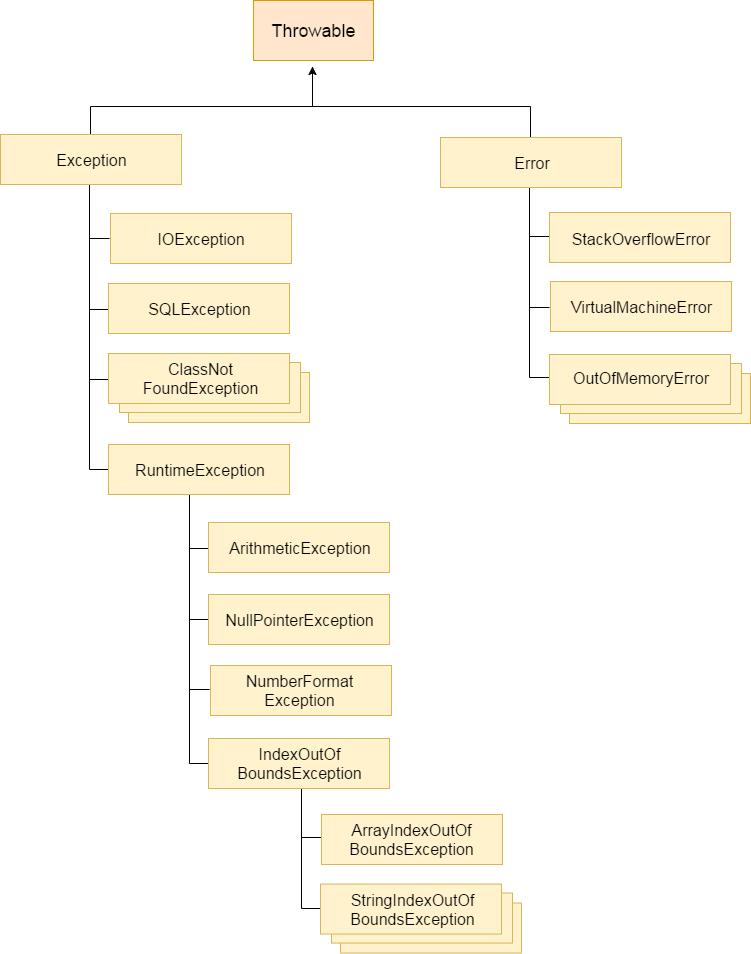
The java.lang.Throwable class is the root class of Java Exception hierarchy which is inherited by two subclasses: Exception and Error. A hierarchy of Java Exception classes are given below:
hierarchy of exception handling
Types of Java Exceptions
There are mainly two types of exceptions: checked and unchecked. Here, an error is considered as the unchecked exception. According to Oracle, there are three types of exceptions:
- Checked Exception
- Unchecked Exception
- Error
Types of Java Exceptions
Difference between Checked and Unchecked Exceptions
1) Checked Exception
The classes which directly inherit Throwable class except RuntimeException and Error are known as checked exceptions e.g. IOException, SQLException etc. Checked exceptions are checked at compile-time.
2) Unchecked Exception
The classes which inherit RuntimeException are known as unchecked exceptions e.g. ArithmeticException, NullPointerException, ArrayIndexOutOfBoundsException etc. Unchecked exceptions are not checked at compile-time, but they are checked at runtime.
3) Error
Error is irrecoverable e.g. OutOfMemoryError, VirtualMachineError, AssertionError etc.
Java Exception Keywords
There are 5 keywords which are used in handling exceptions in Java.
Keyword Description
- try The "try" keyword is used to specify a block where we should place exception code. The try block must be followed by either catch or finally. It means, we can't use try block alone.
- catch The "catch" block is used to handle the exception. It must be preceded by try block which means we can't use catch block alone. It can be followed by finally block later.
- finally The "finally" block is used to execute the important code of the program. It is executed whether an exception is handled or not.
- throw The "throw" keyword is used to throw an exception.
- throws The "throws" keyword is used to declare exceptions. It doesn't throw an exception. It specifies that there may occur an exception in the method. It is always used with method signature.
Java Exception Handling Example
Let's see an example of Java Exception Handling where we using a try-catch statement to handle the exception.
public class JavaExceptionExample{
  public static void main(String args[]){
   try{
      //code that may raise exception
      int data=100/0;
   }catch(ArithmeticException e){System.out.println(e);}
   //rest code of the program
   System.out.println("rest of the code...");
  }
}
Test it Now
Output:
Exception in thread main java.lang.ArithmeticException:/ by zero
rest of the code...
In the above example, 100/0 raises an ArithmeticException which is handled by a try-catch block.
Common Scenarios of Java Exceptions
There are given some scenarios where unchecked exceptions may occur. They are as follows:
1) A scenario where ArithmeticException occurs
If we divide any number by zero, there occurs an ArithmeticException.
int a=50/0;//ArithmeticException
2) A scenario where NullPointerException occurs
If we have a null value in any variable, performing any operation on the variable throws a NullPointerException.
String s=null;
System.out.println(s.length());//NullPointerException
3) A scenario where NumberFormatException occurs
The wrong formatting of any value may occur NumberFormatException. Suppose I have a string variable that has characters, converting this variable into digit will occur NumberFormatException.
String s="abc";
int i=Integer.parseInt(s);//NumberFormatException
4) A scenario where ArrayIndexOutOfBoundsException occurs
If you are inserting any value in the wrong index, it would result in ArrayIndexOutOfBoundsException as shown below:
int a[]=new int[5];
a[10]=50; //ArrayIndexOutOfBoundsException
Java try-catch block
Java try block
Java try block is used to enclose the code that might throw an exception. It must be used within the method.
If an exception occurs at the particular statement of try block, the rest of the block code will not execute. So, it is recommended not to keeping the code in try block that will not throw an exception.
Java try block must be followed by either catch or finally block.
Syntax of Java try-catch
try{
//code that may throw an exception
}catch(Exception_class_Name ref){}
Syntax of try-finally block
try{
//code that may throw an exception
}finally{}
Java catch block
Java catch block is used to handle the Exception by declaring the type of exception within the parameter. The declared exception must be the parent class exception ( i.e., Exception) or the generated exception type. However, the good approach is to declare the generated type of exception.
The catch block must be used after the try block only. You can use multiple catch block with a single try block.
Let's try to understand the problem if we don't use a try-catch block.
Example 1
public class TryCatchExample1 {

    public static void main(String[] args) {

        int data=50/0; //may throw exception

        System.out.println("rest of the code");

    }

}
Test it Now
Output:
Exception in thread "main" java.lang.ArithmeticException: / by zero
As displayed in the above example, the rest of the code is not executed (in such case, the rest of the code statement is not printed).
There can be 100 lines of code after exception. So all the code after exception will not be executed.
Solution by exception handling
Let's see the solution of the above problem by a java try-catch block.
Example 2
public class TryCatchExample2 {

    public static void main(String[] args) {
        try
        {
        int data=50/0; //may throw exception
        }
            //handling the exception
        catch(ArithmeticException e)
        {
            System.out.println(e);
        }
        System.out.println("rest of the code");
    }

}
Test it Now
Output:
java.lang.ArithmeticException: / by zero
rest of the code
Now, as displayed in the above example, the rest of the code is executed, i.e., the rest of the code statement is printed.
Example 3
In this example, we also kept the code in a try block that will not throw an exception.
public class TryCatchExample3 {

    public static void main(String[] args) {
        try
        {
        int data=50/0; //may throw exception
                         // if exception occurs, the remaining statement will not exceute
        System.out.println("rest of the code");
        }
             // handling the exception
        catch(ArithmeticException e)
        {
            System.out.println(e);
        }

    }

}
Test it Now
Output:
java.lang.ArithmeticException: / by zero
Here, we can see that if an exception occurs in the try block, the rest of the block code will not execute.
Example 4
Here, we handle the exception using the parent class exception.
public class TryCatchExample4 {

    public static void main(String[] args) {
        try
        {
        int data=50/0; //may throw exception
        }
            // handling the exception by using Exception class
        catch(Exception e)
        {
            System.out.println(e);
        }
        System.out.println("rest of the code");
    }

}
Test it Now
Output:
java.lang.ArithmeticException: / by zero
rest of the code
Example 5
Let's see an example to print a custom message on exception.
public class TryCatchExample5 {
public static void main(String[] args) {
    try
    {
    int data=50/0; //may throw exception
    }
         // handling the exception
    catch(Exception e)
    {
              // displaying the custom message
        System.out.println("Can't divided by zero");
    }
}
}
Test it Now
Output:
Can't divided by zero
Example 6
Let's see an example to resolve the exception in a catch block.
public class TryCatchExample6 {

    public static void main(String[] args) {
        int i=50;
        int j=0;
        int data;
        try
        {
        data=i/j; //may throw exception
        }
            // handling the exception
        catch(Exception e)
        {
             // resolving the exception in catch block
            System.out.println(i/(j+2));
        }
    }
}
Test it Now
Output:
25
Example 7
In this example, along with try block, we also enclose exception code in a catch block.
public class TryCatchExample7 {

    public static void main(String[] args) {

        try
        {
        int data1=50/0; //may throw exception

        }
             // handling the exception
        catch(Exception e)
        {
            // generating the exception in catch block
        int data2=50/0; //may throw exception

        }
    System.out.println("rest of the code");
    }
}
Test it Now
Output:
Exception in thread "main" java.lang.ArithmeticException: / by zero
Here, we can see that the catch block didn't contain the exception code. So, enclose exception code within a try block and use catch block only to handle the exceptions.
Example 8
In this example, we handle the generated exception (Arithmetic Exception) with a different type of exception class (ArrayIndexOutOfBoundsException).
public class TryCatchExample8 {
public static void main(String[] args) {
    try
    {
    int data=50/0; //may throw exception

    }
        // try to handle the ArithmeticException using ArrayIndexOutOfBoundsException
    catch(ArrayIndexOutOfBoundsException e)
    {
        System.out.println(e);
    }
    System.out.println("rest of the code");
}
}
Test it Now
Output:
Exception in thread "main" java.lang.ArithmeticException: / by zero
Example 9
Let's see an example to handle another unchecked exception.
public class TryCatchExample9 {

    public static void main(String[] args) {
        try
        {
        int arr[]= {1,3,5,7};
        System.out.println(arr[10]); //may throw exception
        }
            // handling the array exception
        catch(ArrayIndexOutOfBoundsException e)
        {
            System.out.println(e);
        }
        System.out.println("rest of the code");
    }

}
Test it Now
Output:
java.lang.ArrayIndexOutOfBoundsException: 10
rest of the code
Example 10
Let's see an example to handle checked exception.
import java.io.FileNotFoundException;
import java.io.PrintWriter;

public class TryCatchExample10 {

    public static void main(String[] args) {

        PrintWriter pw;
        try {
            pw = new PrintWriter("jtp.txt"); //may throw exception
            pw.println("saved");
        }
// providing the checked exception handler
 catch (FileNotFoundException e) {

            System.out.println(e);
        }
    System.out.println("File saved successfully");
    }
}
Test it Now
Output:
File saved successfully
Internal working of java try-catch block
internal working of try-catch block
The JVM firstly checks whether the exception is handled or not. If exception is not handled, JVM provides a default exception handler that performs the following tasks:
-
Prints out exception description.
Prints the stack trace (Hierarchy of methods where the exception occurred).
Causes the program to terminate.
-
But if exception is handled by the application programmer, normal flow of the application is maintained i.e. rest of the code is executed.
Java catch multiple exceptions
Java Multi-catch block
A try block can be followed by one or more catch blocks. Each catch block must contain a different exception handler. So, if you have to perform different tasks at the occurrence of different exceptions, use java multi-catch block.
Points to remember
- At a time only one exception occurs and at a time only one catch block is executed.
- All catch blocks must be ordered from most specific to most general, i.e. catch for ArithmeticException must come before catch for Exception.
Example 1
Let's see a simple example of java multi-catch block.
public class MultipleCatchBlock1 {

    public static void main(String[] args) {

           try{
                int a[]=new int[5];
                a[5]=30/0;
               }
               catch(ArithmeticException e)
                  {
                   System.out.println("Arithmetic Exception occurs");
                  }
               catch(ArrayIndexOutOfBoundsException e)
                  {
                   System.out.println("ArrayIndexOutOfBounds Exception occurs");
                  }
               catch(Exception e)
                  {
                   System.out.println("Parent Exception occurs");
                  }
               System.out.println("rest of the code");
    }
}
Test it Now
Output:
Arithmetic Exception occurs
rest of the code
Example 2
public class MultipleCatchBlock2 {

    public static void main(String[] args) {

           try{
                int a[]=new int[5];

                System.out.println(a[10]);
               }
               catch(ArithmeticException e)
                  {
                   System.out.println("Arithmetic Exception occurs");
                  }
               catch(ArrayIndexOutOfBoundsException e)
                  {
                   System.out.println("ArrayIndexOutOfBounds Exception occurs");
                  }
               catch(Exception e)
                  {
                   System.out.println("Parent Exception occurs");
                  }
               System.out.println("rest of the code");
    }
}
Test it Now
Output:
ArrayIndexOutOfBounds Exception occurs
rest of the code
Example 3
In this example, try block contains two exceptions. But at a time only one exception occurs and its corresponding catch block is invoked.
public class MultipleCatchBlock3 {

    public static void main(String[] args) {

           try{
                int a[]=new int[5];
                a[5]=30/0;
                System.out.println(a[10]);
               }
               catch(ArithmeticException e)
                  {
                   System.out.println("Arithmetic Exception occurs");
                  }
               catch(ArrayIndexOutOfBoundsException e)
                  {
                   System.out.println("ArrayIndexOutOfBounds Exception occurs");
                  }
               catch(Exception e)
                  {
                   System.out.println("Parent Exception occurs");
                  }
               System.out.println("rest of the code");
    }
}
Test it Now
Output:
Arithmetic Exception occurs
rest of the code
Example 4
In this example, we generate NullPointerException, but didn't provide the corresponding exception type. In such case, the catch block containing the parent exception class Exception will invoked.
public class MultipleCatchBlock4 {
public static void main(String[] args) {

       try{
            String s=null;
            System.out.println(s.length());
           }
           catch(ArithmeticException e)
              {
               System.out.println("Arithmetic Exception occurs");
              }
           catch(ArrayIndexOutOfBoundsException e)
              {
               System.out.println("ArrayIndexOutOfBounds Exception occurs");
              }
           catch(Exception e)
              {
               System.out.println("Parent Exception occurs");
              }
           System.out.println("rest of the code");
}
}
Test it Now
Output:
Parent Exception occurs
rest of the code
Example 5
Let's see an example, to handle the exception without maintaining the order of exceptions (i.e. from most specific to most general).
class MultipleCatchBlock5{
  public static void main(String args[]){
   try{
    int a[]=new int[5];
    a[5]=30/0;
   }
   catch(Exception e){System.out.println("common task completed");}
   catch(ArithmeticException e){System.out.println("task1 is completed");}
   catch(ArrayIndexOutOfBoundsException e){System.out.println("task 2 completed");}
   System.out.println("rest of the code...");
 }
}
Test it Now
Output:
Compile-time error
Java Nested try block
The try block within a try block is known as nested try block in java.
Why use nested try block
Sometimes a situation may arise where a part of a block may cause one error and the entire block itself may cause another error. In such cases, exception handlers have to be nested.
Syntax:
....
try
{
    statement 1;
    statement 2;
    try
    {
        statement 1;
        statement 2;
    }
    catch(Exception e)
    {
    }
}
catch(Exception e)
{
}
....
Java nested try example
Let's see a simple example of java nested try block.
class Excep6{
 public static void main(String args[]){
  try{
    try{
     System.out.println("going to divide");
     int b =39/0;
    }catch(ArithmeticException e){System.out.println(e);}

    try{
    int a[]=new int[5];
    a[5]=4;
    }catch(ArrayIndexOutOfBoundsException e){System.out.println(e);}

    System.out.println("other statement);
  }catch(Exception e){System.out.println("handeled");}

  System.out.println("normal flow..");
 }
}
Finally Block in Exception Handling
Java finally block is a block that is used to execute important code such as closing connection, stream etc.
Java finally block is always executed whether exception is handled or not.
Java finally block follows try or catch block.
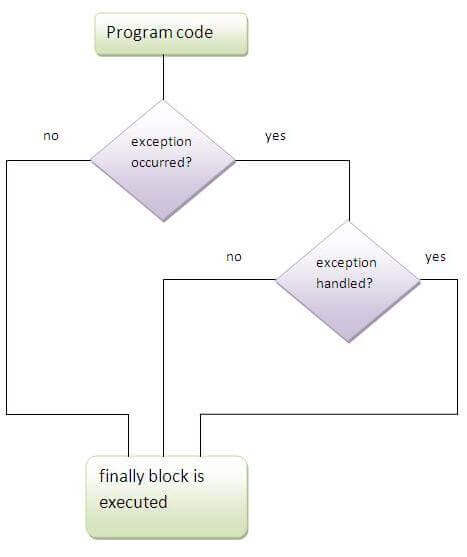
Note: If you don't handle exception, before terminating the program, JVM executes finally block(if any).
Why use java finally
Finally block in java can be used to put "cleanup" code such as closing a file, closing connection etc.
Java throw exception
Java throw keyword
The Java throw keyword is used to explicitly throw an exception.
We can throw either checked or uncheked exception in java by throw keyword. The throw keyword is mainly used to throw custom exception. We will see custom exceptions later.
The syntax of java throw keyword is given below.
throw exception;
Let's see the example of throw IOException.
throw new IOException("sorry device error);
java throw keyword example
In this example, we have created the validate method that takes integer value as a parameter. If the age is less than 18, we are throwing the ArithmeticException otherwise print a message welcome to vote.
public class TestThrow1{
   static void validate(int age){
     if(age<18)
      throw new ArithmeticException("not valid");
     else
      System.out.println("welcome to vote");
   }
   public static void main(String args[]){
      validate(13);
      System.out.println("rest of the code...");
  }
}
Test it Now
Output:
Exception in thread main java.lang.ArithmeticException:not valid
Java Exception propagation
An exception is first thrown from the top of the stack and if it is not caught, it drops down the call stack to the previous method,If not caught there, the exception again drops down to the previous method, and so on until they are caught or until they reach the very bottom of the call stack.This is called exception propagation.
Rule: By default Unchecked Exceptions are forwarded in calling chain (propagated).
Program of Exception Propagation
class TestExceptionPropagation1{
  void m(){
    int data=50/0;
  }
  void n(){
    m();
  }
  void p(){
   try{
    n();
   }catch(Exception e){System.out.println("exception handled");}
  }
  public static void main(String args[]){
   TestExceptionPropagation1 obj=new TestExceptionPropagation1();
   obj.p();
   System.out.println("normal flow...");
  }
}
Test it Now
Output:exception handled
       normal flow...
exception propagation
In the above example exception occurs in m() method where it is not handled,so it is propagated to previous n() method where it is not handled, again it is propagated to p() method where exception is handled.
Exception can be handled in any method in call stack either in main() method,p() method,n() method or m() method.
Rule: By default, Checked Exceptions are not forwarded in calling chain (propagated).
Program which describes that checked exceptions are not propagated
class TestExceptionPropagation2{
  void m(){
    throw new java.io.IOException("device error");//checked exception
  }
  void n(){
    m();
  }
  void p(){
   try{
    n();
   }catch(Exception e){System.out.println("exception handeled");}
  }
  public static void main(String args[]){
   TestExceptionPropagation2 obj=new TestExceptionPropagation2();
   obj.p();
   System.out.println("normal flow");
  }
}
Test it Now
Output:Compile Time Error
Java throws keyword
The Java throws keyword is used to declare an exception. It gives an information to the programmer that there may occur an exception so it is better for the programmer to provide the exception handling code so that normal flow can be maintained.
Exception Handling is mainly used to handle the checked exceptions. If there occurs any unchecked exception such as NullPointerException, it is programmers fault that he is not performing check up before the code being used.
Syntax of java throws
return_type method_name() throws exception_class_name{
//method code
}
Which exception should be declared checked exception only, because:
unchecked Exception: under your control so correct your code.
error: beyond your control e.g. you are unable to do anything if there occurs VirtualMachineError or StackOverflowError.
Advantage of Java throws keyword
Now Checked Exception can be propagated (forwarded in call stack).
It provides information to the caller of the method about the exception.
Java throws example
Let's see the example of java throws clause which describes that checked exceptions can be propagated by throws keyword.
import java.io.IOException;
class Testthrows1{
  void m()throws IOException{
    throw new IOException("device error");//checked exception
  }
  void n()throws IOException{
    m();
  }
  void p(){
   try{
    n();
   }catch(Exception e){System.out.println("exception handled");}
  }
  public static void main(String args[]){
   Testthrows1 obj=new Testthrows1();
   obj.p();
   System.out.println("normal flow...");
  }
}
Test it Now
Output:
exception handled
normal flow...
Rule: If you are calling a method that declares an exception, you must either caught or declare the exception.
There are two cases:
Case1:You caught the exception i.e. handle the exception using try/catch.
Case2:You declare the exception i.e. specifying throws with the method.
Case1: You handle the exception
In case you handle the exception, the code will be executed fine whether exception occurs during the program or not.
import java.io.*;
class M{
 void method()throws IOException{
  throw new IOException("device error");
 }
}
public class Testthrows2{
   public static void main(String args[]){
    try{
     M m=new M();
     m.method();
    }catch(Exception e){System.out.println("exception handled");}

    System.out.println("normal flow...");
  }
}
Test it Now
Output:exception handled
       normal flow...
Case2: You declare the exception
A)In case you declare the exception, if exception does not occur, the code will be executed fine.
B)In case you declare the exception if exception occures, an exception will be thrown at runtime because throws does not handle the exception.
A)Program if exception does not occur
import java.io.*;
class M{
 void method()throws IOException{
  System.out.println("device operation performed");
 }
}
class Testthrows3{
   public static void main(String args[])throws IOException{//declare exception
     M m=new M();
     m.method();

    System.out.println("normal flow...");
  }
}
Test it Now
Output:device operation performed
       normal flow...
B)Program if exception occurs
import java.io.*;
class M{
 void method()throws IOException{
  throw new IOException("device error");
 }
}
class Testthrows4{
   public static void main(String args[])throws IOException{//declare exception
     M m=new M();
     m.method();

    System.out.println("normal flow...");
  }
}
Test it Now
Output:Runtime Exception
Difference between throw and throws
There are many differences between throw and throws keywords. A list of differences between throw and throws are given below:
| throw |
throws |
| Java throw keyword is used to explicitly throw an exception. |
Java throws keyword is used to declare an exception. |
| Checked exception cannot be propagated using throw only. |
Checked exception can be propagated with throws. |
| Throw is followed by an instance. |
Throws is followed by class. |
| Throw is used within the method. |
Throws is used with the method signature. |
| You cannot throw multiple exceptions. |
You can declare multiple exceptions e.g. public void method()throws IOException,SQLException. |
Que) Can we rethrow an exception?
Yes, by throwing same exception in catch block.
Java throw example
void m(){
throw new ArithmeticException("sorry");
}
Java throws example
void m()throws ArithmeticException{
//method code
}
Java throw and throws example
void m()throws ArithmeticException{
throw new ArithmeticException("sorry");
}
Difference between final, finally and finalize
There are many differences between final, finally and finalize. A list of differences between final, finally and finalize are given below:
| No. |
final |
finally |
finalize |
| 1) |
Final is used to apply restrictions on class, method and variable. Final class can't be inherited, final method can't be overridden and final variable value can't be changed. |
Finally is used to place important code, it will be executed whether exception is handled or not. |
Finalize is used to perform clean up processing just before object is garbage collected. |
| 2) |
Final is a keyword. |
Finally is a block. |
Finalize is a method. |
Java final example
class FinalExample{
public static void main(String[] args){
final int x=100;
x=200;//Compile Time Error
}}
Java finally example
class FinallyExample{
public static void main(String[] args){
try{
int x=300;
}catch(Exception e){System.out.println(e);}
finally{System.out.println("finally block is executed");}
}}
Java finalize example
class FinalizeExample{
public void finalize(){System.out.println("finalize called");}
public static void main(String[] args){
FinalizeExample f1=new FinalizeExample();
FinalizeExample f2=new FinalizeExample();
f1=null;
f2=null;
System.gc();
}}
Next TopicException Handling With Method Overriding
Next →← Prev
ExceptionHandling with MethodOverriding in Java
There are many rules if we talk about methodoverriding with exception handling. The Rules are as follows:
If the superclass method does not declare an exception
If the superclass method does not declare an exception, subclass overridden method cannot declare the checked exception but it can declare unchecked exception.
If the superclass method declares an exception
If the superclass method declares an exception, subclass overridden method can declare same, subclass exception or no exception but cannot declare parent exception.
If the superclass method does not declare an exception
1) Rule: If the superclass method does not declare an exception, subclass overridden method cannot declare the checked exception.
import java.io.*;
class Parent{
  void msg(){System.out.println("parent");}
}

class TestExceptionChild extends Parent{
  void msg()throws IOException{
    System.out.println("TestExceptionChild");
  }
  public static void main(String args[]){
   Parent p=new TestExceptionChild();
   p.msg();
  }
}
Test it Now
Output:Compile Time Error
2) Rule: If the superclass method does not declare an exception, subclass overridden method cannot declare the checked exception but can declare unchecked exception.
import java.io.*;
class Parent{
  void msg(){System.out.println("parent");}
}
class TestExceptionChild1 extends Parent{
void msg()throws ArithmeticException{
System.out.println("child");
}
public static void main(String args[]){
Parent p=new TestExceptionChild1();
p.msg();
}
}
Test it Now
Output:child
If the superclass method declares an exception
1) Rule: If the superclass method declares an exception, subclass overridden method can declare same, subclass exception or no exception but cannot declare parent exception.
Example in case subclass overridden method declares parent exception
import java.io.*;
class Parent{
  void msg()throws ArithmeticException{System.out.println("parent");}
}

class TestExceptionChild2 extends Parent{
  void msg()throws Exception{System.out.println("child");}

  public static void main(String args[]){
   Parent p=new TestExceptionChild2();
   try{
   p.msg();
   }catch(Exception e){}
  }
}
Test it Now
Output:Compile Time Error
Example in case subclass overridden method declares same exception
import java.io.*;
class Parent{
  void msg()throws Exception{System.out.println("parent");}
}

class TestExceptionChild3 extends Parent{
  void msg()throws Exception{System.out.println("child");}

  public static void main(String args[]){
   Parent p=new TestExceptionChild3();
   try{
   p.msg();
   }catch(Exception e){}
  }
}
Test it Now
Output:child
Example in case subclass overridden method declares subclass exception
import java.io.*;
class Parent{
  void msg()throws Exception{System.out.println("parent");}
}

class TestExceptionChild4 extends Parent{
  void msg()throws ArithmeticException{System.out.println("child");}

  public static void main(String args[]){
   Parent p=new TestExceptionChild4();
   try{
   p.msg();
   }catch(Exception e){}
  }
}
Test it Now
Output:child
Example in case subclass overridden method declares no exception
import java.io.*;
class Parent{
  void msg()throws Exception{System.out.println("parent");}
}

class TestExceptionChild5 extends Parent{
  void msg(){System.out.println("child");}

  public static void main(String args[]){
   Parent p=new TestExceptionChild5();
   try{
   p.msg();
   }catch(Exception e){}
  }
}
Test it Now
Output:child
Java Custom Exception
If you are creating your own Exception that is known as custom exception or user-defined exception. Java custom exceptions are used to customize the exception according to user need.
By the help of custom exception, you can have your own exception and message.
Let's see a simple example of java custom exception.
class InvalidAgeException extends Exception{
 InvalidAgeException(String s){
  super(s);
 }
}
class TestCustomException1{

   static void validate(int age)throws InvalidAgeException{
     if(age<18)
      throw new InvalidAgeException("not valid");
     else
      System.out.println("welcome to vote");
   }

   public static void main(String args[]){
      try{
      validate(13);
      }catch(Exception m){System.out.println("Exception occured: "+m);}

      System.out.println("rest of the code...");
  }
}
Test it Now
Output:Exception occured: InvalidAgeException:not valid
       rest of the code...
[end, ref: https://www.javatpoint.com/exception-handling-in-java]
Views: 65