
01 什么是RDD
Spark提供了一种对数据的核心抽象,称为弹性分布式数据集(Resilient Distributed Dataset,简称RDD)。这个数据集的全部或部分可以缓存在内存中,并且可以在多次计算时重用。RDD其实就是一个分布在多个节点上的数据集合。
RDD的弹性主要是指:当内存不够时,数据可以持久化到磁盘,并且RDD具有高效的容错能力。分布式数据集是指:一个数据集存储在不同的节点上,每个节点存储数据集的一部分。
例如,将数据集(hello,world,scala,spark,love,spark,happy)存储在三个节点上,节点一存储(hello,world),节点二存储(scala,spark,love),节点三存储(spark,happy),这样对三个节点的数据可以并行计算,并且三个节点的数据共同组成了一个RDD。
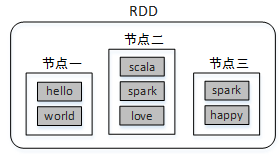
分布式数据集类似于HDFS中的文件分块,不同的块存储在不同的节点上;而并行计算类似使用MapReduce读取HDFS中的数据并进行Map和Reduce操作。Spark则包含了这两种功能,并且计算更加灵活。
RDD的主要特征如下:
- RDD是不可变的,但是可以将RDD转换成新的RDD进行操作
- RDD是可分区的,一个RDD可以由很多分区组成(数据存在多个节点上),每个分区对应一个Task来执行
- 对RDD的操作是作用在RDD的每个分区上
- RDD拥有一系列对分区进行计算的函数,成为算子
- RDD之间存在依赖关系,可以实现管道化,避免中间数据的存储
在编程时,可以把RDD看作是一个数据操作的基本单位,而不必关心数据的分布式特性,Spark会自动将RDD的数据分发到集群的各个节点。Spark中对数据的操作主要是对RDD的操作(创建、转化、求值)。
1、从对象集合创建RDD
Spark可以通过parallelize()或makeRDD()方法将一个对象集合转化为RDD。
例如,将一个List集合转化为RDD:
scala> val rdd=sc.parallelize(List(1,2,3,4,5,6))
rdd: org.apache.spark.rdd.RDD[Int] = ParallelCollectionRDD[0]
或
scala> val rdd=sc.makeRDD(List(1,2,3,4,5,6))
rdd: org.apache.spark.rdd.RDD[Int] = ParallelCollectionRDD[1]
从返回信息可以看出,上述创建的RDD中存储的是Int类型数据。实际上RDD也是一个集合(并行集合),与常用的List集合不同的是,RDD集合的数据分布于多台机器上。
2、从外部存储创建RDD
Spark的textFile()方法可以读取本地文件系统或外部其它系统中的数据,并创建RDD。所不同的是,数据的来源路径不同。
首先在本地准备文件"/tmp/words.txt,内容如下:
hello hadoop
hello java
scala
进入Spark Shell读取本地数据(加载本地文件,必须以file:///开头):
//读取本地数据
scala> val rdd=sc.textFile("file:///tmp/words.txt")
rdd: org.apache.spark.rdd.RDD[String] = /tmp/words.txt MapPartitionsRDD[1]

scala> rdd.collect
res1: Array[String] = Array("hello hadoop ", "hello java ", "scala ")
异常问题
Spark Shell 调用 rdd.collect报错
spark Compression codec com.hadoop.compression.lzo.LzoCodec not found.
这是因为在hadoop中配置了编解码器lzo,所以当使用yarn模式时,spark自身没有lzo的jar包所以报错无法找到!
解决办法:
配置spark-default.conf文件!
修改spark-defaults.sh, 添加:
spark.jars /opt/pkg/hadoop/share/hadoop/common/hadoop-lzo-0.4.20.jar读取本地数据时报错路径不存在
这个问题发生在集群方式提交本地文件的时候。
这是因为文件的读取是发生在Executor所在的节点(即Worker节点),只有将文件
tmp/words.txt同步到所有Worker节点才能避免路径不存在的问题发生。有意思的地方是,即使不同步到所有Worker节点,先调用rdd.first拉取第一条数据之后再调用rdd.collect就可以获取到数据了(中间也会出现文件找不到问题,但是仍可以获取到结果)。原因就是RDD的collect方法属于转化算子(算子的概念后面会讲)是有惰性的(不是一开始马上收集,需要等待动作算子(如first或者count)操作数据时才会收集)才会主动收集数据
解决办法就是:
- 改为Local模式运行
$ spark-shell --master local - 把文件
file:///tmp/words.txt同步到所有salve节点。 - 把文件先上传到HDFS,然后再读取HDFS上的文件
读取HDFS数据
先将数据上传到HDFS
$ hadoop fs -put /tmp/words.txt /tmp/再读取HDFS数据
//读取HDFS数据
scala> val rdd=sc.textFile("hdfs://centos01:8082/tmp/words.txt")
rdd: org.apache.spark.rdd.RDD[String] = hdfs://centos01:8082/tmp/words.txt MapPartitionsRDD[2]

scala> rdd.collect
res2: Array[String] = Array("hello hadoop ", "hello java ", "scala ")
02 RDD常用算子
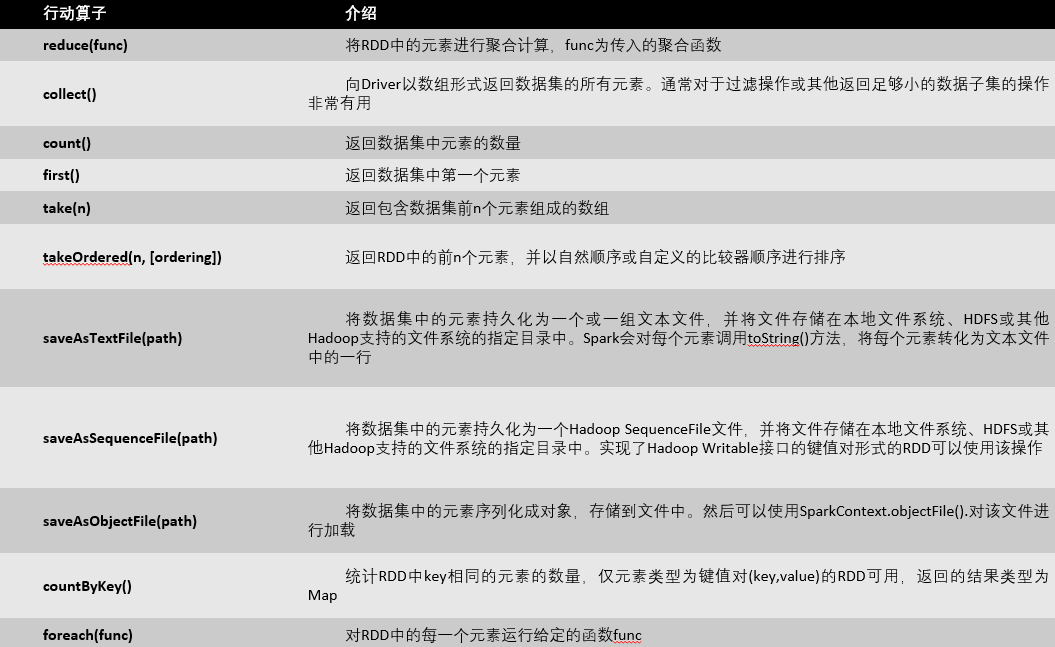
RDD被创建后是只读的,不允许修改。Spark提供了丰富的用于操作RDD的方法,这些方法被称为算子。一个创建完成的RDD只支持两种算子:转化(Transformation)算子和行动(Action)算子。
1、转化算子
Spark中的转化算子主要时对RDD进行操作并返回新的RDD。
(1)map(func)
对rdd1应用map()算子,将rdd1中的每个元素加1并返回一个名为rdd2的新RDD:
scala> val rdd1=sc.parallelize(List(1,2,3,4,5,6))
scala> val rdd2=rdd1.map(x => x+1)
(2)filter(func)
对源RDD的每个元素应用函数func进行过滤,并返回一个新的RDD。
例如,过滤出rdd1中大于3的所有元素,并输出结果:
scala> val rdd1=sc.parallelize(List(1,2,3,4,5,6))
scala> val rdd2=rdd1.filter(_>3)
scala> rdd2.collect
res1: Array[Int] = Array(4, 5, 6)
上述代码中的下划线“_”代表rdd1中的每个元素。
(3)flatMap(func)
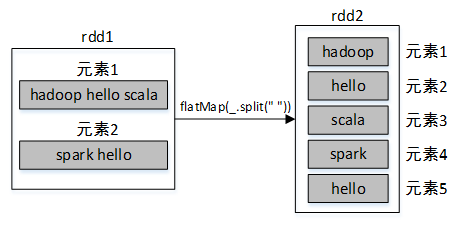
与map()算子类似,但是每个传入给函数func的RDD元素会返回0到多个元素,最终会将返回的所有元素合并到一个RDD。
例如,将集合List转为rdd1,然后调用rdd1的flatMap()算子将rdd1的每个元素按照空格进行分割成多个元素,最终合并所有元素到一个新的RDD。
scala> val rdd1=sc.parallelize(List("hadoop hello scala","spark hello"))
scala> val rdd2=rdd1.flatMap(_.split(" "))
scala> rdd2.collect
res3: Array[String] = Array(hadoop, hello, scala, spark, hello)
(4)reduceByKey()
reduceByKey()算子的作用对像是元素为(key,value)形式(Scala元组)的RDD,使用该算子可以将相同key的元素聚集到一起,最终把所有相同key的元素合并成为一个元素。该元素的key不变,value可以聚合成一个列表或者进行求和等操作。最终返回的RDD的元素类型和原有类型保持一致。
例如,有两个同学zhangsan和lisi,zhangsan的语文和数学成绩分别为98、78,lisi的语文和数学成绩分别为88、79,现需要分别求zhangsan和lisi的总成绩,代码如下:
scala> val list=List(("zhangsan",98),("zhangsan",78),("lisi",88),("lisi",79))
scala> val rdd1=sc.parallelize(list)
scala> val rdd2=rdd1.reduceByKey((x,y)=>x+y) //可以简化为rdd1.reduceByKey(_+_)
scala> rdd2.collect
res5: Array[(String, Int)] = Array((zhangsan,176), (lisi,167))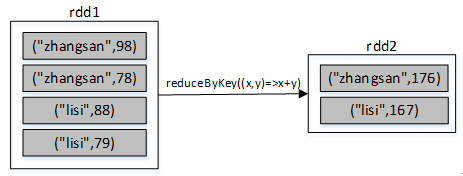
(5)groupByKey()
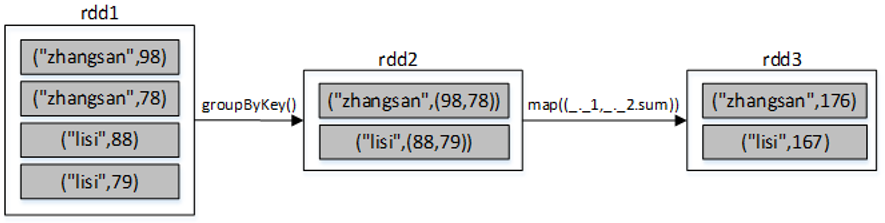
groupByKey()算子的作用对像是元素为(key,value)形式(Scala元组)的RDD,使用该算子可以将相同key的元素聚集到一起,最终把所有相同key的元素合并成为一个元素。该元素的key不变,value则聚集到一个集合中。
仍然以上述求学生zhangsan和lisi的总成绩为例,使用groupByKey()算子的代码如下:
scala> val list=List(("zhangsan",98),("zhangsan",78),("lisi",88),("lisi",79))
scala> val rdd1=sc.parallelize(list)
scala> val rdd2=rdd1.groupByKey()
scala> rdd2.map(x => (x._1,x._2.sum)).collect
res0: Array[(String, Int)] = Array((zhangsan,176), (lisi,167))
(6)union()
union()算子将两个RDD合并为一个新的RDD,主要用于对不同的数据来源进行合并,两个RDD中的数据类型要保持一致。
例如以下代码,通过集合创建了两个RDD,然后将两个RDD合并成了一个RDD:
scala> val rdd1=sc.parallelize(Array(1,2,3))
scala> val rdd2=sc.parallelize(Array(4,5,6))
scala> val rdd3=rdd1.union(rdd2)
scala> rdd3.collect
res8: Array[Int] = Array(1, 2, 3, 4, 5, 6)
(7)sortBy()
sortBy()算子将RDD中的元素按照某个规则进行排序。该算子的第一个参数为排序函数,第二个参数是一个布尔值,指定升序(默认)或降序。若需要降序排列,需将第二个参数置为false。
例如,一个数组中存放了三个元组,将该数组转为RDD集合,然后对该RDD按照每个元素中的第二个值进行降序排列,代码如下:
scala> val rdd1=sc.parallelize(Array(("hadoop",12),("java",32),("spark",22)))
scala> val rdd2=rdd1.sortBy(x=>x._2,false)
scala> rdd2.collect
res2: Array[(String, Int)] = Array((java,32),(spark,22),(hadoop,12))
(8)sortByKey()
sortByKey()算子将(key,value)形式的RDD按照key进行排序。默认升序,若需降序排列,可以传入参数false,代码如下:
rdd.sortByKey(false)
(9)join ()
join()算子将两个(key,value)形式的RDD根据key进行连接操作,相当于数据库的内连接(inner join),只返回两个RDD都匹配的内容。例如,将rdd1和rdd2进行内连接,代码如下:
scala> val arr1= Array(("A","a1"),("B","b1"),("C","c1"),("D","d1"),("E","e1")
scala> val rdd1 = sc.parallelize(arr1))
scala> val arr2= Array(("A","A1"),("B","B1"),("C","C1"),("C","C2"),("C","C3"),("E","E1"))
scala> val rdd2 = sc.parallelize(arr2)
scala> rdd1.join(rdd2).collect
res0: Array[(String, (String, String))] = Array((B,(b1,B1)), (A,(a1,A1)), (C,(c1,C1)), (C,(c1,C2)), (C,(c1,C3)), (E,(e1,E1)))
scala> rdd2.join(rdd1).collect
res1: Array[(String, (String, String))] = Array((B,(B1,b1)), (A,(A1,a1)), (C,(C1,c1)), (C,(C2,c1)), (C,(C3,c1)), (E,(E1,e1)))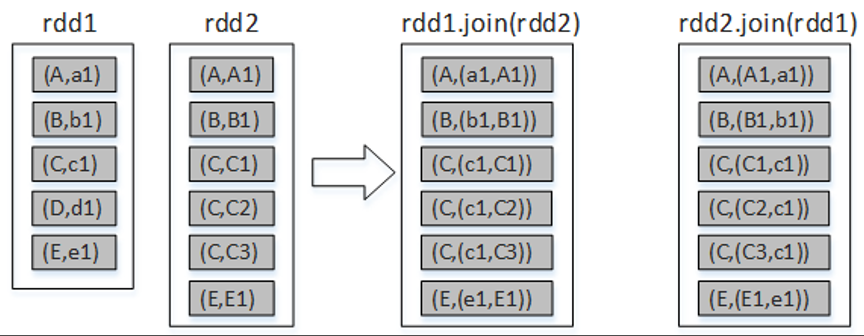
2、行动算子
Spark中的转化算子并不会马上进行运算,而是在遇到行动算子时才会执行相应的语句,触发Spark的任务调度。
2、行动算子
(1)reduce()
将数字1到100所组成的集合转为RDD,然后对该RDD进行reduce()算子计算,统计RDD中所有元素值的总和,代码如下:
scala> val rdd1 = sc.parallelize(1 to 100)
scala> rdd1.reduce(_+_)
res2: Int = 5050
scala> val rdd1 = sc.parallelize(1 to 100)
scala> rdd1.count
res3: Long = 100
(2)count()
统计RDD集合中元素的数量:
scala> val rdd1 = sc.parallelize(1 to 100)
scala> rdd1.reduce(_+_)
res2: Int = 5050
scala> val rdd1 = sc.parallelize(1 to 100)
scala> rdd1.count
res3: Long = 100
(3)countByKey()
例如,List集合中存储的是键值对形式的元组,使用该List集合创建一个RDD,然后对其进行countByKey()的计算:
scala> val rdd1 = sc.parallelize(List(("zhang",87),("zhang",79),("li",90)))
scala> rdd1.countByKey
res1: scala.collection.Map[String,Long] = Map(zhang -> 2, li -> 1)

scala> val rdd1 = sc.parallelize(1 to 100)
scala> rdd1.take(5)
res4: Array[Int] = Array(1, 2, 3, 4, 5)
(4)take(n)
返回集合中前5个元素组成的数组:
scala> val rdd1 = sc.parallelize(List(("zhang",87),("zhang",79),("li",90)))
scala> rdd1.countByKey
res1: scala.collection.Map[String,Long] = Map(zhang -> 2, li -> 1)

scala> val rdd1 = sc.parallelize(1 to 100)
scala> rdd1.take(5)
res4: Array[Int] = Array(1, 2, 3, 4, 5)
03 RDD的分区
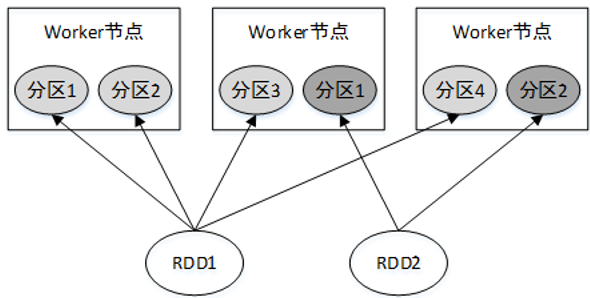
RDD是一个大的数据集合,该集合被划分成多个子集合分布到了不同的节点上,而每一个子集合就称为分区(Partition)。因此也可以说,RDD是由若干个分区组成的。
RDD各个分区中的数据可以并行计算,因此分区的数量决定了并行计算的粒度。Spark会给每一个分区分配一个单独的Task任务对其进行计算,因此并行Task的数量是由分区的数量决定的。RDD分区的一个分区原则是使得分区的数量尽量等于集群中CPU核心数量。
04 RDD的依赖
Spark中,对RDD的每一次转化操作都会生成一个新的RDD,由于RDD的懒加载特性,新的RDD会依赖原有RDD,因此RDD之间存在类似流水线的前后依赖关系。这种依赖关系分为两种:窄依赖和宽依赖。
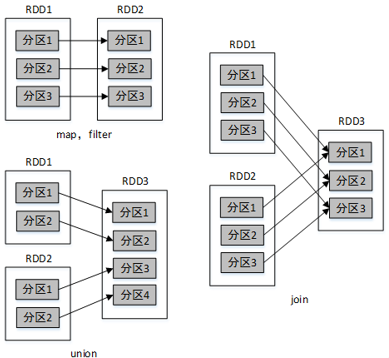
1、窄依赖
窄依赖是指父RDD的一个分区最多被子RDD的一个分区所用。也就是说,父RDD的分区与子RDD的分区的对应关系为一对一或多对一。例如map()、filter()、union()等操作都会产生窄依赖。
2、宽依赖
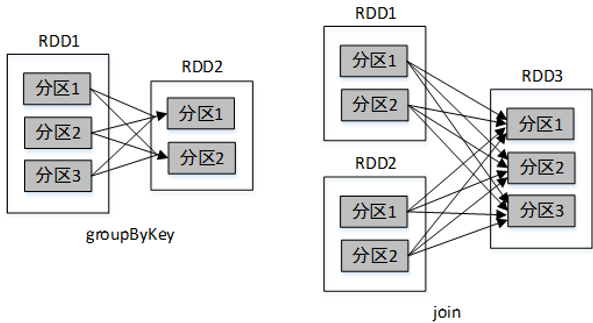
宽依赖是指,父RDD的一个分区被子RDD的多个分区所用。也就是说,父RDD的分区与子RDD的分区的对应关系为多对多。例如groupByKey()、reduceByKey()、sortByKey()等操作都会产生宽依赖。
Stage 划分
在Spark中,对每一个RDD的操作都会生成一个新的RDD,将这些RDD用带方向的直线连接起来(从父RDD连接到子RDD)会形成一个关于计算路径的有向无环图,称为DAG(Directed Acyclic Graph)。
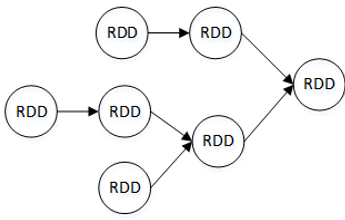
Spark会根据DAG将整个计算划分为多个阶段,每个阶段称为一个Stage。每个Stage由多个Task任务并行进行计算,每个Task任务作用在一个分区上,一个Stage的总Task任务数量是由Stage中最后一个RDD的分区个数决定。
Stage的划分依据为是否有宽依赖,即是否有Shuffle。Spark调度器会从DAG图的末端向前进行递归划分,遇到Shuffle则进行划分,Shuffle之前的所有RDD组成一个Stage,整个DAG图为一个Stage。经典的单词计数执行流程的Stage划分:
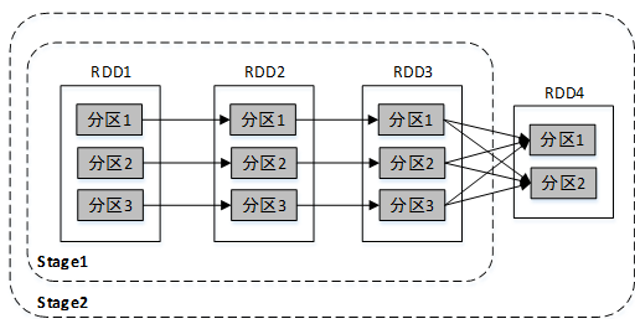
比较复杂一点的Stage划分:
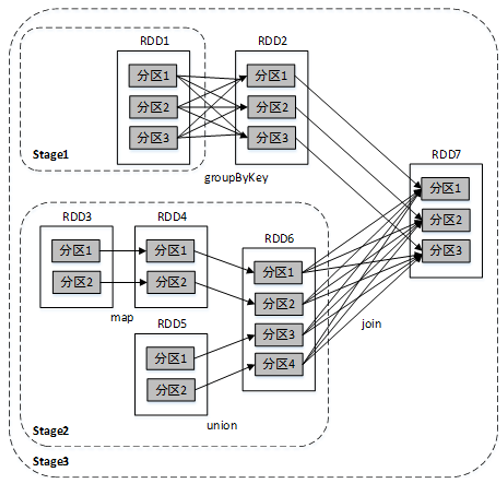
为说明要根据宽依赖划分Stage呢?这是因为窄依赖对优化很有利。逻辑上,每个RDD的算子都是一个fork/join操作(此join非上文的join算子,而是指同步多个并行任务的barrier): 把计算fork到每个分区,算完后join,然后fork/join下一个RDD的算子。如果子RDD的分区到 父RDD的分区是窄依赖,就可以实施优化把两个fork/join合为一个;如果连续的变换算子序列都是窄依赖,就可以把很多个 fork/join并为一个,这将极大地提升性能。Spark把这个叫做 流水线(pipeline)优化。
05 RDD的持久化
Spark中的RDD是懒加载的,只有当遇到行动算子时才会从头计算所有RDD,而且当同一个RDD被多次使用时,每次都需要重新计算一遍,这样会严重增加消耗。为了避免重复计算同一个RDD,可以将RDD进行持久化。
Spark中最重要的功能之一是可以将某个RDD中的数据保存到内存或者磁盘中,每次需要对这个RDD进行算子操作时,可以直接从内存或磁盘中取出该RDD的持久化数据,而不需要从头计算才能得到这个RDD。
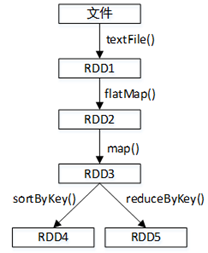
例如有多个RDD,它们的依赖关系如图。若RDD3没有持久化保存,则每次对RDD3进行操作时都需要从textFile()开始计算,将文件数据转化为RDD1,再转化为RDD2,最终才得到RDD3。
可以在RDD上使用persist()或cache()方法来标记要持久化的RDD(cache()方法实际上底层调用的是persist()方法)。
RDD的检查点
RDD的检查点机制(Checkpoint)相当于对RDD数据进行快照,可以将经常使用的RDD快照到指定的文件系统中,最好是共享文件系统,例如HDFS。当机器发生故障导致内存或磁盘中的RDD数据丢失时可以快速从快照中对指定的RDD进行恢复,而不需要根据RDD的依赖关系从头进行计算,大大提高了计算效率。与cache()或者persist()将RDD数据存放到内存或者磁盘中的不同有以下几点:
(1)cache()或者persist()是将数据存储于机器本地的内存或磁盘,当机器故障时无法进行数据恢复,而检查点是将RDD数据存储于外部的共享文件系统(例如HDFS),共享文件系统的副本机制保证了数据的可靠性。
(2)在Spark应用程序执行结束后,cache()或者persist()存储的数据将被清空,而检查点存储的数据不会受影响,将永久存在,除非手动将其移除。因此,检查点数据可以被下一个Spark应用程序使用,而cache()或者persist()数据只能被当前Spark应用程序使用。
val sc = new SparkContext(conf);
//设置检查点数据存储路径
sc.setCheckpointDir("hdfs://centos01:8020/spark-ck")
06 共享变量
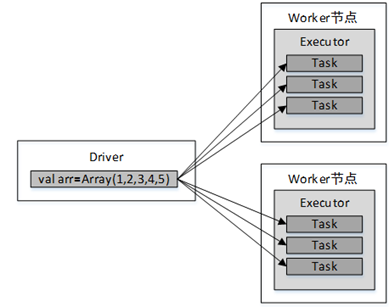
通常情况下,Spark应用程序运行的时候,Spark算子(例如map(func)或filter(func))中的函数func会被发送到远程的多个Worker节点上执行,如果一个算子中使用了某个外部变量,则该变量会拷贝到Worker节点的每一个Task任务中,各个Task任务对变量的操作相互独立。当变量所存储的数据量非常大时(例如一个大型集合)将增加网络传输及内存的开销。因此,Spark提供了两种共享变量:广播变量和累加器。
广播变量
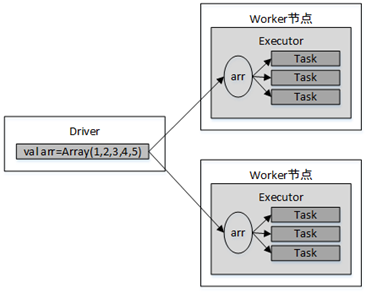
广播变量是将一个变量通过广播的形式发送到每个Worker节点的缓存中,而不是发送到每个Task任务中,各个Task任务可以共享该变量的数据。因此广播变量是只读的。
1、默认情况下变量的传递
例如,map()算子中使用了外部变量arr:
val arr=Array(1,2,3,4,5);
val lines:RDD[String] = sc.textFile("file:///tmp/data.txt")
val result = lines.map(line =>
   (line, arr)
)
变量传递流程如图。
2、使用广播变量时变量的传递
例如,使用广播变量将数组arr传递给了map()算子:
val arr=Array(1,2,3,4,5);
val broadcastVar = sc.broadcast(arr)
val result = lines.map(line =>
   (line, broadcastVar) // broadcastVar为广播变量
)
传递流程如图。
在分布式函数中可以通过Broadcast对象的value方法访问
广播变量的值:
scala> val broadcastVar = sc.broadcast(Array(1, 2, 3))
scala> broadcastVar.value
res0: Array[Int] = Array(1, 2, 3)
累加器
累加器提供了将Worker节点的值聚合到Driver的功能,可以用于实现计数和求和。
例如,对一个整型数组进行求和,若不使用累加器,以下代码的输出结果不正确:
var sum=0 //在Driver中声明
val rdd=sc.makeRDD(Array(1,2,3,4,5))
rdd.foreach(x=>
  //在Executor中执行
  sum+=x
)
println(sum)//输出0
使用累加器对数组进行求和:
//声明一个累加器,默认初始值为0(只能在Driver端定义)
val myacc=sc.longAccumulator("My Accumulator")
val rdd=sc.makeRDD(Array(1,2,3,4,5))
rdd.foreach(x=>
   myacc.add(x)//向累加器中添加值
)
println(myacc.value)//输出15(只能在Driver端读取)
注意,累加器只能在Driver端定义,在Executor端更新。Executor端不能读取累加器的值,需要在Driver端使用value属性读取。
Views: 98