

SpringBoot解决跨域的三种方式

什么是跨域

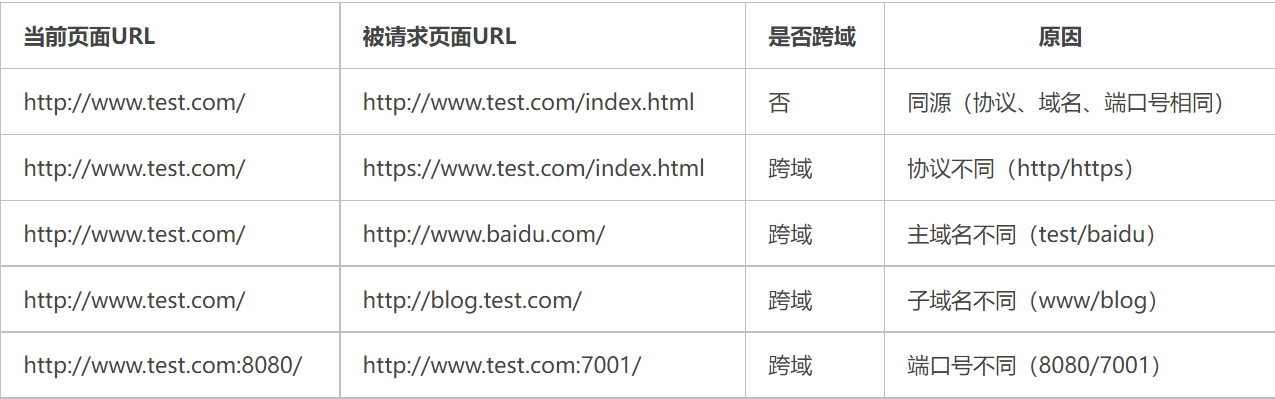
出于浏览器的同源策略限制。同源策略(Same Origin Policy)是一种约定,它是浏览器最核心也最基本的安全功能,如果缺少了同源策略,则浏览器的正常功能可能都会受到影响。可以说Web是构建在同源策略基础之上的,浏览器只是针对同源策略的一种实现。同源策略会阻止一个域的javascript脚本和另外一个域的内容进行交互。所谓同源(即指在同一个域)就是两个页面具有相同的协议(protocol),主机(host)和端口号(port)

简单说A应用只能访问A应用后台传来数据,B应用只能访问B应用后台传来的数据,如果A应用用Ajax获取数据时的URL地址中的协议、端口、域名其中有一个和B应用对应的话,则是A应用跨域了想获取B应用数据,是不允许的

当请求发起方(客户端)的 协议、域名、端口 三者之间任意一个与请求接收方(服务端)不同时即为跨域
file

非同源限制

浏览器为了安全性,限制了一些请求无法访问非同源URL

  1. 无法读取非同源网页的 Cookie、LocalStorage 和 IndexedDB
  2. 无法接触非同源网页的 DOM
  3. 无法向非同源地址发送 AJAX 请求

如何解决跨域问题

服务端使用纯代码的方式逻辑解决跨域问题,如果使用SpringBoot的话请看下章

【腾讯文档】JSONP跨域解决 https://docs.qq.com/doc/DVEVTemdrcVVjSFlE

SpringBoot解决跨域问题

解决方式:

  1. 返回新的CorsFilter
  2. 重写WebMvcConfigurer
  3. 使用注解@CrossOrigin
  4. 手动设置响应头(HttpServletResponse)参考第一章第四节

注意:
CorFilter / WebMvConfigurer / @CrossOrigin 需要 SpringMVC 4.2以上版本才支持,对应springBoot 1.3版本以上

上面前两种方式属于全局 CORS 配置,后两种属于局部 CORS配置。如果使用了局部跨域是会覆盖全局跨域的规则.

所以可以通过 @CrossOrigin 注解来进行细粒度更高的跨域资源控制。
其实无论哪种方案,最终目的都是修改响应头,向响应头中添加浏览器所要求的数据,进而实现跨域

配置CorsFilter(全局跨域)

import org.springframework.boot.SpringBootConfiguration;
import org.springframework.context.annotation.Bean;
import org.springframework.web.cors.CorsConfiguration;
import org.springframework.web.cors.UrlBasedCorsConfigurationSource;
import org.springframework.web.filter.CorsFilter;

@SpringBootConfiguration
public class WebGlobalConfig {

    @Bean
    public CorsFilter corsFilter() {

        //创建CorsConfiguration对象后添加配置
        CorsConfiguration config = new CorsConfiguration();
        //设置放行哪些原始域
        config.addAllowedOrigin("*");
        //放行哪些原始请求头部信息
        config.addAllowedHeader("*");
        //暴露哪些头部信息
        config.addExposedHeader("*");
        //放行哪些请求方式
        config.addAllowedMethod("GET");     //get
        config.addAllowedMethod("PUT");     //put
        config.addAllowedMethod("POST");    //post
        config.addAllowedMethod("DELETE");  //delete
        //corsConfig.addAllowedMethod("*");     //放行全部请求

        //是否发送Cookie
        config.setAllowCredentials(true);

        //2. 添加映射路径
        UrlBasedCorsConfigurationSource corsConfigurationSource =
                new UrlBasedCorsConfigurationSource();
        corsConfigurationSource.registerCorsConfiguration("/**", config);
        //返回CorsFilter
        return new CorsFilter(corsConfigurationSource);
    }
}

如果你使用的是高版本SpringBoot2.4.4则需要改动一下,否则后台报错

java.lang.IllegalArgumentException: When allowCredentials is true, allowedOrigins cannot contain the special value "*" since that cannot be set on the "Access-Control-Allow-Origin" response header. To allow credentials to a set of origins, list them explicitly or consider using "allowedOriginPatterns" instead.
at org.springframework.web.cors.CorsConfiguration.validateAllowCredentials(CorsConfiguration.java:453) ~[spring-web-5.3.6.jar:5.3.6]

当allowCredentials为true时,alloedOrigins不能包含特殊值“*”,因为该值不能在“Access-Control-Allow-Origin”响应头部中设置。要允许凭据访问一组来源,请显式列出它们或考虑改用“AllowedOriginPatterns”。

解决:把 config.addAllowedOrigin("*"); 替换成 config.addAllowedOriginPattern("*");

重写WebMvcConfigurer(全局跨域)

import org.springframework.boot.SpringBootConfiguration;
import org.springframework.web.servlet.config.annotation.CorsRegistry;
import org.springframework.web.servlet.config.annotation.WebMvcConfigurer;

/**
 * @Author AnHui_XiaoYang
 * @Email 939209948@qq.com
 * @Date 2021/5/10 17:49
 * @Description
 */
@SpringBootConfiguration
public class CorsConfig implements WebMvcConfigurer {
    @Override
    public void addCorsMappings(CorsRegistry registry) {
        //添加映射路径
        registry.addMapping("/**")
                //是否发送Cookie
                .allowCredentials(true)
                //设置放行哪些原始域   SpringBoot2.4.4下低版本使用.allowedOrigins("*")    
                .allowedOriginPatterns("*")
                //放行哪些请求方式
                .allowedMethods(new String[]{"GET", "POST", "PUT", "DELETE"})
                //.allowedMethods("*") //或者放行全部
                //放行哪些原始请求头部信息
                .allowedHeaders("*")
                //暴露哪些原始请求头部信息
                .exposedHeaders("*");
    }
}

使用注解@CrossOrigin(局部跨域)

@Target({ElementType.TYPE, ElementType.METHOD})
@Retention(RetentionPolicy.RUNTIME)
@Documented
public @interface CrossOrigin {
    //这origins和value是一样的
    //允许来源域名的列表,例如 'www.jd.com',匹配的域名是跨域预请求 Response 头中的'Access-Control-Aloow_origin' 
    //字段值。不设置确切值时默认支持所有域名跨域访问。
    @AliasFor("origins")
    String[] value() default {};
    @AliasFor("value")
    String[] origins() default {};
    //高版本下Spring2.4.4使用originPatterns 而不是value 和 origins
    String[] originPatterns() default {};

    //跨域请求中允许的请求头中的字段类型, 该值对应跨域预请求 Response 头中的 'Access-Control-Allow-Headers' 字段值。
    //不设置确切值默认支持所有的header字段(Cache-Controller、Content-Language、Content-Type、
    //Expires、Last-Modified、Pragma)跨域访问
    String[] allowedHeaders() default {};

    //跨域请求请求头中允许携带的除Cache-Controller、Content-Language、Content-Type、Expires、Last-Modified、
    //Pragma这六个基本字段之外的其他字段信息,对应的是跨域请求 Response 头中的 'Access-control-Expose-Headers'字段值
    String[] exposedHeaders() default {};

    //跨域HTTP请求中支持的HTTP请求类型(GET、POST...),不指定确切值时默认与 Controller 方法中的 methods 字段保持一致。
    RequestMethod[] methods() default {};

    //该值对应的是是跨域请求 Response 头中的 'Access-Control-Allow-Credentials' 字段值。
    //浏览器是否将本域名下的 cookie 信息携带至跨域服务器中。默认携带至跨域服务器中,但要实现 cookie 
    //共享还需要前端在 AJAX 请求中打开 withCredentials 属性。
    String allowCredentials() default "";

    //该值对应的是是跨域请求 Response 头中的 'Access-Control-Max-Age' 字段值,表示预检请求响应的缓存持续的最大时间,
    //目的是减少浏览器预检请求/响应交互的数量。默认值1800s。设置了该值后,浏览器将在设置值的时间段内对该跨域请求不再发起预请求
    long maxAge() default -1;
}

在控制器(类上)使用@CrossOrigin注解,表示该类的所有方法允许跨域

@Controller
@RequestMapping("/shop")
@CrossOrigin(originPatterns = "*", methods = {RequestMethod.GET, RequestMethod.POST})
public class ShopController {

    @GetMapping("/")
    @ResponseBody
    public Map findAll() {
        //返回数据
        return DataSchool.getStudents();
    }
}

我们也可以设置更小的粒度,在方法上设置跨域

@Controller
@RequestMapping("/shop")
public class ShopController {

    @GetMapping("/")
    @ResponseBody
    //更小的解决跨域 设置只能某些地址访问
    @CrossOrigin(originPatterns = "http://localhost:8080")
    public Map findAll() {
        //返回数据
        return DataSchool.getStudents();
    }
}

.

Views: 211

Spring Boot 简介和使用

https://spring.io/projects/spring-framework

Spring Framework 为基于 Java 的现代企业应用程序 (在任何类型的部署平台上)提供了全面的编程和配置模型。

Spring 的一个关键要素是应用程序级别的基础设施支持:Spring 侧重于企业应用程序的"管道",以便团队可以专注于应用程序级的业务逻辑,而无需与特定的部署环境进行不必要的联系。

特性

  • 核心技术: 依赖项注入、事件、资源、i18n、验证、数据绑定、类型转换、SpEL、AOP。
  • 测试:模拟对象,测试上下文框架,Spring MVC 测试。WebTestClient
  • 数据访问: 事务, Dao 支持, Jdbc, ORM(Hibernate,Mybatis(Sql映射))。
  • Spring MVCSpring WebFlux Web 框架。
  • 集成: 远程处理, JMS, JCA, JMX, 电子邮件, 任务, 计划, 缓存。
  • 语言: Java, Kotlin, Groovy, 等动态语言。

Spring Core Technologies

https://docs.spring.io/spring-framework/docs/current/reference/html/core.html

Spring框架核心技术中最重要的是 Spring 框架的控制反转 (IoC) 容器以及面向切面编程 (AOP) 技术。

SpringBoot

https://spring.io/projects/spring-boot

Spring Boot 可轻松创建独立的、生产级 Spring 应用程序,您可以"直接运行(java jar)",而无需提前准备例如Tomcat应用容器服务器。

Spring Boot 启动应用程序只需要最少的Spring相关配置,贯彻“约定大于配置”的理念。

如果您要查找有关特定版本的信息,或有关如何从早期版本升级的说明,请查看项目发行说明部分在我们的维基上。

特性

  • 创建独立的Spring应用
  • 直接嵌入 Tomcat、Jetty 或底图(Undertow,无需部署 WAR 文件)
  • 提供有意见的"启动器"依赖关系,以简化生成配置
  • 尽可能自动配置Spring和第三方库
  • 提供支持生产所需功能,如指标、健康检查和外部配置
  • 绝对没有生成代码,极大减少 XML 配置要求

快速开始

RESTful Web Service

https://spring.io/guides/gs/rest-service/

This guide walks you through the process of creating a “Hello, World” RESTful web service with Spring.

What You Will Build

You will build a service that will accept HTTP GET requests at http://localhost:8080/greeting.

It will respond with a JSON representation of a greeting, as the following listing shows:

{"id":1,"content":"Hello, World!"}

You can customize the greeting with an optional name parameter in the query string, as the following listing shows:

http://localhost:8080/greeting?name=User

The name parameter value overrides the default value of World and is reflected in the response, as the following listing shows:

{"id":1,"content":"Hello, User!"}

What You Need

How to complete this guide

Like most Spring Getting Started guides, you can start from scratch and complete each step or you can bypass basic setup steps that are already familiar to you. Either way, you end up with working code.

To start from scratch, move on to Starting with Spring Initializr.

To skip the basics, do the following:

When you finish, you can check your results against the code in gs-rest-service/complete.

Starting with Spring Initializr

For all Spring applications, you should start with the Spring Initializr. The Initializr offers a fast way to pull in all the dependencies you need for an application and does a lot of the setup for you. This example needs only the Spring Web dependency.

The following listing shows the pom.xml file that is created when you choose Maven:


    4.0.0
    
        org.springframework.boot
        spring-boot-starter-parent
        2.3.0.RELEASE
         
    
    com.example
    rest-service
    0.0.1-SNAPSHOT
    rest-service
    Demo project for Spring Boot

    
        1.8


            org.springframework.boot
            spring-boot-starter-web


            org.springframework.boot
            spring-boot-starter-actuator


            org.springframework.boot
            spring-boot-starter-test
            test
            
                
                    org.junit.vintage
                    junit-vintage-engine


                org.springframework.boot
                spring-boot-maven-plugin


The following listing shows the build.gradle file that is created when you choose Gradle:

plugins {
    id 'org.springframework.boot' version '2.3.2.RELEASE'
    id 'io.spring.dependency-management' version '1.0.8.RELEASE'
    id 'java'
}

group = 'com.example'
version = '0.0.1-SNAPSHOT'
sourceCompatibility = '1.8'

repositories {
    mavenCentral()
}

dependencies {
    implementation 'org.springframework.boot:spring-boot-starter-web'
    testImplementation('org.springframework.boot:spring-boot-starter-test') {
        exclude group: 'org.junit.vintage', module: 'junit-vintage-engine'
    }
}

test {
    useJUnitPlatform()
}

Create a Resource Representation Class

Now that you have set up the project and build system, you can create your web service.

Begin the process by thinking about service interactions.

The service will handle GET requests for /greeting, optionally with a name parameter in the query string. The GET request should return a 200 OK response with JSON in the body that represents a greeting. It should resemble the following output:

{
    "id": 1,
    "content": "Hello, World!"
}

The id field is a unique identifier for the greeting, and content is the textual representation of the greeting.

To model the greeting representation, create a resource representation class. To do so, provide a plain old Java object with fields, constructors, and accessors for the id and content data, as the following listing (from src/main/java/com/example/restservice/Greeting.java) shows:

package com.example.restservice;

public class Greeting {

    private final long id;
    private final String content;

    public Greeting(long id, String content) {
        this.id = id;
        this.content = content;
    }

    public long getId() {
        return id;
    }

    public String getContent() {
        return content;
    }
}
This application uses the Jackson JSON library to automatically marshal instances of type Greeting into JSON. Jackson is included by default by the web starter.

Create a Resource Controller

In Spring’s approach to building RESTful web services, HTTP requests are handled by a controller. These components are identified by the @RestController annotation, and the GreetingController shown in the following listing (from src/main/java/com/example/restservice/GreetingController.java) handles GET requests for /greeting by returning a new instance of the Greeting class:

package com.example.restservice;

import java.util.concurrent.atomic.AtomicLong;

import org.springframework.web.bind.annotation.GetMapping;
import org.springframework.web.bind.annotation.RequestParam;
import org.springframework.web.bind.annotation.RestController;

@RestController
public class GreetingController {

    private static final String template = "Hello, %s!";
    private final AtomicLong counter = new AtomicLong();

    @GetMapping("/greeting")
    public Greeting greeting(@RequestParam(value = "name", defaultValue = "World") String name) {
        return new Greeting(counter.incrementAndGet(), String.format(template, name));
    }
}

This controller is concise and simple, but there is plenty going on under the hood. We break it down step by step.

The @GetMapping annotation ensures that HTTP GET requests to /greeting are mapped to the greeting() method.

There are companion annotations for other HTTP verbs (e.g. @PostMapping for POST). There is also a @RequestMapping annotation that they all derive from, and can serve as a synonym (e.g. @RequestMapping(method=GET)).

@RequestParam binds the value of the query string parameter name into the name parameter of the greeting() method. If the name parameter is absent in the request, the defaultValue of World is used.

The implementation of the method body creates and returns a new Greeting object with id and content attributes based on the next value from the counter and formats the given name by using the greeting template.

A key difference between a traditional MVC controller and the RESTful web service controller shown earlier is the way that the HTTP response body is created. Rather than relying on a view technology to perform server-side rendering of the greeting data to HTML, this RESTful web service controller populates and returns a Greeting object. The object data will be written directly to the HTTP response as JSON.

This code uses Spring @RestController annotation, which marks the class as a controller where every method returns a domain object instead of a view. It is shorthand for including both @Controller and @ResponseBody.

The Greeting object must be converted to JSON. Thanks to Spring’s HTTP message converter support, you need not do this conversion manually. Because Jackson 2 is on the classpath, Spring’s MappingJackson2HttpMessageConverter is automatically chosen to convert the Greeting instance to JSON.

@SpringBootApplication is a convenience annotation that adds all of the following:

  • @Configuration: Tags the class as a source of bean definitions for the application context.
  • @EnableAutoConfiguration: Tells Spring Boot to start adding beans based on classpath settings, other beans, and various property settings. For example, if spring-webmvc is on the classpath, this annotation flags the application as a web application and activates key behaviors, such as setting up a DispatcherServlet.
  • @ComponentScan: Tells Spring to look for other components, configurations, and services in the com/example package, letting it find the controllers.

The main() method uses Spring Boot’s SpringApplication.run() method to launch an application. Did you notice that there was not a single line of XML? There is no web.xml file, either. This web application is 100% pure Java and you did not have to deal with configuring any plumbing or infrastructure.

Build an executable JAR

You can run the application from the command line with Gradle or Maven. You can also build a single executable JAR file that contains all the necessary dependencies, classes, and resources and run that. Building an executable jar makes it easy to ship, version, and deploy the service as an application throughout the development lifecycle, across different environments, and so forth.

If you use Gradle, you can run the application by using ./gradlew bootRun. Alternatively, you can build the JAR file by using ./gradlew build and then run the JAR file, as follows:

java -jar build/libs/gs-rest-service-0.1.0.jar

If you use Maven, you can run the application by using ./mvnw spring-boot:run. Alternatively, you can build the JAR file with ./mvnw clean package and then run the JAR file, as follows:

java -jar target/gs-rest-service-0.1.0.jar
The steps described here create a runnable JAR. You can also build a classic WAR file.

Logging output is displayed. The service should be up and running within a few seconds.

Test the Service

Now that the service is up, visit http://localhost:8080/greeting, where you should see:

{"id":1,"content":"Hello, World!"}

Provide a name query string parameter by visiting http://localhost:8080/greeting?name=User. Notice how the value of the content attribute changes from Hello, World! to Hello, User!, as the following listing shows:

{"id":2,"content":"Hello, User!"}

This change demonstrates that the @RequestParam arrangement in GreetingController is working as expected. The name parameter has been given a default value of World but can be explicitly overridden through the query string.

Notice also how the id attribute has changed from 1 to 2. This proves that you are working against the same GreetingController instance across multiple requests and that its counter field is being incremented on each call as expected.

Summary

Congratulations! You have just developed a RESTful web service with Spring.

See Also

The following guides may also be helpful:

Views: 589

Index