
百度搜索官网
使用八爪鱼网络数据采集器爬取数据
使用手机号注册账号
利用现有模板创建采集任务(免费用户不能设置定时采集以及云采集)
这里选择的是猎聘招聘网

设置查询关键词,这里使用”大数据“作为关键词
关键词可以写多行,并设置翻页次数

启动本地采集任务

如果IP被禁,过一段时间再次开启,多次执行就会累计足够数据
查看本地采集的数据

在远程数据库创建数据库,选取感兴趣的列建表

使用八爪鱼自带功能导出到远程MySQL数据库 (如果需要特殊处理可以导出CSV,处理后再导入数据库)

连接配置

找到唯一且不为空不重复的列作为主键,创建正确的映射关系是导出成功的前提

每批导出可以适当减少,因为同一批次中的数据如果有一个导出失败,整个批次也会失败。

如果还是不能导入,检查数据库表的编码是否支持中文,如果是latin则改成UTF8
导出csv格式再导入MySQL
发现八爪鱼采集的数据中包含回车空格的多余的字符,最好提前处理号再导出,否则导入到Hive时数据会混乱。
也可以在导入hive时使用参数--hive-drop-import-delims去掉两边多余的空格和回车
另外薪水字段的格式不方便后续分析,可以额外添加三个字段,分别放上解析出来的结果。
工作地点有的包含区名,不方便后续分析,可以额外添加一个city字段。
以上对原始数据的处理本是属于数据清洗的过程,一般是通过Hive完成的。这里由于数据采集是通过八爪鱼获得的,里面没有任何业务数据,所以为了方便直接在MySQL表上面添加了几个字段,方便后续的分析。
创建maven工程如下:
<project xsi:schemaLocation="http://maven.apache.org/POM/4.0.0 http://maven.apache.org/maven-v4_0_0.xsd"
xmlns:xsi="http://www.w3.org/2001/XMLSchema-instance" xmlns="http://maven.apache.org/POM/4.0.0">
<modelVersion>4.0.0</modelVersion>
<groupId>org.example</groupId>
<artifactId>java_csv_to_mysql</artifactId>
<version>1.0-SNAPSHOT</version>
<name>java_csv_to_mysql Tapestry 5 Application</name>
<properties>
<java.version>1.8</java.version>
</properties>
<dependencies>
<dependency>
<groupId>net.sourceforge.javacsv</groupId>
<artifactId>javacsv</artifactId>
<version>2.0</version>
</dependency>
<dependency>
<groupId>com.alibaba</groupId>
<artifactId>druid</artifactId>
<version>1.0.26</version>
</dependency>
<dependency>
<groupId>mysql</groupId>
<artifactId>mysql-connector-java</artifactId>
<version>5.1.46</version>
</dependency>
</dependencies>
</project>
由于需要导入到MySQL,创建工具类
package com.niit.csv;
import java.sql.*;
import java.util.ResourceBundle;
public class DbUtils {
private static Connection connection = null;
private static PreparedStatement pps = null;
private static ResultSet rs = null;
private static final String url;
private static final String username;
private static final String password;
private static final String driver;
public static final int BATCH_SIZE;
static {
ResourceBundle bundle = ResourceBundle.getBundle("db");
url = bundle.getString("url");
username = bundle.getString("username");
password = bundle.getString("password");
driver = bundle.getString("driver");
BATCH_SIZE = Integer.parseInt(bundle.getString("batchSIze"));
try {
Class.forName(driver);
} catch (ClassNotFoundException e) {
e.printStackTrace();
}
}
public static Connection getConnection() {
try {
connection = DriverManager.getConnection(url, username, password);
} catch (SQLException e) {
e.printStackTrace();
}
return connection;
}
protected static void closeAll() {
try {
if (rs != null) {
rs.close();
}
if (pps != null) {
pps.close();
}
if (connection != null) {
connection.close();
}
} catch (SQLException e) {
e.printStackTrace();
}
}
}
创建资源目录(marked as recources folder),并创建db.properties文件, 这里面主要是对MySQL数据源进行配置。
driver=com.mysql.jdbc.Driver
url=jdbc:mysql://192.168.186.100:3306/job?useSSL=false
username=root
password=niit1234
batchSIze=20
接下来编写实体类JobDetail
package com.niit.csv;
import java.util.Date;
/**
* @Author: deLucia
* @Date: 2021/4/18
* @Version: 1.0
* @Description:
* 关键词,岗位名称,链接,薪酬,地区,学历,工作经验,发布时间,反馈时间,公司名称,公司链接,融资情况,标签,语言要求,年龄要求,职位描述,公司规模,公司地址,其他信息,公司介绍,企业介绍,当前时间
*/
public class JobDetail {
/**
* 链接
*/
private String jobUrl;
/**
* 岗位名称
*/
private String jobName;
/**
* 薪酬
*/
private String jobSalary;
/**
* 地区
*/
private String jobRegion;
/**
* 学历
*/
private String seekerEdu;
/**
* 工作经验
*/
private String seekerExp;
/**
* 发布时间
*/
private String gmtPublish;
/**
* 反馈时间
*/
private String gmtFeedback;
/**
* 公司名称
*/
private String companyName;
/**
* 公司链接
*/
private String companyUrl;
/**
* 融资情况
*/
private String companyFinancing;
/**
* 标签
*/
private String jobTag;
/**
* 当前时间
*/
private Date gmtCreate;
/**
* 最低月薪
*/
private int minSalaryPerMonth;
/**
* 最高月薪
*/
private int maxSalaryPerMonth;
/**
* 一年几薪
*/
private int monthsSalaryPerYear;
/**
* 市
*/
private String city;
public String getJobUrl() {
return jobUrl;
}
public void setJobUrl(String jobUrl) {
this.jobUrl = jobUrl;
}
public String getJobName() {
return jobName;
}
public void setJobName(String jobName) {
this.jobName = jobName;
}
public String getJobSalary() {
return jobSalary;
}
public void setJobSalary(String jobSalary) {
this.jobSalary = jobSalary;
}
public String getJobRegion() {
return jobRegion;
}
public void setJobRegion(String jobRegion) {
this.jobRegion = jobRegion;
}
public String getSeekerEdu() {
return seekerEdu;
}
public void setSeekerEdu(String seekerEdu) {
this.seekerEdu = seekerEdu;
}
public String getSeekerExp() {
return seekerExp;
}
public void setSeekerExp(String seekerExp) {
this.seekerExp = seekerExp;
}
public String getGmtPublish() {
return gmtPublish;
}
public void setGmtPublish(String gmtPublish) {
this.gmtPublish = gmtPublish;
}
public String getGmtFeedback() {
return gmtFeedback;
}
public void setGmtFeedback(String gmtFeedback) {
this.gmtFeedback = gmtFeedback;
}
public String getCompanyName() {
return companyName;
}
public void setCompanyName(String companyName) {
this.companyName = companyName;
}
public String getCompanyUrl() {
return companyUrl;
}
public void setCompanyUrl(String companyUrl) {
this.companyUrl = companyUrl;
}
public String getCompanyFinancing() {
return companyFinancing;
}
public void setCompanyFinancing(String companyFinancing) {
this.companyFinancing = companyFinancing;
}
public String getJobTag() {
return jobTag;
}
public void setJobTag(String jobTag) {
this.jobTag = jobTag;
}
public Date getGmtCreate() {
return gmtCreate;
}
public void setGmtCreate(Date gmtCreate) {
this.gmtCreate = gmtCreate;
}
public int getMinSalaryPerMonth() {
return minSalaryPerMonth;
}
public void setMinSalaryPerMonth(int minSalaryPerMonth) {
this.minSalaryPerMonth = minSalaryPerMonth;
}
public int getMaxSalaryPerMonth() {
return maxSalaryPerMonth;
}
public void setMaxSalaryPerMonth(int maxSalaryPerMonth) {
this.maxSalaryPerMonth = maxSalaryPerMonth;
}
public int getMonthsSalaryPerYear() {
return monthsSalaryPerYear;
}
public void setMonthsSalaryPerYear(int monthsSalaryPerYear) {
this.monthsSalaryPerYear = monthsSalaryPerYear;
}
public String getCity() {
return city;
}
public void setCity(String city) {
this.city = city;
}
public JobDetail() {
}
@Override
public String toString() {
return "JobDetail{" +
"jobUrl='" + jobUrl + '\'' +
", jobName='" + jobName + '\'' +
", jobSalary='" + jobSalary + '\'' +
", jobRegion='" + jobRegion + '\'' +
", seekerEdu='" + seekerEdu + '\'' +
", seekerExp='" + seekerExp + '\'' +
", gmtPublish='" + gmtPublish + '\'' +
", gmtFeedback='" + gmtFeedback + '\'' +
", companyName='" + companyName + '\'' +
", companyUrl='" + companyUrl + '\'' +
", companyFinancing='" + companyFinancing + '\'' +
", jobTag='" + jobTag + '\'' +
", gmtCreate=" + gmtCreate +
", minSalaryPerMonth=" + minSalaryPerMonth +
", maxSalaryPerMonth=" + maxSalaryPerMonth +
", monthsSalaryPerYear=" + monthsSalaryPerYear +
", city='" + city + '\'' +
'}';
}
}
最后编写主程序如下:
package com.niit.csv;
import com.csvreader.CsvReader;
import com.sun.xml.internal.fastinfoset.stax.events.Util;
import java.nio.charset.Charset;
import java.sql.Connection;
import java.sql.Statement;
import java.text.SimpleDateFormat;
import java.util.ArrayList;
import java.util.List;
/**
* @Author: deLucia
* @Date: 2021/4/13
* @Version: 1.0
* @Description: 处理CSV后导入到MySQL
*/
public class ProcessCSV2MySQL {
private static final SimpleDateFormat SDF = new SimpleDateFormat("yyyy-MM-dd HH:mm:ss.SSS");
public static void main(String[] args) {
//生成CsvReader对象,以,为分隔符,GBK编码方式
CsvReader r;
List<JobDetail> list = new ArrayList<JobDetail>();
try {
String csvFilePath = "./data/data.csv";
r = new CsvReader(csvFilePath, ',', Charset.forName("UTF-8"));
//读取表头
r.readHeaders();
//逐条读取记录,直至读完
while (r.readRecord()) {
JobDetail d = new JobDetail();
d.setCompanyFinancing(r.get("融资情况").trim());
d.setCompanyName(r.get("公司名称").trim());
d.setCompanyUrl(r.get("公司链接").trim());
String dateStr = r.get("当前时间").trim();
if (!Util.isEmptyString(dateStr)) {
d.setGmtCreate(SDF.parse(dateStr));
}
d.setGmtFeedback(r.get("反馈事件").trim());
d.setGmtPublish(r.get("发布时间").trim());
d.setJobName(r.get("岗位名称").trim());
String regionString = r.get("地区").trim();
d.setJobRegion(regionString);
String salaryStr = r.get("薪酬").trim();
d.setJobSalary(salaryStr);
d.setJobTag(r.get("标签").trim());
d.setJobUrl(r.get("链接").trim());
d.setSeekerEdu(r.get("学历").trim());
d.setSeekerExp(r.get("经验").trim());
// 20-60k·14薪
if (!Util.isEmptyString(salaryStr) && !"面议".equals(salaryStr)) {
String[] split = salaryStr.split("·");
String[] s = split[0].split("-");
// MIN_SALARY_PER_MONTH
d.setMinSalaryPerMonth(Integer.parseInt(s[0]));
// MAX_SALARY_PER_MONTH
d.setMaxSalaryPerMonth(Integer.parseInt(s[1].replace("k", "")));
// MONTHS_SALARY_PER_YEAR
d.setMonthsSalaryPerYear(Integer.parseInt(split[1].replace("薪","")));
}
// city
if (!Util.isEmptyString(regionString)) {
d.setCity(regionString.split("-")[0]);
}
list.add(d);
}
r.close();
int totalSize = list.size();
int index = 0;
int batchCount = 0;
Connection connection = DbUtils.getConnection();
Statement statement = connection.createStatement();
while (index <= totalSize - 1) {
StringBuilder sb = new StringBuilder();
for (int i = index; i < index + DbUtils.BATCH_SIZE; i++) {
if (i > totalSize - 1) {
break;
}
JobDetail d = list.get(i);
if (i != index) {
sb.append(",");
}
sb.append("(\"");
sb.append(d.getJobUrl());
sb.append("\",\"");
sb.append(d.getJobName());
sb.append("\",\"");
sb.append(d.getJobSalary());
sb.append("\",\"");
sb.append(d.getJobRegion());
sb.append("\",\"");
sb.append(d.getSeekerEdu());
sb.append("\",\"");
sb.append(d.getSeekerExp());
sb.append("\",\"");
sb.append(d.getGmtPublish());
sb.append("\",\"");
sb.append(d.getGmtFeedback());
sb.append("\",\"");
sb.append(d.getCompanyName());
sb.append("\",\"");
sb.append(d.getCompanyUrl());
sb.append("\",\"");
sb.append(d.getCompanyFinancing());
sb.append("\",\"");
sb.append(d.getJobTag());
sb.append("\",\"");
sb.append(d.getGmtCreate());
sb.append("\",\"");
sb.append(d.getMinSalaryPerMonth());
sb.append("\",\"");
sb.append(d.getMaxSalaryPerMonth());
sb.append("\",\"");
sb.append(d.getMonthsSalaryPerYear());
sb.append("\",\"");
sb.append(d.getCity());
sb.append("\")");
}
index += DbUtils.BATCH_SIZE;
System.out.println(sb.toString());
int updateResult = statement.executeUpdate("INSERT INTO `bigdata_job` VALUES " + sb.toString());
if (updateResult > 0) {
System.out.println("Batch[" + (batchCount++) + "]: " + updateResult + " records updated successfully.");
} else {
System.out.println("Batch[" + (batchCount++) + "]: " + updateResult + " records failed to update.");
}
}
} catch (Exception e) {
e.printStackTrace();
} finally {
DbUtils.closeAll();
}
}
}
这里设置了每10条数据一个批次,批次的大小可以通过BATCH_SIZE来修改。
数据导入
下面通过sqoop将mysql的数据导入到hive表当中,以便后续进行统计分析的工作。
在hive当中创建表
Hive是一个数据仓库基础工具提供简单的sql查询功能,可以将sql语句转换为MapReduce任务进行运行。Hive 并不能够在大规模数据集上实现低延迟快速的查询,Hive 的最佳使用场合是大数据集的批处理作业,例如,网络日志分析。
进入到hive的客户端,然后执行以下命令来创建hive数据库以及hive数据库表
create table job_detail(
job_url string,
job_name string,
job_salary string,
job_region string,
seeker_edu string,
seeker_exp string,
gmt_publish string,
gmt_feedback string,
company_name string,
company_url string,
company_financing string,
job_tag string,
gmt_create string,
min_salary_per_month int,
max_salary_per_month int,
months_salary_per_year int,
city string
) partitioned by (data_date string) row format delimited fields terminated by '\001' location 'hdfs://hadoop100:8020/user/hive/warehouse/job.db/job_detail';
使用sqoop将mysql数据导入到hive当中
数据进入mysql数据库之后,可以使用sqoop工具来讲数据导入到hive数仓当中,进行统一分析
sqoop import \
--connect jdbc:mysql://hadoop100:3306/job?useSSL=false \
--username root \
--password niit1234 \
--table bigdata_job \
--delete-target-dir \
--hive-import \
--hive-database job \
--hive-table job_detail \
--hive-partition-key data_date \
--hive-partition-value 2021-02-28 \
--hive-drop-import-delims \
-m 1
使用Hive对大数据岗位数据进行多维分析
接下来使用hive进行统计分析工作,并将分析结果分别存在另一张hive表中。
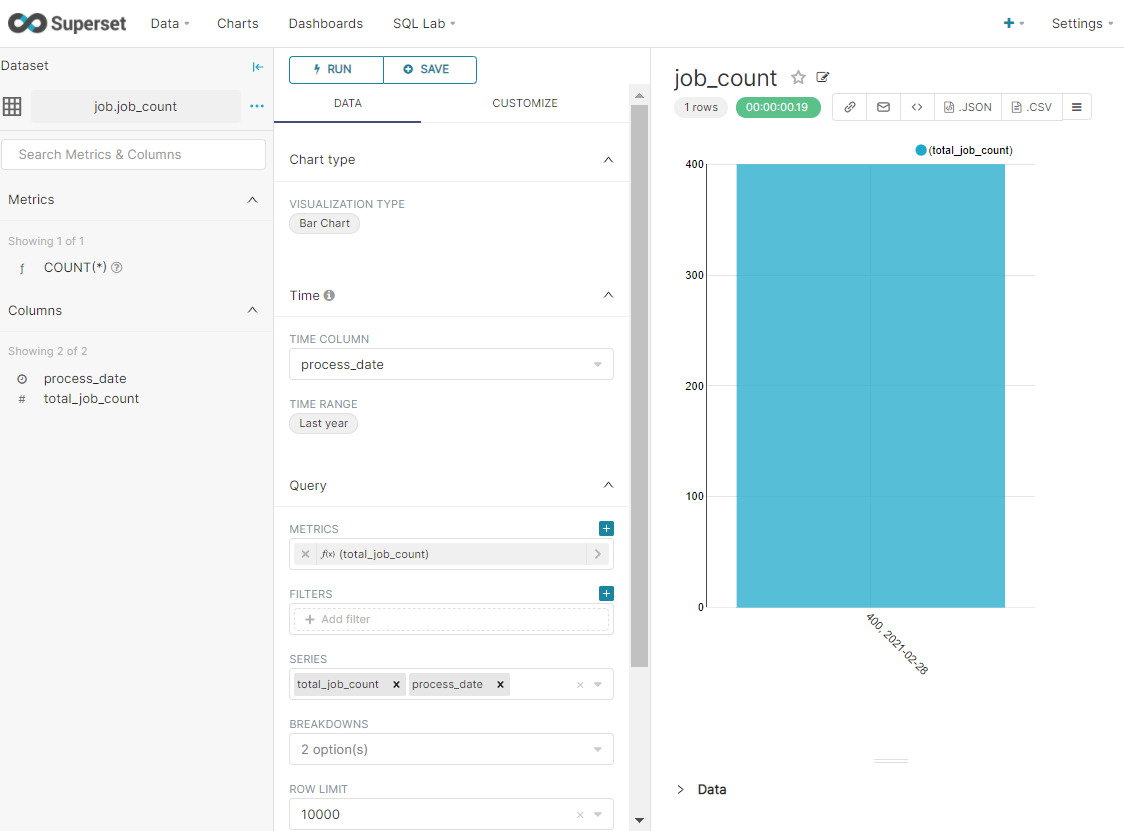
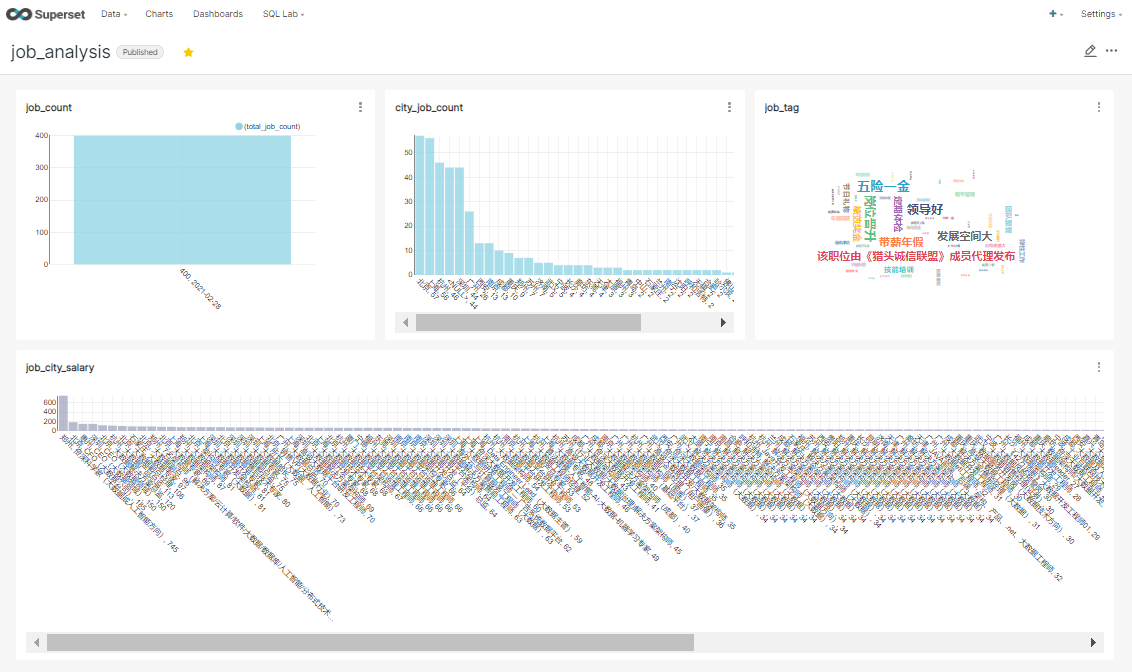
1. 统计此次爬取的数据中一共有多少个大数据岗位
创建表
> create table job_count(process_date string,total_job_count int) partitioned by (data_date string) row format delimited fields terminated by '\001';
查询并插入数据
> insert overwrite table job_count partition(data_date = '2021-02-28') select '2021-02-28' as process_date,count(distinct job_url) as total_job_count from job_detail;
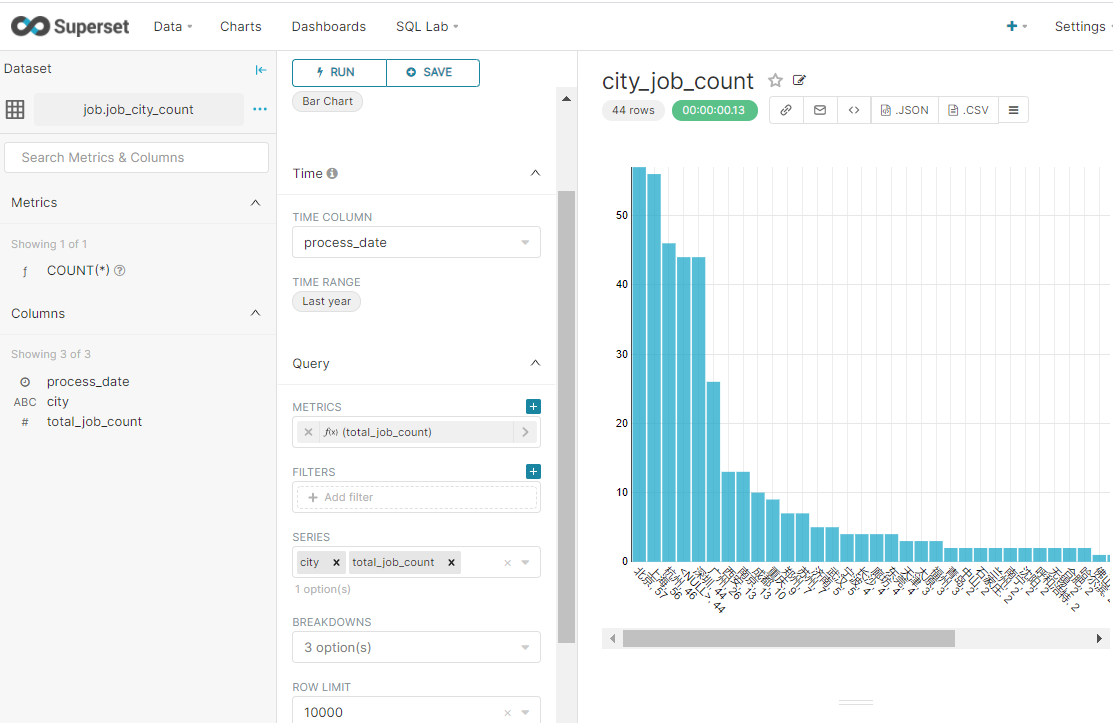
2、统计每个城市提供的大数据岗位数量
创建表
> create table job_city_count(process_date string,city string, total_job_count int) partitioned by (data_date string);
查询并插入数据
> insert overwrite table job_city_count partition(data_date = '2021-02-28') select '2021-02-28' as process_date, city, count(distinct job_url) as total_job_count from job_detail group by city;
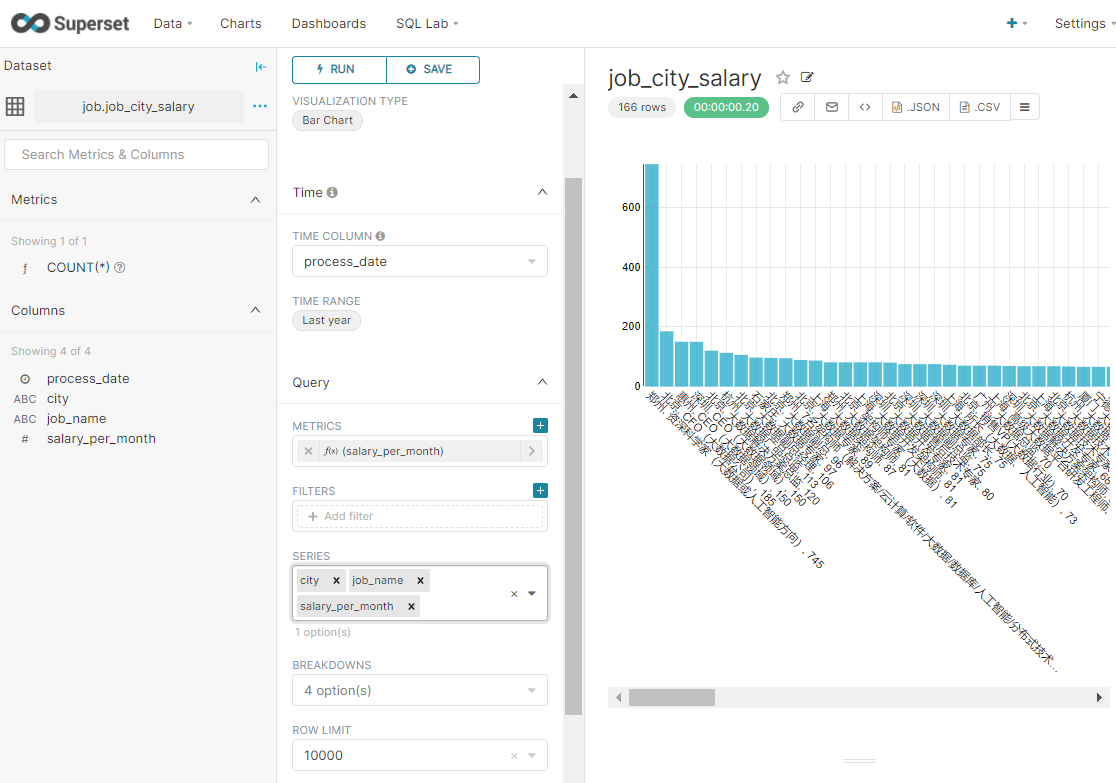
3、按照薪资降序排序各城市大数据相关岗位(每个城市按薪资倒序取前10)
创建表
> create table job_city_salary(process_date string,city string, job_name string, salary_per_month int) partitioned by (data_date string);
查询并插入数据
insert overwrite table job_city_salary partition(data_date = '2021-02-28')
select
"2021-02-28" as process_date,
city,
job_name,
salary_per_month
from (
select
city,
job_name,
salary_per_month,
row_number() over (partition by city order by salary_per_month desc) as rank
from (
select
city,
job_name,
avg((min_salary_per_month + max_salary_per_month) * months_salary_per_year / 24) as salary_per_month
from job_detail
group by city,job_name having city!="null"
) tmp1
) tmp2 where rank<=10;
说明:
- row_number() over (partition by ... order by)用来实现topN查询
- 分组->排序->打行号标记,再套一层子查询根据行号打印每个分组的前10条记录
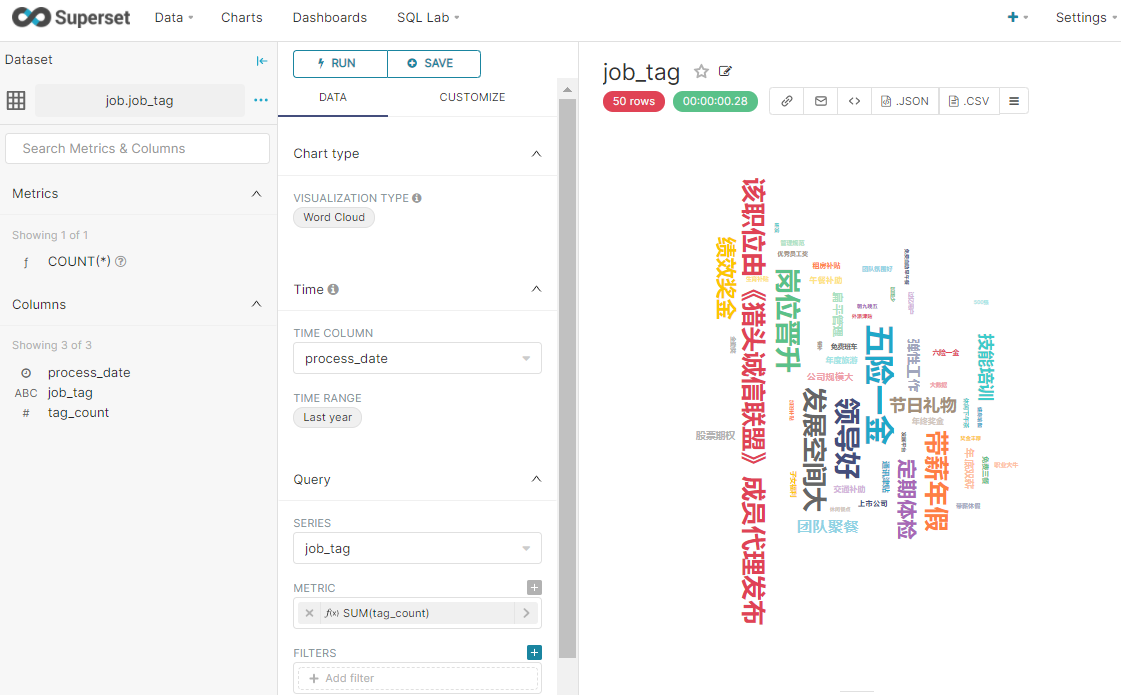
4、统计所有大数据岗位中出现次数最多的标签(取倒序前50个标签)
创建表
create table job_tag(process_date string,job_tag string, tag_count int) partitioned by (data_date string);
查询并插入数据
insert overwrite table job_tag partition(data_date='2021-02-28')
select
'2021-02-28' as process_date,
tmptable.single_tag as job_tag,
count(single_tag) as tag_count
from (
select subview.single_tag from job_detail lateral view explode(split(job_tag," ")
) subview as single_tag) tmptable group by single_tag order by tag_count desc limit 50;
说明:
explode函数可以将单行数据(数组)转换成多列数据输出(行转列)
- 使用
UDTF函数时(如split函数)只能select拆分出来的字段
- 如果想要同时
select其他字段,需配合侧视图(lateral view)使用
single_tag是给拆分出来的字段起的别名
Views: 107